The allowed and denied image lists are system-wide overrides that pass or fail images unconditionally, before any policy mapping logic runs. Both lists are stored inside the policy bundle and are checked at the very first step of the evaluation pipeline. For how these lists relate to the other exception mechanism, see Manage Exceptions.
An image can be referenced in one of three ways:
- Name — registry, repository, and tag. For example:
docker.io/library/centos:latest. Wildcards (*) are supported. Names are not unique — over time different images may carry the same tag — so a descriptive identifier is recommended. - Image ID — the full 64-character hex image ID. For example:
e934aafc22064b7322c0250f1e32e5ce93b2d19b356f4537f5864bd102e8531f. The algorithm prefix (sha256:) is not included. - Image Digest — registry, repository, and digest, including the algorithm prefix. For example:
docker.io/library/centos@sha256:989b936d56b1ace20ddf855a301741e52abca38286382cba7f44443210e96d16. The tag is not used when referencing by digest.
Manage Allowed and Denied Images in the Anchore Enterprise GUI
In a policy, open the Allowed / Denied Images tab. It is split into two sub-tabs:
- Allowed Images — images that always pass policy evaluation, regardless of the policies mapped to them.
- Denied Images — images that always fail policy evaluation, regardless of the policies mapped to them.

Add an Allowed or Denied Image
If the list is empty, click Let’s add one! to begin. The workflow is identical for allowed and denied images.

Choose how to reference the image — by Name, Image ID, or Image Digest (see the reference forms above) — and enter the required fields.


Click OK to add the entry to the policy.
The list view shows each entry with these fields:
- Allowlist Name — a user-friendly label for the image(s).
- Type — how the image is specified: Name, ID, or Digest.
- Image — the specification used to define the image.
- Actions — copy the image specification to the clipboard, edit the entry, or delete it.
Find an Image’s ID or Digest
In the Anchore Enterprise GUI, an image’s ID and digest are shown on its detail page in the Images view — open the image and copy the value directly.
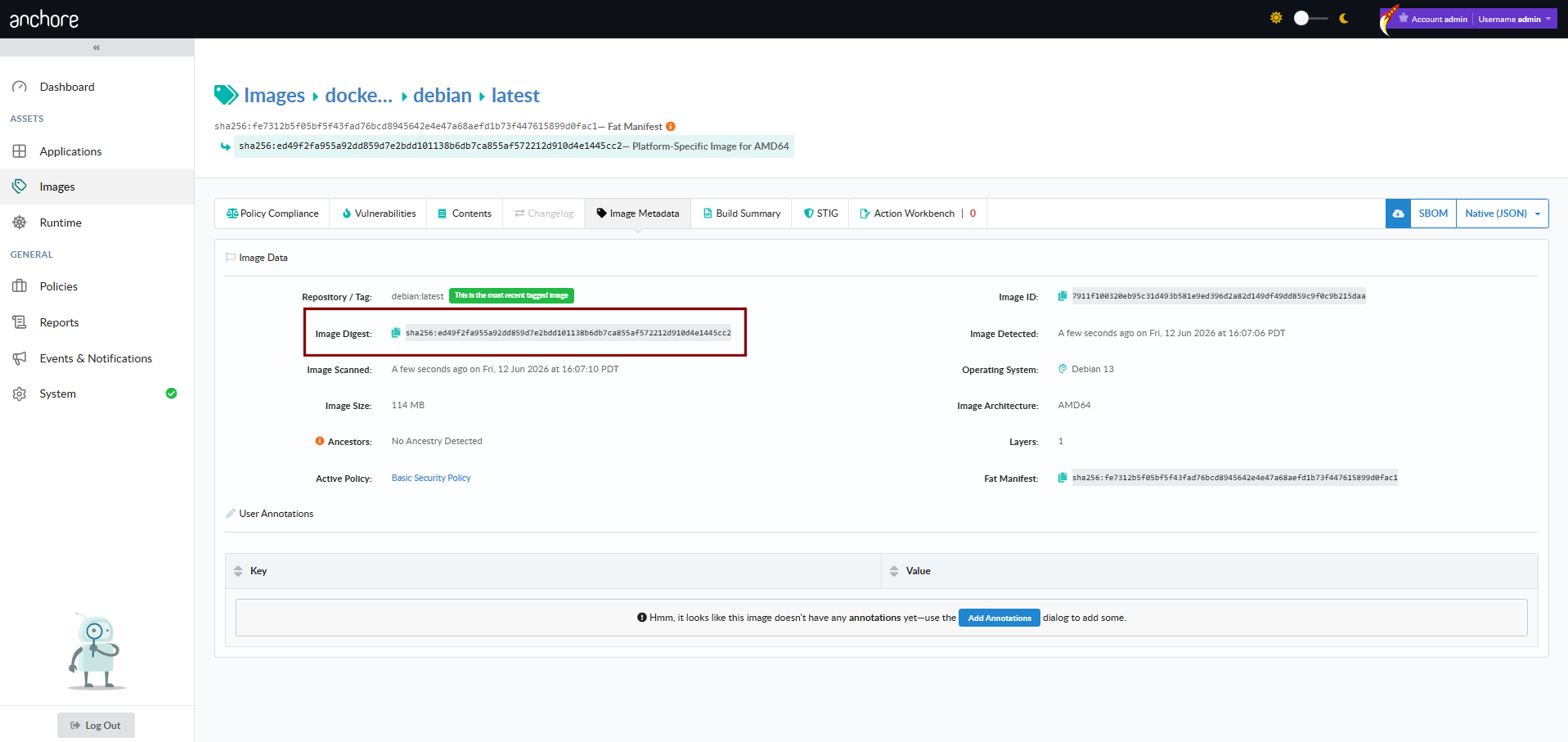
You can also retrieve the value with AnchoreCTL.
Image ID with AnchoreCTL:
anchorectl image get library/debian:latest | grep ID
ID: 8626492fecd368469e92258dfcafe055f636cb9cbc321a5865a98a0a6c99b8dd
Image digest with AnchoreCTL:
anchorectl image get library/debian:latest | grep Digest
Digest: sha256:7df746b3af67bbe182a8082a230dbe1483ea1e005c24c19471a6c42a4af6fa82
Manage Allowed and Denied Images with AnchoreCTL
There is no dedicated AnchoreCTL command for allowed and denied images — they are part of the policy bundle. To manage them from the CLI, edit the allowlisted_images and denylisted_images arrays in the bundle JSON (shape below) and apply the bundle with anchorectl policy add or anchorectl policy update.
Within the bundle, each entry in the allowlisted_images or denylisted_images array is a JSON object of the following shape:
{
  "name": "AllowlistDebianStable",
  "registry": "docker.io",
  "repository": "library/debian",
  "image": { "type": "tag", "value": "stable" }
}
name— human-readable label for the entry.registry,repository— the image source to match; wildcards (*) are supported.image— the reference to match.typeis one oftag,digest, orid, andvalueis the matching string. Wildcards are supported invalue.
Allowlist entries (allowlisted_images) always produce a pass for matching images; denylist entries (denylisted_images) always produce a fail. When an image matches both, the denylist wins.
Manage Allowed and Denied Images with the API
The allowed and denied lists are submitted as part of the policy bundle, not through a dedicated endpoint. Include the allowlisted_images and denylisted_images arrays (shapes above) in the bundle when you create or update a policy:
| Method | Path | Purpose |
|---|---|---|
POST | /policies | Create a policy whose bundle includes the allowed/denied lists |
PUT | /policies/{policy_id} | Update an existing policy’s bundle, including its allowed/denied lists |
The full request and response schemas are in the API browser; search for the Policies tag.