A policy is a JSON document — the policy bundle — that carries everything the policy engine needs to evaluate an artifact: rule sets, mappings, allowlists, and image overrides. Policies are managed through the Anchore Enterprise GUI, AnchoreCTL, or the Anchore API. All three surfaces operate on the same bundle structure.
Anchore Enterprise supports multiple policies per account. Each has a unique name and UUID, and exactly one policy is active at any time — the active policy is used for automated evaluations, notifications, and the Kubernetes admission controller. Inactive policies can still be explicitly requested by policy ID, making it practical to keep historical policies for audit and side-by-side comparison.
Apps can override the account-level active policy by setting policy_id on the app itself, scoping a different policy to all of that app’s versions without affecting other apps in the account. See Anatomy of an App for the per-app field reference.
Anatomy of a Policy Bundle
A bundle is built around five sections plus its identifying metadata. The detail of each section is documented under its own page; this table is the top-level orientation.
Field
Required
Purpose
id
Yes
UUID identifying the bundle
name
Yes
Human-readable name, unique within the account
version
Yes
Bundle schema version
description
No
Free-form description
rule_sets
Yes
Named sets of rules that define the checks to run — see Policy Gates
A bundle authored manually or downloaded from the API can be uploaded as-is through the Anchore Enterprise GUI, AnchoreCTL, or the Anchore API. The full schema and a complete example are in the API browser; search for the Policies tag.
Source mappings as found in v5.x of Anchore Enterprise are deprecated in v6. They have been replaced with filesystem scans via AnchoreCTL, which are represented by SBOM assets within an app version.
Manage Policies in the Anchore Enterprise GUI
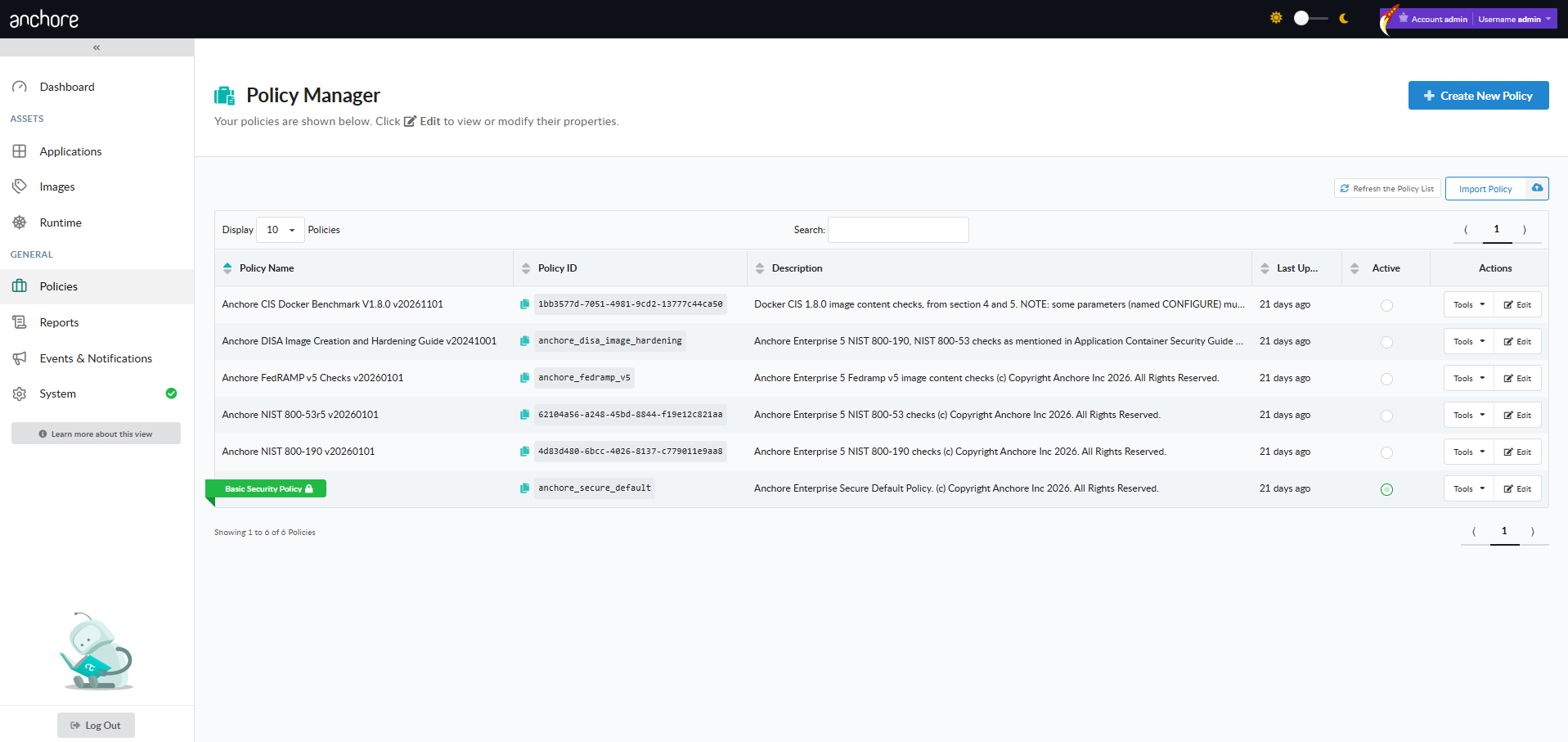
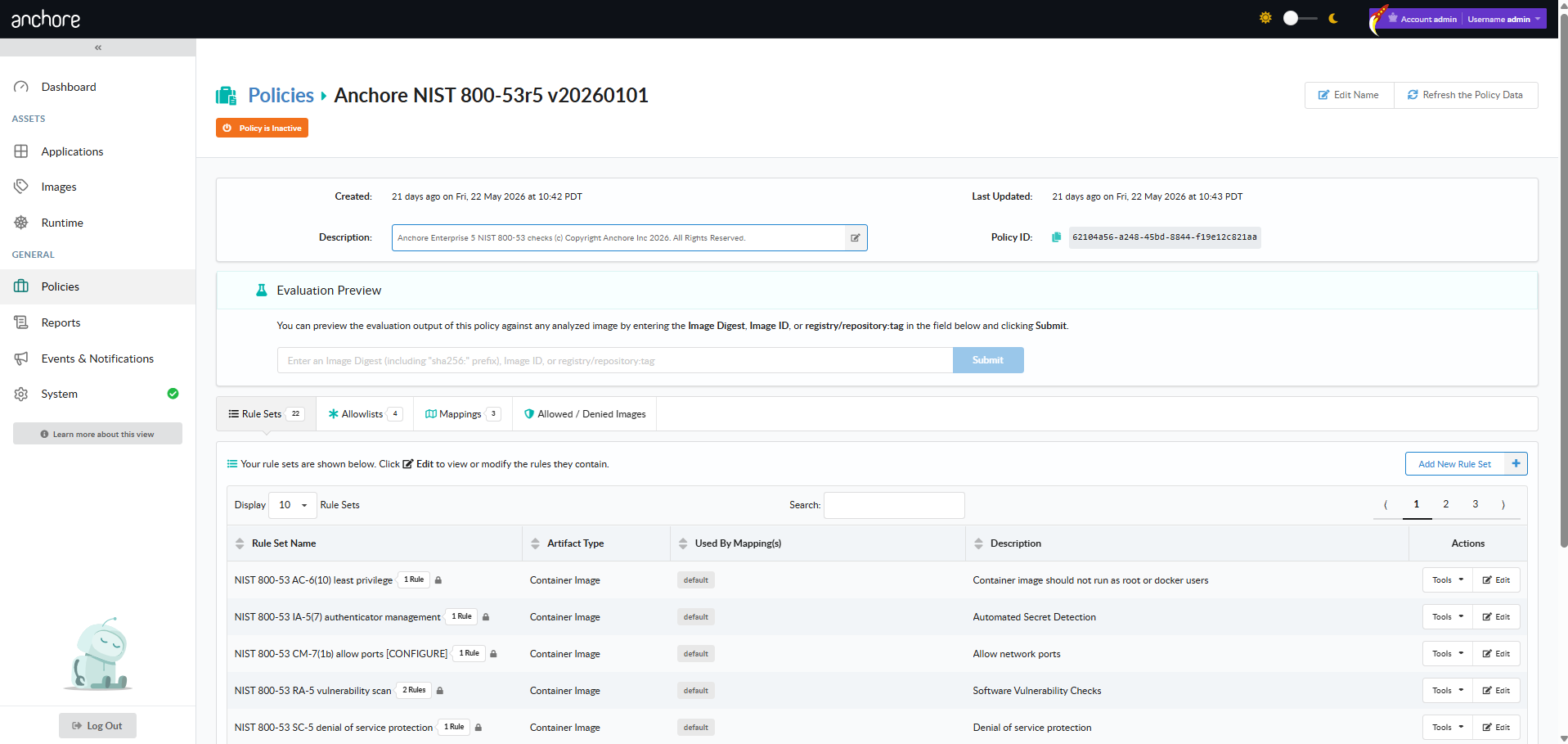
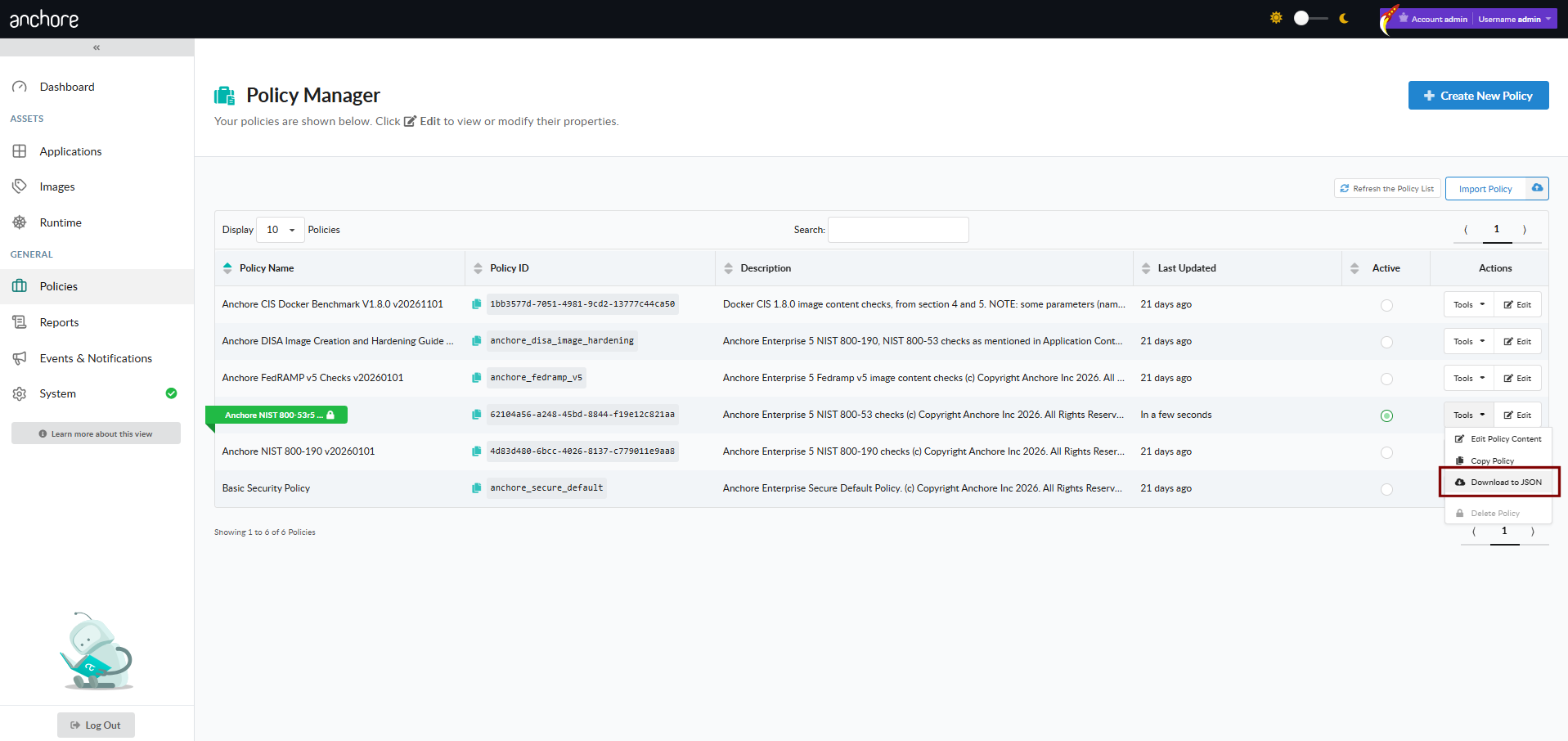
The Policies tab is the home for policy management. From there you can browse every policy in the current account, drill into a policy to inspect or edit its rule sets, and trigger the create / copy / activate / download / delete flows.
Create a Policy in the GUI
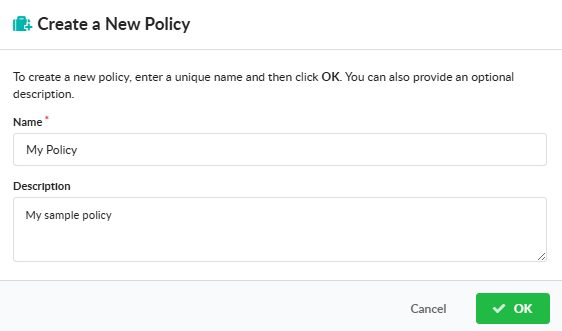
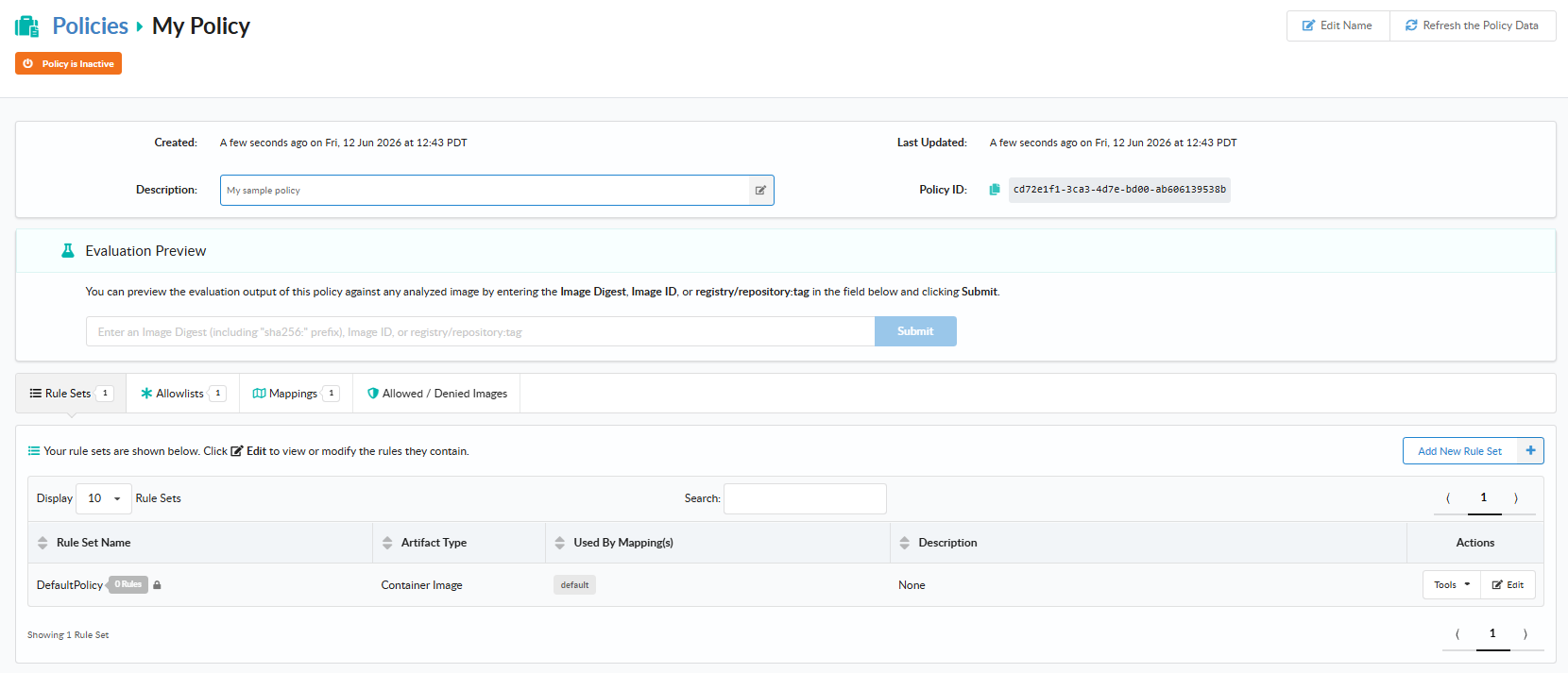
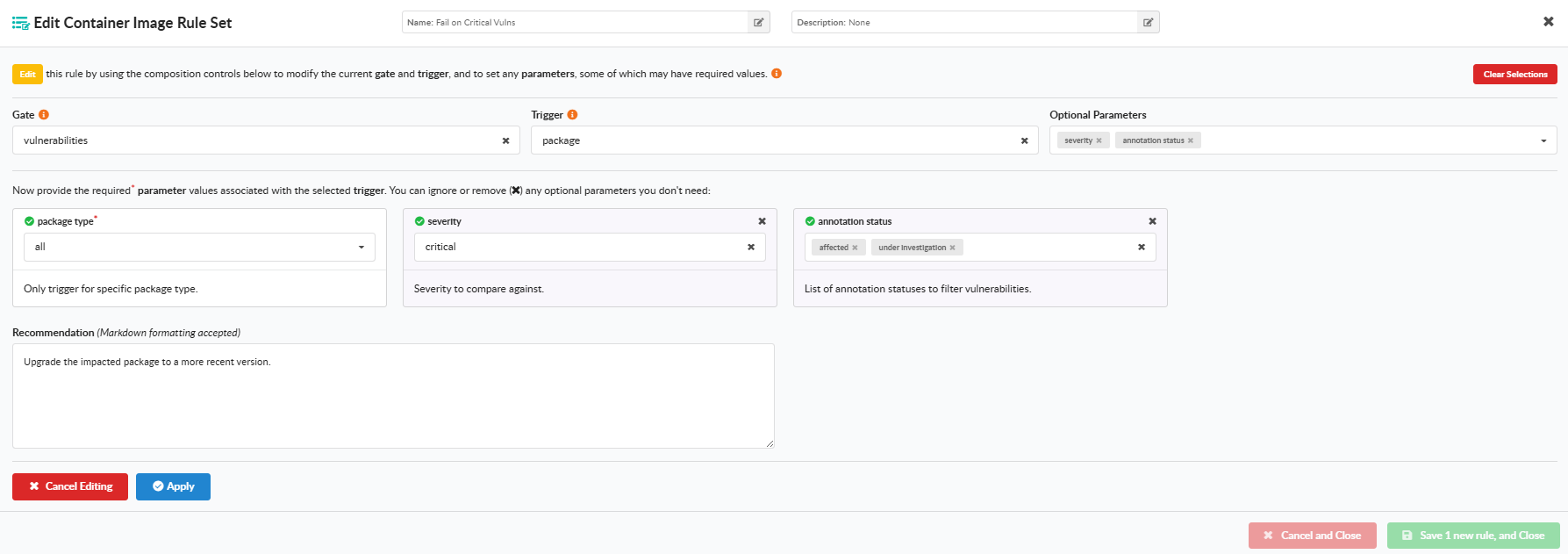
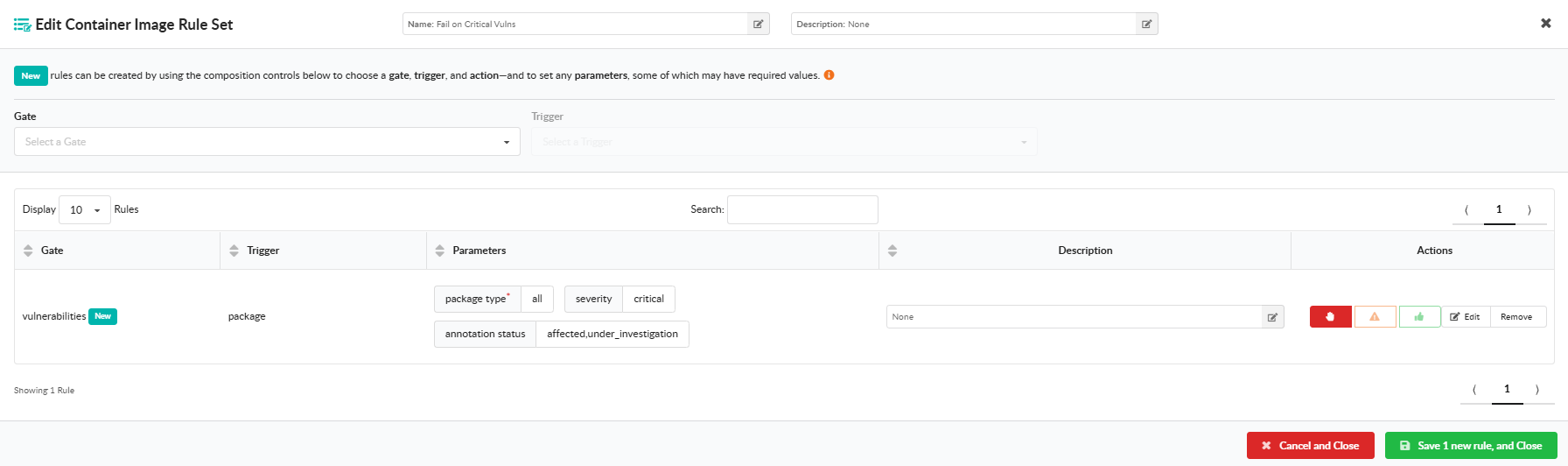
Click Create New Policy and provide a name and description. Then click Add New Rule Set and choose either Container Images or SBOMs for the artifact type the rule set will evaluate. Configure each rule set under Edit by selecting a gate from the dropdown, choosing a trigger within that gate, supplying any required parameters, and selecting an action (STOP, WARN, or GO). Save the rule set when the rule list looks correct.
For SBOM rule sets, only the Vulnerabilities gate is available. Container-image rule sets support the full gate library.
Edit a Policy in the GUI
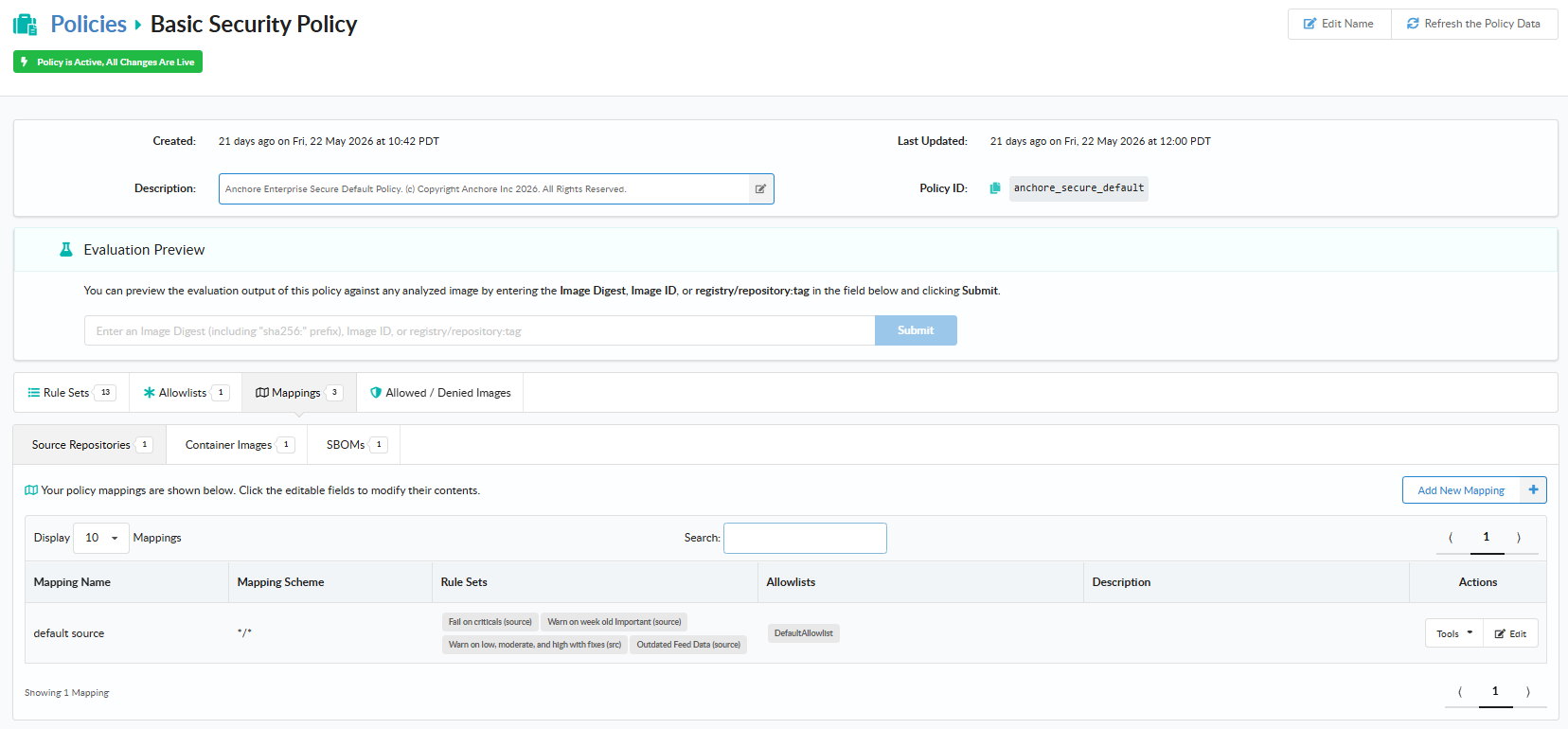
From the policy’s detail page, open the Edit action to modify name, description, rule sets, mappings, allowlists, or the allowed and denied image lists. The same field rules apply as on create.
Activate a Policy in the GUI
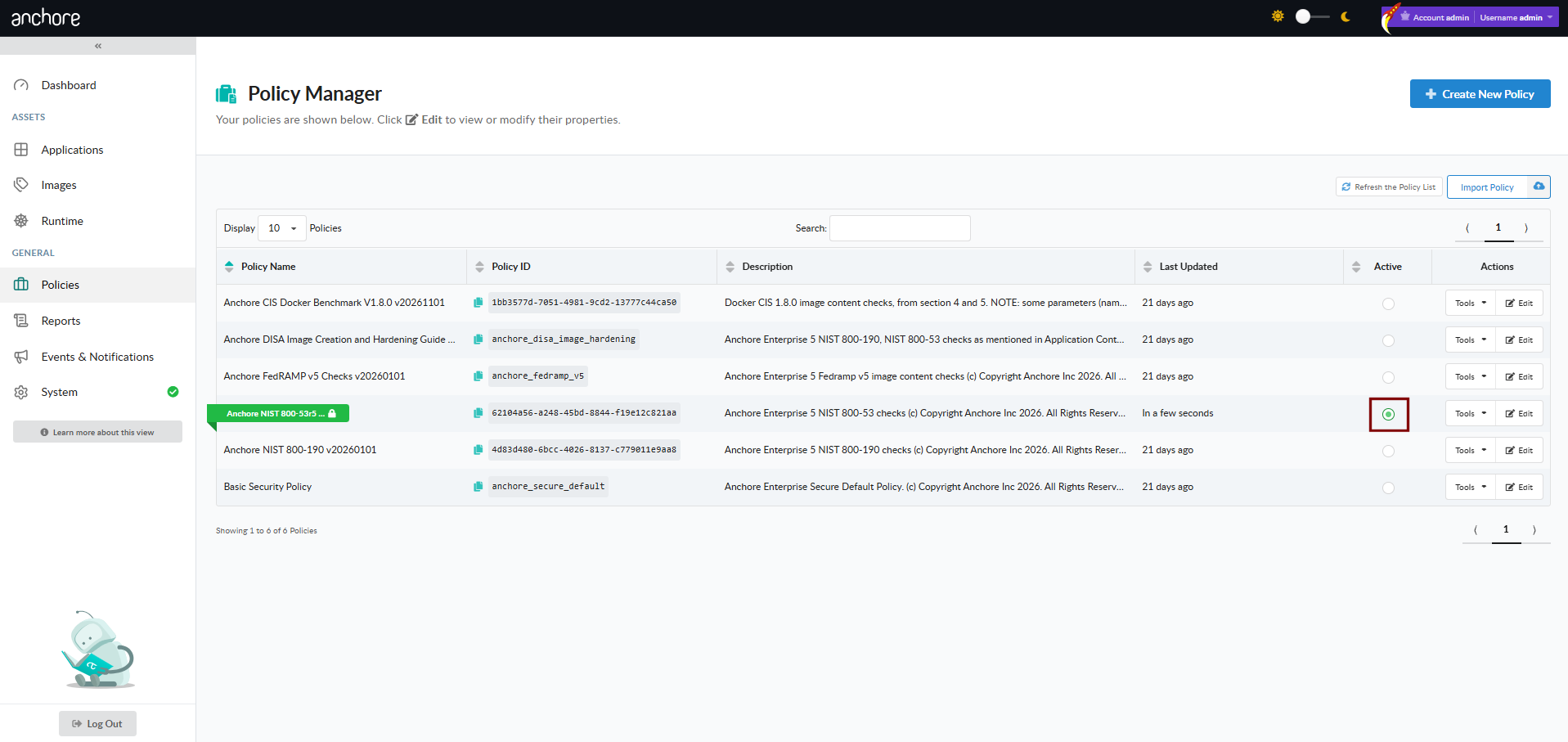
Activating a policy makes it the default used for automated evaluations across the account. Select Activate on a policy’s row; the previously active policy is automatically marked inactive — only one policy is active at a time. The active policy is highlighted in the list with a green indicator.
Adding a policy does not automatically activate it. New policies become available for explicit evaluation requests but must be activated separately to become the account default.
Copy a Policy in the GUI
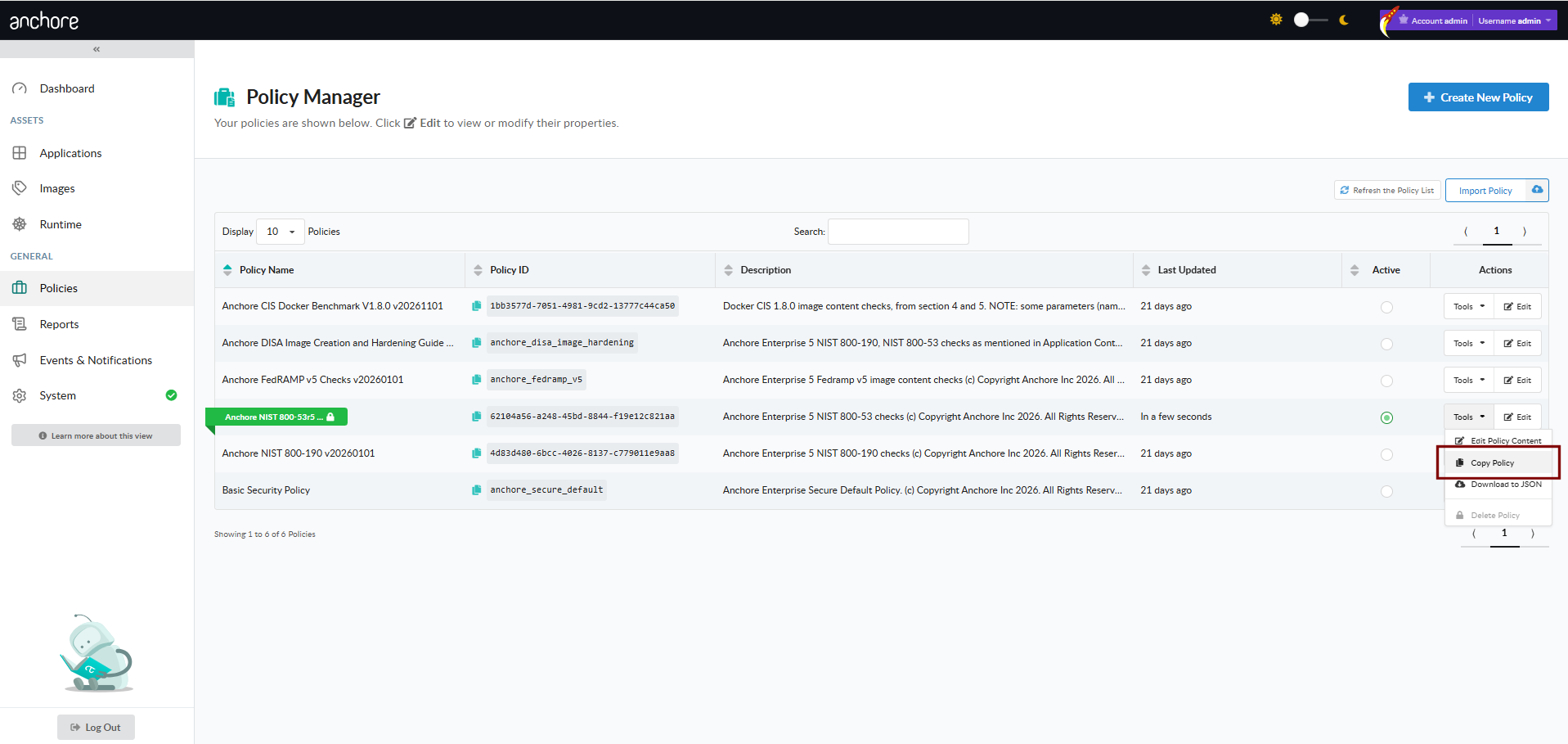
To use an existing policy as a starting point for another, choose Copy Policy from the policy’s Tools menu, then give the copy a new name (and optionally a description). The copy inherits all rule sets, mappings, allowlists, and image lists from the original.
Download a Policy in the GUI
Choose Download to JSON from the policy’s Tools menu to save the policy bundle as a JSON file. Use this when transferring a policy between accounts, archiving a snapshot, or hand-editing the bundle for upload.
Delete a Policy in the GUI
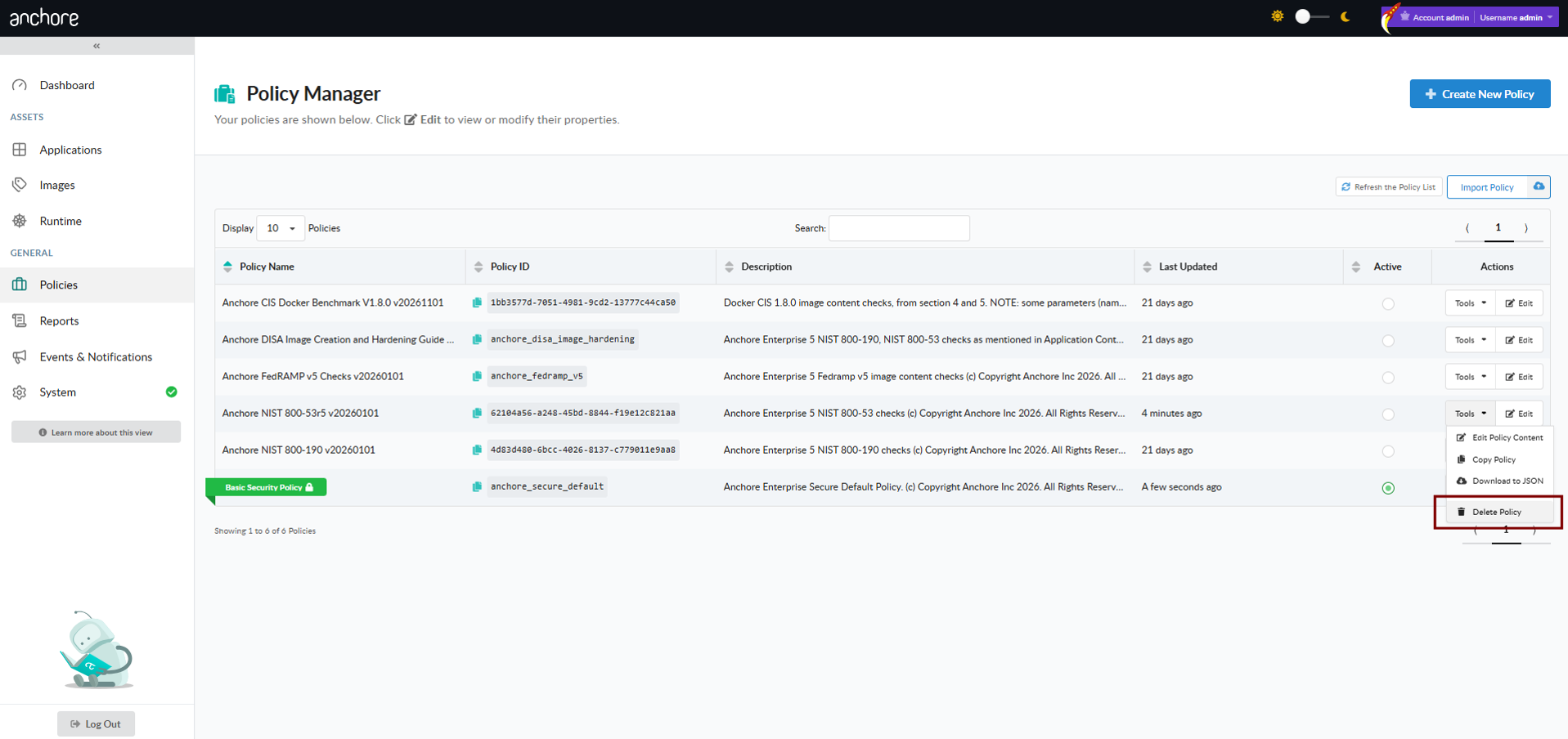
Choose Delete Policy from the policy’s Tools menu. The active policy cannot be deleted — to remove it, first mark another policy as active. Rule sets in use by active mappings also cannot be deleted until they have been removed from every associated mapping.
Policy deletion is irreversible. Download the policy first if you need a backup.
Manage Policies with AnchoreCTL
Policy CRUD lives under anchorectl policy. The add and update verbs read a bundle from a JSON file; the rest accept the policy name or its UUID.
List Policies
List every policy in the current account, with a terse one-line-per-policy summary by default:
anchorectl policy list
Add --detail together with a JSON output format to retrieve every policy’s full bundle content in one call:
Update replaces the bundle in full — there is no partial update. To change a single field, retrieve the bundle, edit it locally, and submit the updated file.
Activate a Policy
Make a policy the active default for the account:
anchorectl policy activate strict-policy
The previously active policy is automatically marked inactive. Only one policy is active at a time.
Delete a Policy
Delete a policy by name or UUID:
anchorectl policy delete strict-policy
The active policy cannot be deleted. Activate a different policy first, then delete the one you no longer need.
Manage Policies with the API
Policy CRUD is exposed under /policies — create, list, get, update, and delete operations are all available. The full endpoint inventory, request and response schemas (including the complete bundle schema), and error codes are in the API browser; search for the Policies tag.
A few conventions worth knowing as you call these endpoints:
The bundle uploaded on POST /policies and PUT /policies/{policy_id} is the same JSON shape that AnchoreCTL submits and the GUI emits. There is no separate API-only format.
The detail query parameter on GET /policies controls whether each entry in the list response carries its full bundle content or just metadata.
Activation is set with the active query parameter on PUT /policies/{policy_id} (the update endpoint). Marking a policy active automatically deactivates the previously active one; an active policy cannot be deactivated directly (activate a different policy instead). The AnchoreCTL policy activate command wraps this.
Cross-account requests follow the standard pattern — see Account Scoping.
1 - Policy Gates
This page is the canonical list of policy gates supported by Anchore Enterprise. Each gate documented here has its own detail page covering its triggers, parameters, and example rules.
A rule inside a policy is built from four pieces:
Gate — the broad category of check (vulnerabilities, dockerfile, licenses, and so on).
Trigger — the specific condition to evaluate within the gate.
Parameters — gate- and trigger-specific values that tune the check.
Action — STOP, WARN, or GO, applied when the trigger fires.
For the broader conceptual model — how rules combine into rule sets, how mappings select which rule sets evaluate an artifact, and where allowlists override the result — see How It Works.
SBOM rule sets support the vulnerabilities gate (and the always utility gate), but not every trigger of the vulnerabilities gate is available in this scope. The supported triggers for SBOM rule sets are:
denylist — fire when a specific CVE is present.
package — fire when a package has a vulnerability matching the configured severity, CVSS, or fix-state criteria.
stale_feed_data(deprecated) — fire when the vulnerability data source has not been updated within a configured time window.
The stale_feed_data trigger is deprecated in v6 and is no longer included in the default policy. Avoid using it in new rule sets.
The remaining vulnerabilities triggers and all other gates apply only to container-image rule sets. To use the full gate library on a release that includes both images and SBOMs, model the release as an app version and let the per-asset mappings pick the appropriate rule set for each asset.
Runtime Gate Inventory
The table above describes the gate library shipped with Anchore Enterprise. To retrieve the gate inventory as implemented by a specific running instance — including any gates added in a later release — call GET /system/policy-spec. The endpoint returns every gate, trigger, parameter, and value type the running instance supports, in the same shape that the policy validator uses.
1.1 - Gate: always
Introduction
The “always” gate is intended for testing purposes and is advised against actual policy usage. The “always” gate only has one trigger that if it is part of a rule set, the policy evaluation will automatically result with the configured action (in most cases, “STOP”). This is especially useful when users want to test mappings and allowlists because they can use this rule in combination with other rules in a single rule set without having to manually create dedicated policies for running tests.
The gate will always trigger with the configured action if it is included inside an active policy.
Reference: always
Trigger Name
Description
Parameter
Description
Example
always
Fires if present in a policy being evaluated. Useful for things like deny-listing images or testing mappings and allowlists by using this trigger in combination with policy mapping rules.
1.2 - Gate: ancestry
Introduction
The “ancestry” gate gives users the ability to construct policy rules against an image’s ancestry, specifically the base and ancestor images. This gate becomes useful when a user needs to quickly identify if an image SBOM is not part of an organization’s approved set of base and/or ancestor images.
Base images is referred to the image that a given image was built from. It serves as a template for developers to create a standardized environment on top of which they can build their custom images (often referred to as a “golden” image).
Ancestor images is referred to the chain of images built from other images.
Goal: Fail a policy evaluation if an image is not part of a list of approved base images.
Example rule set configuration in Anchore Enterprise
Gate: ancestry Trigger: allowed base image digest Required Parameters: base digest = “SHA256:abcdef123456” Recommendation (Optional): The image is not derived from an approved base image. Remediation required. Action: STOP
Reference: ancestry
Trigger Name
Description
Parameter
Description
Example
allowed_base_image_digest
Checks to see if base image is approved
base_digest
List of approved base image digests.
sha256:123abc
allowed_base_image_tag
Checks to see if base image is approved
base_tag
List of approved base image tags.
docker.io/nginx:latest
denylist_ancestor_image_digest
Triggers if any of the ancestor images have the provided image digest(s)
ancestor_digest
List of ancestor image digests to check for. Accepts comma separated list of digests.
sha256:123abc
denylist_ancestor_image_tag
Triggers if any of the ancestor images have the provided image tag(s)
ancestor_tag
List of denied image tags to check the ancestry for. Accepts comma separated list of tags.
docker.io/nginx:latest
no_ancestors_analyzed
Checks to see if the image has a known ancestor
1.3 - Gate: distro
Introduction
The “distro” gate is solely intended to deny an image that is running on a specific distro. This is especially useful if a user wants to create a rule that can quickly discover any image SBOMs containing a specific version of a distro that is denied in their organization.
Example Use-case
Scenario 1
Goal: Create a rule that results in a STOP action for images that are running below Debian version 9.
Example rule set configuration in Anchore Enterprise
Gate: distro Trigger: deny Required Parameters: distro = “debian”, version = “9”, check = “<”
Recommendations (optional): “Image is running on an old version of Debian. Update required.” Action: STOP
Reference: distro
Trigger Name
Description
Parameter
Description
Example
deny
Triggers if the image distro and version match the criteria
distro
Name of the distribution to match
debian
deny
Triggers if the image distro and version match the criteria
version
Version of distribution to compare against
9
deny
Triggers if the image distro and version match the criteria
check
The comparison to use in the evaluation
<
1.4 - Gate: dockerfile
Introduction
This article reviews the “dockerfile” gate and its triggers. The dockerfile gate allows users to perform checks on the content of the dockerfile or docker history for an image and make policy actions based on the construction of an image, not just its content. This is particularly useful for enforcing best practices or metadata inclusion (e.g. labels) on images.
Anchore Enterprise is either given a dockerfile or infers one from the docker image layer history. There are implications to what data is available and what it means depending on these differing sources, so first, we’ll cover the input data for the gate and how it impacts the triggers and parameters used.
The “dockerfile”
The data that this gate operates on can come from two different sources:
The actual dockerfile used to build an image, as provided by the user at the time of running anchorectl image add <img ref> --dockerfile <filename> or the corresponding API call to: POST /images?dockerfile=
The history from layers as encoded in the image itself (see docker history <img> for this output)
All images have data from history available, but data from the actual dockerfile is only available when a user provides it. This also means that any images analyzed by the tag watcher functionality will not have an actual dockerfile.
The FROM line
In the actual dockerfile, the FROM instruction is preserved and available as used to build the image, however in the history data, the FROM line will always be the very first FROM instruction used to build the image and all of its dependent based image. Thus, for most images, the value in the history will be omitted and Anchore Enterprise will automatically infer a FROM scratch line, which is logically inserted for this gate if the dockerfile/history does not contain an explicit FROM entry.
For example, using the docker.io/jenkins/jenkins image:
FROMopenjdk:8-jdk-stretchRUN apt-get update && apt-get install -y git curl && rm -rf /var/lib/apt/lists/*ARGuser=jenkins
ARGgroup=jenkins
ARGuid=1000ARGgid=1000ARGhttp_port=8080ARGagent_port=50000ARGJENKINS_HOME=/var/jenkins_homeENV JENKINS_HOME $JENKINS_HOMEENV JENKINS_SLAVE_AGENT_PORT ${agent_port}# Jenkins is run with user `jenkins`, uid = 1000# If you bind mount a volume from the host or a data container,# ensure you use the same uidRUN mkdir -p $JENKINS_HOME\
&& chown ${uid}:${gid}$JENKINS_HOME\
&& groupadd -g ${gid}${group}\
&& useradd -d "$JENKINS_HOME" -u ${uid} -g ${gid} -m -s /bin/bash ${user}# Jenkins home directory is a volume, so configuration and build history# can be persisted and survive image upgradesVOLUME$JENKINS_HOME# `/usr/share/jenkins/ref/` contains all reference configuration we want# to set on a fresh new installation. Use it to bundle additional plugins# or config file with your custom jenkins Docker image.RUN mkdir -p /usr/share/jenkins/ref/init.groovy.d# Use tini as subreaper in Docker container to adopt zombie processesARGTINI_VERSION=v0.16.1COPY tini_pub.gpg ${JENKINS_HOME}/tini_pub.gpgRUN curl -fsSL https://github.com/krallin/tini/releases/download/${TINI_VERSION}/tini-static-$(dpkg --print-architecture) -o /sbin/tini \
&& curl -fsSL https://github.com/krallin/tini/releases/download/${TINI_VERSION}/tini-static-$(dpkg --print-architecture).asc -o /sbin/tini.asc \
&& gpg --no-tty --import ${JENKINS_HOME}/tini_pub.gpg \
&& gpg --verify /sbin/tini.asc \
&& rm -rf /sbin/tini.asc /root/.gnupg \
&& chmod +x /sbin/tiniCOPY init.groovy /usr/share/jenkins/ref/init.groovy.d/tcp-slave-agent-port.groovy# jenkins version being bundled in this docker imageARG JENKINS_VERSIONENV JENKINS_VERSION ${JENKINS_VERSION:-2.121.1}# jenkins.war checksum, download will be validated using itARGJENKINS_SHA=5bb075b81a3929ceada4e960049e37df5f15a1e3cfc9dc24d749858e70b48919
# Can be used to customize where jenkins.war get downloaded fromARGJENKINS_URL=https://repo.jenkins-ci.org/public/org/jenkins-ci/main/jenkins-war/${JENKINS_VERSION}/jenkins-war-${JENKINS_VERSION}.war# could use ADD but this one does not check Last-Modified header neither does it allow to control checksum# see https://github.com/docker/docker/issues/8331RUN curl -fsSL ${JENKINS_URL} -o /usr/share/jenkins/jenkins.war \
&& echo "${JENKINS_SHA} /usr/share/jenkins/jenkins.war" | sha256sum -c -ENV JENKINS_UC https://updates.jenkins.ioENVJENKINS_UC_EXPERIMENTAL=https://updates.jenkins.io/experimentalENVJENKINS_INCREMENTALS_REPO_MIRROR=https://repo.jenkins-ci.org/incrementalsRUN chown -R ${user}"$JENKINS_HOME" /usr/share/jenkins/ref# for main web interface:EXPOSE${http_port}# will be used by attached slave agents:EXPOSE${agent_port}ENV COPY_REFERENCE_FILE_LOG $JENKINS_HOME/copy_reference_file.logUSER${user}COPY jenkins-support /usr/local/bin/jenkins-supportCOPY jenkins.sh /usr/local/bin/jenkins.shCOPY tini-shim.sh /bin/tiniENTRYPOINT ["/sbin/tini", "--", "/usr/local/bin/jenkins.sh"]# from a derived Dockerfile, can use `RUN plugins.sh active.txt` to setup /usr/share/jenkins/ref/plugins from a support bundleCOPY plugins.sh /usr/local/bin/plugins.shCOPY install-plugins.sh /usr/local/bin/install-plugins.sh
Anchore Enterprise will detect the history/dockerfile as this, if not explicitly provided (note order is reversed from docker history output, so it reads in same order as actual dockerfile):
NOTE: Anchore Enterprise processes the leading /bin/sh commands, so you do not have to include those in any trigger param config if using the docker history output.
The actual_dockerfile_only Parameter
The actual vs history impacts the semantics of the dockerfile gate’s triggers. To allow explicit control of the differences, most triggers in this gate includes a parameter: actual_dockerfile_only that if set to true or false will ensure the trigger check is only done on the source of data specified. If actual_dockerfile_only = true, then the trigger will evaluate only if an actual dockerfile is available for the image and will skip evaluation if not. If actual_dockerfile_only is false or omitted, then the trigger will run on the actual dockerfile if available, or the history data if the dockerfile was not provided.
Differences in data between Docker History and actual Dockerfile
With Actual Dockerfile:
FROM line is preserved, so the parent tag of the image is easily available
Instruction checks are all against instructions created during the build for that exact image, not any parent images
When the actual_dockerfile_only parameter is set to true, all instructions from the parent image are ignored in policy processing. This may have some unexpected consequences depending on how your images are structured and layered (e.g. golden base images that establish common patterns of volumes, labels, healthchecks)
COPY/ADD instructions will maintain the actual values used
Multistage-builds in that specific dockerfile will be visible with multiple FROM lines in the output
With Docker History data, when no dockerfile is provided:
FROM line is not accurate, and will nearly always default to ‘FROM scratch’
Instructions are processed from all layers in the image
COPY and ADD instructions are transformed into SHAs rather than the actual file path/name used at build-time
Multi-stage builds are not tracked with multiple FROM lines, only the copy operations between the phases
Trigger: instruction
This trigger evaluates instructions found in the “dockerfile”.
Parameters
actual_dockerfile_only (optional): See above
instruction: The dockerfile instruction to check against. One of:
ADD
ARG
COPY
CMD
ENTRYPOINT
ENV
EXPOSE
FROM
HEALTHCHECK
LABEL
MAINTAINER
ONBUILD
USER
RUN
SHELL
STOPSIGNAL
VOLUME
WORKDIR
check: The comparison/evaluation to perform. One of: =, != , exists, not_exists, like, not_like, in, not_in.
value (optional): A string value to compare against, if applicable.
Examples
Ensure an image has a HEALTHCHECK defined in the image (warn if not found).
This trigger processes all USER directives in the dockerfile or history to determine which user will be used to run the container by default (assuming no user is set explicitly at runtime). The detected value is then subject to a allowlist or denylist filter depending on the configured parameters. Typically, this is used for denylisting the root user.
Parameters
actual_dockerfile_only (optional): See above
users: A string with a comma delimited list of username to check for.
type: The type of check to perform. One of: ‘denylist’ or ‘allowlist’. This determines how the value of the ‘users’ parameter is interpreted.
This trigger processes the set of EXPOSE directives in the dockerfile/history to determine the set of ports that are defined to be exposed (since it can span multiple directives). It performs checks on that set to denylist/allowlist them based on parameter settings.
Parameters
actual_dockerfile_only (optional): See above
ports: String of comma delimited port numbers to be checked.
type: The type of check to perform. One of: ‘denylist’ or ‘allowlist’. This determines how the value of the ‘users’ parameter is interpreted.
Examples
Allow only ports 80 and 443. Trigger will fire on any port defined to be exposed that is not 80 or 443.
This trigger allows checks on the way the image was added, firing if the dockerfile was not explicitly provided at analysis time. This is useful in identifying and qualifying other trigger matches.
Parameters
None
Examples
Raise a warning if no dockerfile was provided at analysis time .
Goal: Create a rule that results in a STOP action for username “root” found in an image SBOM’s dockerfile “USER” line.
Example rule set configuration in Anchore Enterprise
Gate: dockerfile Trigger: effective_user Required Parameters: users = “root”, type = “denylist” Recommendations (optional): “The username “root” is found in USER line. Fix required.” Action: STOP
Scenario 2
Goal: Create a rule that results in a WARN action for usernames “nginx” or “jenkins” not found in an image SBOM’s dockerfile “USER” line.
Example rule set configuration in Anchore Enterprise
Triggers if any directives in the list are found to match the described condition in the dockerfile.
instruction
The Dockerfile instruction to check.
from
instruction
Triggers if any directives in the list are found to match the described condition in the dockerfile.
check
The type of check to perform.
=
instruction
Triggers if any directives in the list are found to match the described condition in the dockerfile.
value
The value to check the dockerfile instruction against.
scratch
instruction
Triggers if any directives in the list are found to match the described condition in the dockerfile.
actual_dockerfile_only
Only evaluate against a user-provided dockerfile, skip evaluation on inferred/guessed dockerfiles. Default is False.
true
effective_user
Checks if the effective user matches the provided user names, either as a allowlist or blocklist depending on the type parameter setting.
users
User names to check against as the effective user (last user entry) in the images history.
root,docker
effective_user
Checks if the effective user matches the provided user names, either as a allowlist or blocklist depending on the type parameter setting.
type
How to treat the provided user names.
denylist
exposed_ports
Evaluates the set of ports exposed. Allows configuring allowlist or blocklist behavior. If type=allowlist, then any ports found exposed that are not in the list will cause the trigger to fire. If type=denylist, then any ports exposed that are in the list will cause the trigger to fire.
ports
List of port numbers.
80,8080,8088
exposed_ports
Evaluates the set of ports exposed. Allows configuring allowlist or blocklist behavior. If type=allowlist, then any ports found exposed that are not in the list will cause the trigger to fire. If type=denylist, then any ports exposed that are in the list will cause the trigger to fire.
type
Whether to use port list as a allowlist or denylist.
denylist
exposed_ports
Evaluates the set of ports exposed. Allows configuring allowlist or blocklist behavior. If type=allowlist, then any ports found exposed that are not in the list will cause the trigger to fire. If type=denylist, then any ports exposed that are in the list will cause the trigger to fire.
actual_dockerfile_only
Only evaluate against a user-provided dockerfile, skip evaluation on inferred/guessed dockerfiles. Default is False.
true
no_dockerfile_provided
Triggers if anchore analysis was performed without supplying the actual image Dockerfile.
1.5 - Gate: files
Introduction
The “files” gate performs checks against the files in an analyzed image SBOM and is useful when users need to create policies that trigger against any matched file content, names and/or attributes.
The “files” gate differs from the “retrieved_files” gate. The “files” gate searches against the files present in an image SBOM whereas the “retrieved_files” gate utilizes Anchore Enterprise’s cataloger capability and checks against files that are provided and stored by the user before analysis.
Example Use-cases
Scenario 1
Goal: Create a rule that results in a STOP action for any file name that contains “.pem”, which may include information such as the public certificate or even an entire certificate chain (public key, private key, and root certificates) of an image SBOM.
Example rule set configuration in Anchore Enterprise
Gate: files Trigger: name match Required Parameters: regex = “.*\.pem” Recommendations (optional): “Filename with “.pem” found - Remediation required.” Action: STOP
Scenario 2
Goal: Create a rule that results in a STOP action for any file that matches against regex string “.*password.*” in an image SBOM.
In order to use this gate, the analyzer_config.yaml file for your Anchore Enterprise deployment must have specific regex strings configured under the content_search section as the rule will only check against regex strings that appear in this list. Please use the optional parameter “regex name” if you want to specify a single string for your policy rule. If this parameter is not configured, then every regex string stored in the content_search section in the analyzer_config.yaml will be checked against.
Example rule set configuration in Anchore Enterprise
Gate: files Trigger: content regex match Optional Parameters: regex name = “ABC” Recommendations (optional): “Regex string “.*password.*” found in file. Fix required.” Action: STOP
analyzer_config.yaml file
Reference: files
Trigger Name
Description
Parameter
Description
Example
content_regex_match
Triggers for each file where the content search analyzer has found a match using configured regexes in the analyzer_config.yaml “content_search” section. If the parameter is set, the trigger will only fire for files that matched the named regex. Refer to your analyzer_config.yaml for the regex values.
regex_name
Regex string that also appears in the FILECHECK_CONTENTMATCH analyzer parameter in analyzer configuration, to limit the check to. If set, will only fire trigger when the specific named regex was found in a file.
.password.
name_match
Triggers if a file exists in the container that has a filename that matches the provided regex. This does have a performance impact on policy evaluation.
regex
Regex to apply to file names for match.
.*.pem
attribute_match
Triggers if a filename exists in the container that has attributes that match those which are provided . This check has a performance impact on policy evaluation.
filename
Filename to check against provided checksum.
/etc/passwd
attribute_match
Triggers if a filename exists in the container that has attributes that match those which are provided . This check has a performance impact on policy evaluation.
checksum_algorithm
Checksum algorithm
sha256
attribute_match
Triggers if a filename exists in the container that has attributes that match those which are provided . This check has a performance impact on policy evaluation.
Triggers if a filename exists in the container that has attributes that match those which are provided . This check has a performance impact on policy evaluation.
checksum_match
Checksum operation to perform.
equals
attribute_match
Triggers if a filename exists in the container that has attributes that match those which are provided . This check has a performance impact on policy evaluation.
mode
File mode of file.
00644
attribute_match
Triggers if a filename exists in the container that has attributes that match those which are provided . This check has a performance impact on policy evaluation.
mode_op
File mode operation to perform.
equals
attribute_match
Triggers if a filename exists in the container that has attributes that match those which are provided . This check has a performance impact on policy evaluation.
skip_missing
If set to true, do not fire this trigger if the file is not present. If set to false, fire this trigger ignoring the other parameter settings.
true
suid_or_guid_set
Fires for each file found to have suid or sgid bit set.
ignore dir
When set to true, the gate will not trigger if found on a directory. The default is false which will include evaluating directories as well as files
true
1.6 - Gate: image_source_drift
This gate is deprecated in v6.x and is no longer used.
The image_source_drift gate compared the package contents of a built container image against the SBOM of its source repository, surfacing packages added, removed, or modified between the source and the image.
1.7 - Gate: licenses
Introduction
The “licenses” gate allows users to perform checks against found licenses in an image SBOM and perform different
policy actions with available triggers.
License names are normalized to SPDX format. Please refer to the SPDX License List for more information.
Example Use-case
Scenario 1
Goal: Create a rule that results in a STOP action for any “GNU packages” that are running on General Public License (GPL) version 2 or later.
Example rule set configuration in Anchore Enterprise
Triggers if the evaluated image has a package installed with software distributed under the specified (exact match) license(s).
licenses
List of license names to denylist exactly.
GPLv2+,GPL-3+,BSD-2-clause
denylist_exact_match
Triggers if the evaluated image has a package installed with software distributed under the specified (exact match) license(s).
package_type
Only trigger for specific package type.
all
denylist_partial_match
triggers if the evaluated image has a package installed with software distributed under the specified (substring match) license(s)
licenses
List of strings to do substring match for denylist.
LGPL,BSD
denylist_partial_match
triggers if the evaluated image has a package installed with software distributed under the specified (substring match) license(s)
package_type
Only trigger for specific package type.
all
1.8 - Gate: malware
Introduction
The “Malware” Policy Gate allows users to apply compliance rules when malware has been detected within an image.
Anchore Enterprise uses ClamAV during image analysis to detect malware. ClamAV is an open-source antivirus toolkit and can be used to detect various kinds of malicious threats on a system. For additional details, please see Malware Scanning.
Please Note: Files in an image which are greater than 2GB will be skipped due to a limitation in ClamAV. Any skipped file will be identified with a Malware Signature as ANCHORE.FILE_SKIPPED.MAX_FILE_SIZE_EXCEEDED.
When performing Malware Scanning on these larger images, please expect an increase in your analysis time.
Reference: malware
Trigger
Description
Parameters
scans
Triggers if the malware scanner has found any matches in the image.
scan_not_run
Triggers if a file was skipped because it exceeded max file size.
Fire on Skipped Files
Example Use-case
Scenario 1
Goal: Create a rule that results in a STOP action if malware is detected on an image SBOM.
Example rule set configuration in Anchore Enterprise
Gate: malware Trigger: scans Action: STOP
1.9 - Gate: metadata
Introduction
The “metadata” gate provides users a variety of attributes to create policy rules that check against image SBOM metadata. Currently, the following attributes are provided in the “metadata” gate for policy rule creation:
size
architecture
os type
distro
distro version
like distro
layer count
Example Use-case
Scenario 1
Goal: Create a rule that results in a STOP action for an image SBOM containing alpine OS.
Example rule set configuration in Anchore Enterprise
Triggers if a named image metadata value matches the given condition.
attribute
Attribute name to be checked.
size
attribute
Triggers if a named image metadata value matches the given condition.
check
The operation to perform the evaluation.
>
attribute
Triggers if a named image metadata value matches the given condition.
value
Value used in comparison.
1073741824
1.10 - Gate: packages
Introduction
The “packages” gate allows users to perform checks against the packages discovered in an image SBOM. It provides triggers for requiring specific packages, denylisting unwanted packages, filtering on package metadata, and verifying package integrity against the package database.
Example Use-cases
Scenario 1
Goal: Create a rule that results in a STOP action if libssl packages are not found in an image SBOM.
Example rule set configuration in Anchore Enterprise
Goal: Create a rule that results in a STOP action if libssl-dev packages are found in an image SBOM but running on a version other than 1.1.1-1ubuntu2.1~18.04.23.
Example rule set configuration in Anchore Enterprise
Gate: packages Trigger: metadata Optional Parameters: name = “libssl-dev”, name comparison = “=”, version = “1.1.1-1ubuntu2.1~18.04.23”, version comparison = “!=” Action: STOP
Reference: packages
Trigger Name
Description
Parameter
Description
Example
required_package
Triggers if the specified package and optionally a specific version is not found in the image.
name
Name of package that must be found installed in image.
libssl
required_package
Triggers if the specified package and optionally a specific version is not found in the image.
version
Optional version of package for exact version match.
1.10.3rc3
required_package
Triggers if the specified package and optionally a specific version is not found in the image.
version_match_type
The type of comparison to use for version if a version is provided.
exact
verify
Check package integrity against package db in the image. Triggers for changes or removal or content in all or the selected “dirs” parameter if provided, and can filter type of check with the “check_only” parameter. Requires enable_package_db_load to be enabled. See Enable the Package Database.
only_packages
List of package names to limit verification.
libssl,openssl
verify
Check package integrity against package db in the image. Triggers for changes or removal or content in all or the selected “dirs” parameter if provided, and can filter type of check with the “check_only” parameter. Requires enable_package_db_load to be enabled. See Enable the Package Database.
only_directories
List of directories to limit checks so as to avoid checks on all dir.
/usr,/var/lib
verify
Check package integrity against package db in the image. Triggers for changes or removal or content in all or the selected “dirs” parameter if provided, and can filter type of check with the “check_only” parameter. Requires enable_package_db_load to be enabled. See Enable the Package Database.
check
Check to perform instead of all.
changed
denylist
Triggers if the evaluated image has a package installed that matches the named package optionally with a specific version as well.
name
Package name to denylist.
openssh-server
denylist
Triggers if the evaluated image has a package installed that matches the named package optionally with a specific version as well.
version
Specific version of package to denylist.
1.0.1
denylist
Triggers if the evaluated image has a package installed that matches the named package optionally with a specific version as well.
version comparison
The type of comparison to use for version if a version is provided.
>
metadata
Triggers on a package type comparison.
type
The type of package.
rpm
metadata
Triggers on a package name comparison.
name
The name of the package. Wildcards are supported.
*ssl
metadata
Triggers on a package version comparison.
version
The version of the package. Wildcards are supported.
*fips
Enable the Package Database
The verify trigger requires the package database to be loaded into the policy engine. This setting is disabled by default in newer deployments of Anchore Enterprise, though it was previously enabled by default. Only enable this setting if you intend to use the verify trigger, as loading the package database has a significant performance impact on the database.
You can confirm the current value of this setting from the System -> Configuration screen by searching for “load”.
To enable it, change enable_package_db_load from false to true:
If you re-enable this setting after it has been disabled, any images analyzed while the setting was disabled must be re-analyzed to populate the package database table. If you disable this setting after it was previously enabled, the underlying table must be manually truncated once the setting has been disabled and the services restarted.
1.11 - Gate: passwd_file
Introduction
The “passwd_file” gate allows users to perform checks against /etc/passwd files with the retrieve_files cataloger. For more information about cataloger scans, please click here.
Example Use-case
Scenario 1
Goal: Create a rule that results in a STOP action for username “foobar” that is found in /etc/passwd in values.yaml file.
In order to use this gate, the values.yaml file for your Anchore Enterprise deployment must have usernames configured for deny listing.
Example rule set configuration in Anchore Enterprise
Triggers if the /etc/passwd file is not present/stored in the evaluated image.
denylist_usernames
Triggers if specified username is found in the /etc/passwd file
user_names
List of usernames that will cause the trigger to fire if found in /etc/passwd.
daemon,ftp
denylist_userids
Triggers if specified user id is found in the /etc/passwd file
user_ids
List of userids (numeric) that will cause the trigger to fire if found in /etc/passwd.
0,1
denylist_groupids
Triggers if specified group id is found in the /etc/passwd file
group_ids
List of groupids (numeric) that will cause the trigger to fire if found in /etc/passwd.
999,20
denylist_shells
Triggers if specified login shell for any user is found in the /etc/passwd file
shells
List of shell commands to denylist.
/bin/bash,/bin/zsh
denylist_full_entry
Triggers if entire specified passwd entry is found in the /etc/passwd file.
entry
Full entry to match in /etc/passwd.
ftp:x:14:50:FTP User:/var/ftp:/sbin/nologin
1.12 - Gate: retrieved_files
Introduction
The “retrieved_files” gate allows users to check against the content and/or presence of files retrieved at the time of analysis for an image SBOM. The intent of this gate is to allow users to utilize the retrieve_files cataloger in order to create policy rules from a configured file list. However, the usage of this gate depends on running the retrieve_files cataloger which will require more resources and time to perform analysis on the image SBOM. For more information about cataloger scans, please click here.
The “retrieved_files” gate differs from the “files” gate. The “retrieved_files” gate utilizes Anchore Enterprise’s cataloger capability and checks against files that are provided and stored by the user, while the “files” gate checks against the files present in the analyzed image SBOM (ie file content, file names, filesystem attributes)
Example Use-case
Scenario 1
Goal: Create a rule that results in a STOP action if the regex “SSIEnabled” is not found in the content of the file in the path /etc/httpd.conf.
Example rule set configuration in Anchore Enterprise
Triggers if the specified file is not present/stored in the evaluated image.
path
The path of the file to verify has been retrieved during analysis
/etc/httpd.conf
content_regex
Evaluation of regex on retrieved file content
path
The path of the file to verify has been retrieved during analysis
/etc/httpd.conf
content_regex
Evaluation of regex on retrieved file content
check
The type of check to perform with the regex
match
content_regex
Evaluation of regex on retrieved file content
regex
The regex to evaluate against the content of the file
.SSlEnabled.
1.13 - Gate: secret_scans
Introduction
The “secret_scans” gate allows users to perform checks against secrets and content found in an image SBOM using configured regexes found in the “secret_search” section of the analyzer_config.yaml file.
In order to use this gate effectively, ensure that regexes are properly configured in the analyzer_config.yaml file in the Anchore Enterprise deployment. By default, the following names are made available in the “secret_search” section:
Goal: Create a rule that results in a STOP action for disclosed AWS access key regex strings (that includes “/etc/.*) in an image SBOM.
In order to use this gate, the analyzer_config.yaml file for your Anchore Enterprise deployment must have regexps named and configured.
If none of the optional parameters are used for the policy rule, by default, all regexp_match that are configured in the analyzer_config.yaml file will be checked.*
Example rule set configuration in Anchore Enterprise
Gate: secret scans Trigger: content regex checks Optional Parameters: content regex name = “AWS_ACCESS_KEY”, filename regex = “/etc/.*”, match type = “found” Action: STOP
Reference: secret_scans
Trigger Name
Description
Parameter
Description
Example
content_regex_checks
Triggers if the secret content search analyzer has found any matches with the configured and named regexes. Checks can be configured to trigger if a match is found or is not found (selected using match_type parameter). Matches are filtered by the content_regex_name and filename_regex if they are set. The content_regex_name should be a value from the “secret_search” section of the analyzer_config.yaml.
content_regex_name
Name of content regexps configured in the analyzer that match if found in the image, instead of matching all. Names available by default are: [‘AWS_ACCESS_KEY’, ‘AWS_SECRET_KEY’, ‘PRIV_KEY’, ‘DOCKER_AUTH’, ‘API_KEY’].
AWS_ACCESS_KEY
content_regex_checks
Triggers if the secret content search analyzer has found any matches with the configured and named regexes. Checks can be configured to trigger if a match is found or is not found (selected using match_type parameter). Matches are filtered by the content_regex_name and filename_regex if they are set. The content_regex_name should be a value from the “secret_search” section of the analyzer_config.yaml.
filename_regex
Regexp to filter the content matched files by.
/etc/.*
content_regex_checks
Triggers if the secret content search analyzer has found any matches with the configured and named regexes. Checks can be configured to trigger if a match is found or is not found (selected using match_type parameter). Matches are filtered by the content_regex_name and filename_regex if they are set. The content_regex_name should be a value from the “secret_search” section of the analyzer_config.yaml.
match_type
Set to define the type of match - trigger if match is found (default) or not found.
found
1.14 - Gate: stig
Introduction
The STIG policy gate is intended to deny an image that does not have at least one companion STIG evaluation stored
alongside of it. The STIG evaluation can be generated by using an AnchoreCTL workflow that will generate and upload
it to your Anchore Enterprise deployment.
For more information on the Anchore STIG feature, please see the Anchore STIG documentation.
Example Use-case
Scenario 1
Goal: Create a rule that results in a STOP action for images that do not contain a STIG evaluation.
Example rule set configuration in Anchore Enterprise
Gate: stig Trigger: no stig evaluations available Required Parameters: n/a Recommendations (optional): “Perform STIG evaluation on image” Action: STOP
Scenario 2
Goal: Create a rule that results in a STOP action for images where the uploaded STIG evaluations is older than 7 days.
Example rule set configuration in Anchore Enterprise
Gate: stig Trigger: stig evaluations outdated Required Parameters: max days since stig evaluation = “7” Recommendations (optional): “Perform new STIG evaluation on image” Action: STOP
Reference: stig
Trigger Name
Description
Parameter
Description
Example
no stig evaluations available
Triggers if Anchore Enterprise does not have STIG evaluations for this image
n/a
n/a
n/a
stig evaluations outdated
Triggers if all of the uploaded STIG evaluations are outdated
max days since stig evaluation
The maximum age (in days) for any STIG evaluation - an image won’t trigger as long as it has at least one STIG evaluation within this window.
7
1.15 - Gate: tag_drift
Introduction
If evaluating by image tag, the “tag_drift” gate allows users to perform checks against packages that have been changed (added, removed, modified) on an image SBOM from the tag’s previous image SBOM.
Example Use-case
Scenario 1
Goal: Create a rule that results in a STOP action for any packages that have been modified in an evaluated image tag’s SBOM from the tag’s previous evaluation results.
Example rule set configuration in Anchore Enterprise
Gate: tag drift Trigger: packages modified Action: STOP
Reference: tag_drift
Gate: Tag Drift
Compares the SBOM from the evaluated image’s tag and the tag’s previous image, if found. Provides triggers to detect packages added, removed or modified.
Trigger Name
Description
Parameter
Description
Example
packages_added
Checks to see if any packages have been added.
package_type
Package type to filter for only specific types. If omitted, then all types are evaluated.
apk
packages_removed
Checks to see if any packages have been removed.
package_type
Package type to filter for only specific types. If omitted, then all types are evaluated.
apk
packages_modified
Checks to see if any packages have been modified.
package_type
Package type to filter for only specific types. If omitted, then all types are evaluated.
apk
1.16 - Gate: vulnerabilities
Introduction
The “vulnerabilities” gate provides users the ability to use either a single or combination of triggers and attributes that match against vulnerability metadata to create policies for the vulnerabilities discovered in an image SBOM.
Currently, only the following triggers are available for SBOM rule sets:
Denylist
Package
Stale Feed Data (deprecated in v6)
Example Use-cases
Scenario 1
Goal: Create a rule that results in a STOP action for every critical vulnerability.
Example rule set configuration in Anchore Enterprise
Gate: vulnerabilities
Trigger: package
Required Parameters: package type = “all”
Optional Parameters: severity comparison = “=”, severity = “critical”
Recommendations (optional): “Remediation is required for critical vulnerabilities.”
Action: STOP
Scenario 2
Goal: Create a rule that results in a STOP action for every vulnerability that is a part of CISA’s KEV list.
Example rule set configuration in Anchore Enterprise
Gate: vulnerabilities
Trigger: kev list
Recommendations (optional): “This vulnerability is part of CISA’s Known Exploited Vulnerability (KEV) catalogue. Remediation is required.”
Action: STOP
Scenario 3
Goal: Create a rule that results in a WARN action for every critical vulnerability with a fix that will not be addressed by a vendor.
Example rule set configuration in Anchore Enterprise
Gate: vulnerabilities
Trigger: package
Required Parameters: package type = “all”
Optional Parameters: severity comparison = “=”, severity = “critical”, vendor only = “false”
Recommendations (optional): “Even though this is a critical vulnerability, the vendor indicates that a fix will not be addressed.”
Action: WARN
Reference: vulnerabilities
The missing_annotation and annotation_status parameters on the package trigger are available on both image and SBOM rule sets. At the app-version scope, the status consulted is the version’s annotation for the finding’s (vulnerability, package version) pair, and saving or updating an annotation triggers a fresh evaluation immediately. See Policy Gating by Annotation Status for worked examples.
Trigger Name
Description
Parameter
Description
Example
package
Triggers if a found vulnerability in an image meets the comparison criteria.
package_type
Only trigger for specific package type.
all
package
Triggers if a found vulnerability in an image meets the comparison criteria.
severity_comparison
The type of comparison to perform for severity evaluation.
>
package
Triggers if a found vulnerability in an image meets the comparison criteria.
severity
Severity to compare against.
high
package
Triggers if a found vulnerability in an image meets the comparison criteria.
cvss_v3_base_score_comparison
The type of comparison to perform for CVSS v3 base score evaluation.
>
package
Triggers if a found vulnerability in an image meets the comparison criteria.
cvss_v3_base_score
CVSS v3 base score to compare against.
None
package
Triggers if a found vulnerability in an image meets the comparison criteria.
cvss_v3_exploitability_score_comparison
The type of comparison to perform for CVSS v3 exploitability sub score evaluation.
>
package
Triggers if a found vulnerability in an image meets the comparison criteria.
cvss_v3_exploitability_score
CVSS v3 exploitability sub score to compare against.
None
package
Triggers if a found vulnerability in an image meets the comparison criteria.
cvss_v3_impact_score_comparison
The type of comparison to perform for CVSS v3 impact sub score evaluation.
>
package
Triggers if a found vulnerability in an image meets the comparison criteria.
cvss_v3_impact_score
CVSS v3 impact sub score to compare against.
None
package
Triggers if a found vulnerability in an image meets the comparison criteria.
fix_available
If present, the fix availability for the vulnerability record must match the value of this parameter.
true
package
Triggers if a found vulnerability in an image meets the comparison criteria.
vendor_only
If True, an available fix for this CVE must not be explicitly marked as wont be addressed by the vendor
true
package
Triggers if a found vulnerability in an image meets the comparison criteria.
max_days_since_creation
A grace period, in days, for a vulnerability match to be present after which the vulnerability is a policy violation. Uses the date the match was first found for the given image.
7
package
Triggers if a found vulnerability in an image meets the comparison criteria.
max_days_since_fix
If provided (only evaluated when fix_available option is also set to true), the fix first observed time must be older than the days provided, to trigger. Please note that days since fix begins when your Anchore Enterprise Deployment first sees there is a fix available.
30
package
Triggers if a found vulnerability in an image meets the comparison criteria.
vendor_cvss_v3_base_score_comparison
The type of comparison to perform for vendor specified CVSS v3 base score evaluation.
>
package
Triggers if a found vulnerability in an image meets the comparison criteria.
vendor_cvss_v3_base_score
Vendor CVSS v3 base score to compare against.
None
package
Triggers if a found vulnerability in an image meets the comparison criteria.
vendor_cvss_v3_exploitability_score_comparison
The type of comparison to perform for vendor specified CVSS v3 exploitability sub score evaluation.
>
package
Triggers if a found vulnerability in an image meets the comparison criteria.
vendor_cvss_v3_exploitability_score
Vendor CVSS v3 exploitability sub score to compare against.
None
package
Triggers if a found vulnerability in an image meets the comparison criteria.
vendor_cvss_v3_impact_score_comparison
The type of comparison to perform for vendor specified CVSS v3 impact sub score evaluation.
>
package
Triggers if a found vulnerability in an image meets the comparison criteria.
vendor_cvss_v3_impact_score
Vendor CVSS v3 impact sub score to compare against.
None
package
Triggers if a found vulnerability in an image meets the comparison criteria.
package_path_exclude
The regex to evaluate against the package path to exclude vulnerabilities
.test.jar
package
Triggers if a found vulnerability in an image meets the comparison criteria.
inherited_from_base
If true, only show vulns inherited from the base, if false than only show vulns not inherited from the base. Don’t specify to include vulns from the base image and the current image. See Base and Parent Images for more details.
True
package
Triggers if a found vulnerability in an image meets the comparison criteria.
epss score
The EPSS score to compare against.
0.25
package
Triggers if a found vulnerability in an image meets the comparison criteria.
epss_score_comparison
The type of comparison to perform for EPSS base score evaluation.
>
package
Triggers if a found vulnerability in an image meets the comparison criteria.
epss percentile
The EPSS percentile to compare against.
87
package
Triggers if a found vulnerability in an image meets the comparison criteria.
epss percentile comparison
The type of comparison to perform for EPSS percentile evaluation.
>
package
Triggers if a found vulnerability in an image meets the comparison criteria.
known exploited vulnerability
If True, only trigger for vulnerabilities that are in the CISA KEV list (Known Exploited Vulnerability).
True
package
Triggers if a found vulnerability in an image meets the comparison criteria.
missing_annotation
If true, only trigger for vulnerabilities that have no VEX annotation.
True
package
Triggers if a found vulnerability in an image meets the comparison criteria.
annotation_status
Comma-separated list of VEX annotation statuses; only trigger for vulnerabilities whose status is in the list.
affected
package
Triggers if a found vulnerability in an image meets the comparison criteria.
anchore_score_comparison
The type of comparison to perform for Anchore Score evaluation, one of =, !=, <, <=, >, or >= (defaults to >=). Available on SBOM rule sets only — not on image rule sets.
>=
package
Triggers if a found vulnerability in an image meets the comparison criteria.
anchore_score
Anchore Score to compare against. Available on SBOM rule sets only — not on image rule sets.
80.0
denylist
Triggers if any of a list of specified vulnerabilities has been detected in the image.
vulnerability_ids
List of vulnerability IDs, will cause the trigger to fire if any are detected.
CVE-2019-1234
denylist
Triggers if any of a list of specified vulnerabilities has been detected in the image.
vendor_only
If set to True, discard matches against this vulnerability if vendor has marked as will not fix in the vulnerability record.
True
stale_feed_data
Deprecated for SBOM rule sets in v6. Triggers if the CVE data is older than the window specified by the parameter MAXAGE (unit is number of days).
max_days_since_sync
Fire the trigger if the last sync was more than this number of days ago.
10
vulnerability_data_unavailable
Triggers if vulnerability data is unavailable for the image’s distro packages such as rpms or dpkg. Non-OS packages like npms and java are not considered in this evaluation
None
None
None
The anchore_score and anchore_score_comparison parameters act on the Anchore Score, the composite risk index Anchore Enterprise computes for app-version findings from CVSS, EPSS, and CISA KEV data. Because the score is computed at the app-version scope, these parameters are available on SBOM rule sets only.
2 - Policy Mappings
Source mappings as found in v5.x of Anchore Enterprise are deprecated in v6.
Policy mappings bind rule sets and allowlists to the artifacts they evaluate. When an artifact is checked against a policy, the mapping section of the bundle is what decides which rule sets to run and which allowlists to apply, based on the artifact’s identity.
Each artifact type — container images and SBOMs — has its own mapping configuration inside the policy bundle. Mappings are evaluated in order; the first match wins; everything else in the list is ignored for that artifact.
A typical bundle ends with a catch-all mapping that uses wildcards in every selection field, so every artifact gets matched against at least one rule set. Without a catch-all, an artifact that matches no specific mapping is treated as unmapped.
Mapping Selection Fields
The two mapping types match on different artifact attributes, but share the same set of action fields — the rule sets and allowlists the mapping applies.
Container Image Mappings
Field
Purpose
name
Human-readable label for the mapping
registry
Registry hostname to match. Wildcards supported; * matches any registry
repository
Repository name including namespace. Wildcards supported; partial matches like web*/* work
image
Tag, digest, or image ID. type is one of tag, digest, or id; value is the matching string, wildcards supported
rule_set_ids
The container-image rule sets that evaluate matching images
allowlist_ids
The allowlists applied to the evaluation results
A worked example: an image at registry.example.com/anchore/webapi:latest matches a mapping with registry = registry.example.com, repository = anchore/web*, and image.value = *.
SBOM Mappings
Field
Purpose
name
Human-readable label for the mapping
sbom_name
Name of the SBOM to match. Ignored in v6 — see the note below
sbom_version
Version string to match. Ignored in v6 — see the note below
rule_set_ids
The SBOM rule sets that evaluate matching SBOMs
allowlist_ids
The allowlists applied to the evaluation results
App Version policy evaluation uses all SBOM rules and ignores SBOM mapping selectors in v6. When a policy is evaluated against an app version, every asset in the version — container images and SBOMs alike — is evaluated against all SBOM-type rule sets in the policy bundle, whether or not a rule set is referenced by an SBOM mapping. The container-image mappings list is not used at all. SBOM mappings are consulted only for their allowlists: every allowlist referenced by any SBOM mapping is applied to the results. The sbom_name and sbom_version selectors are completely ignored.
If you need different rule sets to apply to different applications, set a specific policy on each Application (its policy_id) rather than relying on SBOM mappings to differentiate them.
SBOM rule sets support a limited gate library — see Policy Gates for the per-rule-set-type availability.
Order of Evaluation
Container-image mappings within the mappings list are evaluated top-to-bottom and halt on the first match. This means:
Order matters. A specific mapping placed below a wildcard mapping will never fire.
A catch-all should always be last. Putting wildcards (*) in every selection field at the bottom of the list guarantees nothing slips through.
Image and SBOM mappings are independent. Container images consult the mappings list only; SBOMs consult the sbom_mappings list only. An image’s mapping order has no effect on what an SBOM matches.
SBOM mappings are not used to select rule sets in v6. During app-version evaluation, all SBOM-type rule sets in the bundle are applied regardless of mappings; sbom_mappings are consulted only for their allowlists, and the sbom_name / sbom_version selectors are ignored. See SBOM Mappings above.
The allowed and denied image lists are applied before mappings. An image on the denied list fails immediately regardless of which mapping it would otherwise have matched. See Allowed and Denied Images.
Manage Mappings in the Anchore Enterprise GUI
Mappings live on the Mappings tab of the policy editor, with separate panels for container-image and SBOM mappings. Each panel shows the existing mappings in order, with controls to add, edit, reorder, or delete entries.
Add a Mapping in the GUI
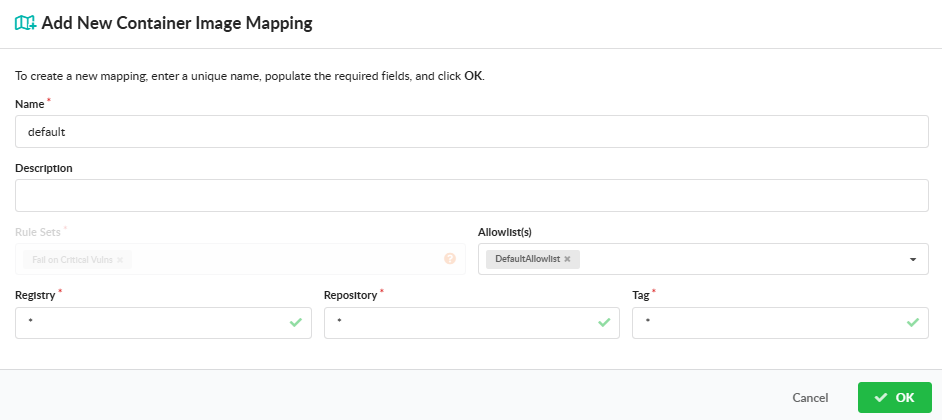
From the relevant panel, click Add Mapping (or the prompt that appears when the panel is empty). Provide a name, the rule sets the mapping should apply, optional allowlists, and the selection fields for the artifact type (registry / repository / tag for images; name / version for SBOMs). When more than one mapping exists, a Position field also appears so the new mapping can be placed at the right point in the evaluation order.
Reorder, Edit, or Delete a Mapping
Use the row actions on each mapping to edit, reorder, or delete it. Because order matters, the reorder action carries the most operational weight — moving a wildcard mapping above a specific one effectively disables the specific one.
Manage Mappings with AnchoreCTL
Mappings live inside the policy bundle JSON. There is no dedicated anchorectl mapping command — to change a policy’s mappings, retrieve the bundle, edit the mappings and sbom_mappings arrays, and submit the updated bundle through anchorectl policy update. The full CRUD workflow is documented under Manage Policies.
A minimal pair of bundle excerpts — one image mapping and one SBOM mapping, each terminated by a catch-all:
The mappings and sbom_mappings arrays are part of the Policy schema and are created and updated through the same POST /policies and PUT /policies/{policy_id} endpoints as the rest of the bundle. The full schema for each mapping type, including every selection field and allowed value, is in the API browser; search for the Policies tag.
3 - Policy Packs
Policy packs are pre-built policies that map to common regulatory frameworks. Each pack ships as a complete bundle of rule sets, mappings, and allowlists, ready to import, customize, and activate against your account.
The Secure pack ships with every Anchore Enterprise deployment. The remaining packs require additional license entitlements:
Anchore Enterprise’s default checks: feed data currency, critical-severity and KEV-listed vulnerabilities, and fixable low, medium, and high vulnerabilities
EU Cyber Resilience Act, Annex I Part I (no known exploitable vulnerabilities)
Anchore Enforce
The NIST SSDF sub-pack covers the Secure Software Development Framework (NIST SP 800-218); see the NIST page for how it relates to the broader NIST pack.
Use a Pack
Each pack page covers the same workflow: download the bundle, import it into Anchore Enterprise, activate it, and adjust its mappings or allowlists for your environment. The mechanics are the same as for any policy: anchorectl policy add, the GUI’s Import action, and the POST /policies endpoint. See Manage Policies for the general CRUD workflow.
Most packs are VEX-aware: their vulnerability rule sets act on the annotation recorded for each finding, so a vulnerability assessed as not_affected or fixed drops out of the evaluation while un-triaged findings keep counting. See Annotations and VEX for how the statuses work and what they produce downstream.
Packs are a starting point, not a final shape. Most teams customize the pack they import before activating the result as the account’s default policy: adjusting mappings to scope the pack to specific registries or repositories, attaching allowlists for known false positives, or layering additional rule sets on top.
3.1 - Secure
The default Secure policy pack comes included (and enabled) in every fresh deployment of Anchore Enterprise.
Current Secure policy pack version: Anchore Enterprise - Secure v2026.2
Introduction
The Secure pack is the Anchore Enterprise baseline vulnerability policy: the checks a deployment should be running before it has a compliance framework to satisfy. It is deliberately conservative: critical and known-exploited findings fail an evaluation, everything else warns, so a fresh deployment produces a usable signal without blocking every build on day one.
The pack ships parallel rule sets for container images and SBOMs, so the vulnerability checks apply whether you scan an image or import an SBOM directly. All the rules configured by default can (and should) be adjusted according to an organization’s security policy.
Controls
Anchore Enterprise checks for the following control specifications in the Secure policy:
Rule set
Behavior
Applies to
Fail on criticals
Fail when a critical severity vulnerability is present
Container images and SBOMs
Fail on KEV list
Fail when a vulnerability appears on the CISA Known Exploited Vulnerabilities (KEV) catalog
Container images and SBOMs
Warn on low, moderate, and high with fixes
Warn on low, medium, and high severity vulnerabilities that have a fix available
Container images and SBOMs
Warn on week old Important
Warn on important severity vulnerabilities more than a week old, even when no fix is available
Container images and SBOMs
Feed Data not available
Fail when vulnerability feed data is unavailable
Container images
Outdated Feed Data
Warn when the vulnerability feed has not synced in 2 days
Container images
“Important” indicates the severity of a vulnerability. By default, it is set to “High” but this can be configured in the policy rule set.
The two feed-data checks are the exception to the parallel coverage: they are bound to the container mapping only and are not evaluated against SBOMs. The pack also ships an empty DefaultAllowlist, attached to both mappings and ready for your accepted risks.
VEX Annotations
The vulnerability rule sets are each split into two rules that differ only in annotation state, as described in Annotations and VEX:
One rule matches findings that carry no annotation yet, so un-triaged vulnerabilities still count against the policy.
The other matches findings annotated affected or under_investigation, so vulnerabilities you have assessed as genuinely exploitable keep counting.
Findings annotated not_affected or fixed match neither rule, so they drop out of the evaluation as soon as the annotation is saved, without an allowlist entry and without editing the policy. This is the intended path for a critical or KEV-listed finding that does not apply to your product: annotate it with a status and justification, and the assessment travels into the VEX document generated for the app version. The feed-currency checks do not depend on annotation state.
Use the Pack
The Secure pack is already imported and active in a new deployment, so there is nothing to add before it starts evaluating. Adjust it as your program matures: tighten the warn-level rules into failures as remediation catches up, attach allowlists for accepted risks, and scope it through Policy Mappings if different registries warrant different thresholds. See Manage Policies for the GUI, AnchoreCTL, and API workflows.
Teams that need to demonstrate a specific framework (NIST, CIS, FedRAMP, CMMC, PCI DSS, or the Essential Eight) generally keep Secure as the baseline and import the matching policy pack alongside it.
3.2 - NIST
The NIST policy packs map the NIST SP 800-53 security controls and the NIST SP 800-190 Application Container Security Guide to checks that the Anchore Enterprise policy engine can evaluate against container images and SBOMs.
Current NIST policy pack versions: Anchore NIST 800-53r5 v2026.2 and Anchore NIST 800-190 v2026.1
The NIST packs require the Anchore Enforce entitlement. Contact Anchore Customer Success for access and more information.
Introduction
The National Institute of Standards and Technology (NIST) is a non-regulatory agency of the U.S. Commerce Department that provides industry standards and guidelines to help federal agencies meet requirements set by the Federal Information Security Management Act (FISMA).
Anchore Enterprise provides two NIST policies:
NIST 800-53: a catalog of security and privacy controls for the U.S. Federal Government. These controls are also the foundation of FedRAMP, the Joint Special Access Program (SAP) Implementation Guide (JSIG), and Intelligence Community Directive (ICD) 503. Anchore Enterprise helps security teams meet the subset of these controls that can be evaluated against container and SBOM content.
NIST 800-190: the Application Container Security Guide, which describes security concerns with container technologies and recommendations to address them across the container lifecycle.
Anchore Enterprise checks for the following control specifications against container images. Rule sets marked Required in the Configuration column ship with placeholder values and must be configured for your environment before the policy is used. See Configure Rule Sets.
Control family
Rule set
Anchore role
Configuration
Access Control (AC)
AC-6(10) least privilege
Fail images whose effective user is root or docker
Access Control (AC)
AC-6(8) least privilege
Fail images containing setuid or setgid binaries
Configuration Management (CM)
CM-7(1b) allow ports
Fail images that expose ports outside the allowed list
Required
Configuration Management (CM)
CM-7(1b) deny ports
Fail images that expose a denied port (ports 0–1024 by default)
Required
Configuration Management (CM)
CM-7(1b) deny packages
Fail images containing a denied package (openssh-server and opensshd by default)
Required
Identification and Authentication (IA)
IA-5(7) authenticator management
Fail images where the secret scan matches a configured secret pattern
Risk Assessment (RA)
RA-5 vulnerability scan
Warn on vendor-reported vulnerabilities of low severity or higher
Risk Assessment (RA)
RA-5 Vulnerability with Known Exploit
Fail on vulnerabilities listed on the CISA Known Exploited Vulnerabilities (KEV) catalog
Risk Assessment (RA)
RA-5 vulnerability fix available
Warn on vulnerabilities that have a fix available
Risk Assessment (RA)
RA-5 specific CVE
Fail images containing a denied vulnerability ID
Required
Risk Assessment (RA)
RA-5 vulnerability feeds
Fail when vulnerability data is unavailable, or when the feed has not synced in 15 days
System and Information Integrity (SI)
SI-3 malicious code protection
Fail on malware findings, and fail when the malware scan did not run
System and Communications Protection (SC)
SC-5 denial of service protection
Fail images with no HEALTHCHECK instruction in the Dockerfile
Supply Chain (SR)
SR-4(4)
Fail images whose base image comes from outside the trusted registry list
Required
None
Dockerfile not found
Fail when no Dockerfile was supplied with the image, since several checks above need one to evaluate
Three rule sets are bound to the SBOM mapping, so the RA-5 checks apply whether you scan an image or import an SBOM directly: RA-5 Vulnerability Scan - SBOM, RA-5 Vulnerability on KEV list - SBOM, and RA-5 specific CVE [CONFIGURE] - SBOM.
NIST 800-190
Anchore Enterprise checks for the following control specifications in the NIST 800-190 policy, which is bound to container images only.
Countermeasure
Rule set
Anchore role
Configuration
Image vulnerabilities
3.1.1
Warn on vendor-reported vulnerabilities of low severity or higher
Image vulnerabilities
3.1.1 vulnerability fix available
Fail on vulnerabilities that have a fix available
Image vulnerabilities
3.1.1 specific CVE
Fail images containing a denied vulnerability ID
Required
Image vulnerabilities
3.1.1 vulnerability feeds
Fail when vulnerability data is unavailable, or when the feed has not synced in 15 days
Image configuration defects
3.1.2 configuration
Fail when a required file is missing or does not match its expected checksum
Required
Embedded clear text secrets
3.1.4
Fail images where the secret scan matches a configured secret pattern
Use of untrusted images
3.1.5
Fail images whose base image comes from outside the trusted registry list
Required
Unbounded network access
3.4.2 allow ports
Fail images that expose ports outside the allowed list
Required
Unbounded network access
3.4.2 deny ports
Fail images that expose a denied port (ports 0–1024 by default)
Required
Insecure runtime configuration
3.4.3 root user
Fail images whose effective user is root or docker
Insecure runtime configuration
3.4.3 setuid/setgid
Fail images containing setuid or setgid binaries
Host OS attack surface
3.5.1 deny packages
Fail images containing a denied package (openssh-server and opensshd by default)
Required
Embedded malware
4.1.3
Fail on malware findings, and fail when the malware scan did not run
Denial of service
2.3.3
Fail images with no HEALTHCHECK instruction in the Dockerfile
None
Dockerfile not found
Fail when no Dockerfile was supplied with the image, since several checks above need one to evaluate
Each 800-190 rule set carries the equivalent 800-53 control in its description, so a finding traces to both frameworks at once.
VEX Annotations
The vulnerability rule sets in both packs are split into two rules that differ only in annotation state, as described in Annotations and VEX:
One rule matches findings that carry no annotation yet, so un-triaged vulnerabilities still count against the policy.
The other matches findings annotated affected or under_investigation, so vulnerabilities you have assessed as genuinely exploitable keep counting.
Findings annotated not_affected or fixed match neither rule, so an accurate VEX assessment clears them from the evaluation without an allowlist entry, and the compliance result refreshes as soon as the annotation is saved. The configuration, privilege, secret, malware, and feed-currency rule sets do not depend on annotation state.
Use the Pack
Import the pack like any other policy. See Manage Policies for the GUI, AnchoreCTL, and API workflows. Once imported, scope it to the registries and repositories it should apply to through Policy Mappings, then activate it as the account’s default policy.
Configure Rule Sets
The rule sets marked Required in the tables above ship with placeholder values: an allowed port of 123456, a denied package of opensshd, an example CVE ID, a sample trusted-registry list, and a placeholder configuration file and checksum. Each is tagged [CONFIGURE] in its rule set name in the GUI. Edit them from the policy’s Edit action in the Anchore Enterprise GUI (see Manage Policies) before you rely on the pack’s results.
3.2.1 - SSDF
In February 2021, The National Institute of Standards and Technology (NIST) created NIST SP 800-218, otherwise known as Secure Software Development Framework (SSDF), in response to a new executive order mandated by the federal government.
SSDF provides a comprehensive set of guidelines aimed at integrating security into the software development lifecycle, thereby enhancing the security posture of software products from inception to deployment. To verify and validate that organizations meet the controls needed to be SSDF compliant, CISA created an official SSDF Attestation Form that allows organizations to verify and attest that they adhere to the SSDF guidelines and comply with a subset of security controls.
Purpose
Anchore provides a downloadable document that serves as an evidence attachment for the SSDF Attestation Form. The document makes the assumption Anchore Enterprise is used in the organization’s environment and is configured to scan the software that is in scope for the SSDF Attestation Form.
The SSDF Attestation Form consists of three sections that must be completed. Sections I and II cover organization-specific details, whereas Section III lists requirements against various security controls. The intent of this document is to provide guidance for first time applicants and help organizations save time collecting evidence required for Section III of the SSDF Attestation Form.
Download
Detailed instructions to complete the form can be found on page 1. This document uses the official SSDF Attestation Form as its base template. Once completed, the document can be directly attached to an SSDF Attestation Form submission. Click below to obtain the form:
Additional Resources
SSDF Attestation 101: A practical guide for Software Producers - Download eBook
Using the Common Form for SSDF Attestation: What Software Producers Need to Know - Read blog
Automate NIST compliance and SSDF attestation with Anchore Enterprise - Learn more
The Center for Internet Security (CIS) provides prescriptive configuration recommendations for a variety of software vendors. Anchore Enterprise’s CIS policy pack is based on the CIS Docker 1.8 Benchmark and validates a subset of security and compliance checks against container images.
The CIS pack requires the Anchore Enforce entitlement. Contact Anchore Customer Success for access and more information.
Introduction
The Center for Internet Security is a nonprofit that publishes consensus-developed configuration baselines, the CIS Benchmarks, for operating systems, cloud platforms, and container runtimes. They are widely used as the reference hardening standard in audits and contracts, and other frameworks frequently point at them rather than restating the same configuration guidance.
The Docker Benchmark is organized by where a control applies: host configuration, daemon configuration and files, container images and build files (section 4), container runtime (section 5), and security operations. This pack implements the section 4 controls, which are evaluated against image and Dockerfile content, plus 5.8 on privileged port mapping. The host, daemon, and runtime sections describe the machine a container runs on rather than the artifact itself and are out of scope for an image policy.
Controls
Anchore Enterprise checks for the following control specifications in the CIS policy. Rule sets marked Required in the Configuration column must be configured for your environment before the policy is used. See Configure Rule Sets.
Control
Check
Configuration
4.1
Ensure that a user for the container has been created
4.2
Ensure that containers use only trusted base images
Required
4.3
Ensure that unnecessary packages are not installed in the container
Required
4.4
Ensure images are scanned and rebuilt to include security patches. Fails on vulnerabilities with a fix available, on unavailable vulnerability data, and when the feed has not synced in 4 days
4.6
Ensure that HEALTHCHECK instructions have been added to container images
4.7
Ensure update instructions are not used alone in Dockerfiles
4.8
Ensure setuid and setgid permissions are removed
4.9
Ensure that COPY is used instead of ADD in Dockerfiles
4.10
Ensure secrets are not stored in Dockerfiles
5.8
Ensure privileged ports are not mapped within containers
Required
Use the Pack
Import the pack like any other policy. See Manage Policies for the GUI, AnchoreCTL, and API workflows. Once imported, scope it to the registries and repositories it should apply to through Policy Mappings, then activate it as the account’s default policy.
Configure Rule Sets
The control specifications marked Required in the table above need configuration for your environment. The control specifications are represented by rule sets, edited from the policy’s Edit action in the Anchore Enterprise GUI (see Manage Policies).
3.4 - FedRAMP
The FedRAMP policy packs map the FedRAMP Rev 5 vulnerability scanning requirements and the FedRAMP 20x Key Security Indicators to checks that the Anchore Enterprise policy engine can evaluate against container images and SBOMs.
Current FedRAMP policy pack versions: Anchore FedRAMP v5 Checks v2026.3 and Anchore FedRAMP 20x v2026.2
The FedRAMP pack requires the Anchore Enforce entitlement plus the FedRAMP add-on. Contact Anchore Customer Success for access and more information.
FedRAMP 20x. This page covers two packs: the Rev 5 baseline below, and the newer FedRAMP 20x Class C pack built around FedRAMP’s Key Security Indicators. Contact Anchore Customer Success for availability.
Introduction
FedRAMP (Federal Risk and Authorization Management Program) is a standardized approach for assessing, authorizing, and monitoring cloud service providers (CSPs) that provide service to federal agencies. Through a rigorous and comprehensive process, FedRAMP ensures that CSPs meet security standards by providing a baseline set of security controls to enhance the overall security of federal information systems.
Anchore Enterprise’s FedRAMP policy validates whether container images are compliant with the FedRAMP Vulnerability Scanning Requirements, and validates them against the FedRAMP controls specified in NIST 800-53 Rev 5 and NIST 800-190. The policy checks only the specification requirements relevant to software supply chain security.
FedRAMP Rev 5
Anchore Enterprise’s FedRAMP Rev 5 policy checks for the following specifications. Rule sets marked Required in the Configuration column must be configured for your environment before the policy is used. See Configure Rule Sets.
Control family
Control
Check
Configuration
Access Control (AC)
AC-6(10)
Prevent non-privileged users from executing privileged functions
Configuration Management (CM)
CM-2(2), CM-3(1), CM-6
Baseline configuration: configure systems and components for high-risk areas
Required
Configuration Management (CM)
CM-5(5)
Access restrictions for change: privilege limitation for production and operation
Required
Configuration Management (CM)
CM-7(1)
Least functionality: network port exposure checks
Required
Configuration Management (CM)
CM-7(5), CM-8(3)
Least functionality: container image build content checks
Required
Configuration Management (CM)
CM-10
Software usage restrictions
Required
Identification and Authentication (IA)
IA-05(7)
Authenticator management: no embedded unencrypted static authenticators
Risk Assessment (RA)
RA-5, SI-02(2)
Vulnerability monitoring and scanning
System and Communications Protection (SC)
SC-5
Denial-of-service protection
An RA-5 SI-02 vulnerability scan remediation rule set is bound to the SBOM mapping, so the RA-5 vulnerability checks apply to imported SBOMs as well as scanned images. The remaining rule sets evaluate image content and are bound to the container mapping only.
The RA-5 SI-02(2) RISK ASSESSMENT rule set is VEX-aware: its vulnerability rules are split so that un-annotated findings and findings annotated affected or under_investigation both match, while findings annotated not_affected or fixed match neither. See Annotations and VEX.
FedRAMP 20x
FedRAMP 20x replaces the Rev 5 control-by-control narrative with Key Security Indicators (KSIs), outcome statements a cloud service offering must demonstrate, and a Vulnerability Detection and Response (VDR) standard governing how providers find and act on vulnerabilities. The Anchore FedRAMP 20x pack implements the Class C indicators that are reachable from container and SBOM content.
Indicator
Rule set
Anchore role
Identity and access management
KSI-IAM-ELP
Fail images whose effective user is root or docker, or that contain setuid or setgid binaries
Identity and access management
KSI-IAM-APM
Fail images carrying embedded API keys, AWS credentials, or passwords
Cloud native architecture
KSI-CNA-RNT
Fail images that expose ports outside the allowed list, or that expose a denied port
Cloud native architecture
KSI-CNA-ULN
Fail images whose Dockerfile exposes ports outside the allowed list
Cloud native architecture
KSI-CNA-DFP
Fail images running as root or containing sshd
Cloud native architecture
KSI-CNA-RVP
Fail images with no HEALTHCHECK instruction in the Dockerfile
Cloud native architecture
KSI-CNA-MAT
Fail on vulnerabilities listed on the CISA Known Exploited Vulnerabilities (KEV) catalog
Service configuration
KSI-SVC-ACM
Fail when Java archives are added to or removed from a tag between builds
Service configuration
KSI-SVC-ASM
Fail images where a secret is found under /etc
Vulnerability detection and response
VDR-CSO-DET
Warn on vendor-reported vulnerabilities and on vulnerabilities with a fix available; fail when vulnerability data is unavailable or the feed has not synced in 15 days
Vulnerability detection and response
VDR-CSO-AKE
Fail on KEV-listed vulnerabilities, which providers must not deploy on new resources
Two rule sets are bound to the SBOM mapping: VDR-CSO-AKE SBOM, which applies the KEV gate to imported SBOMs, and KSI-SCR-MIT - SBOM, which fails supply chain findings that have a fix available or appear on the KEV catalog.
VEX Annotations
The VDR rule sets act on VEX annotation state, as described in Annotations and VEX. They match findings annotated affected or under_investigation, so a finding assessed as not_affected or fixed drops out of the evaluation as soon as the annotation is saved.
This pairing matters more under 20x than under Rev 5: the VDR standard expects a provider to show a continuous detection and response process, and an annotation records the assessment and its justification as evidence rather than simply muting the finding. The KSI rule sets, which evaluate image configuration rather than vulnerabilities, do not depend on annotation state.
Use the Pack
Import the pack like any other policy. See Manage Policies for the GUI, AnchoreCTL, and API workflows. Once imported, scope it to the registries and repositories it should apply to through Policy Mappings, then activate it as the account’s default policy.
Configure Rule Sets
The control specifications marked Required in the table above need configuration for your environment. The control specifications are represented by rule sets, edited from the policy’s Edit action in the Anchore Enterprise GUI (see Manage Policies).
3.5 - DoD
The DoD policy packs map the DISA Container Image Creation and Deployment Guide and the Platform One IronBank requirements to checks that the Anchore Enterprise policy engine can evaluate against container images.
Current IronBank policy pack version: Anchore DoD Iron Bank v2026.1
Current DISA policy pack version: Anchore DISA Image Creation and Hardening Guide v20241001
The DoD packs require the Anchore Enforce entitlement plus the DoD add-on. Contact Anchore Customer Success for access and more information.
Introduction
Anchore Enterprise provides two DoD policies:
DISA Image Creation and Deployment Guide: provided by the Defense Information Systems Agency (DISA), the agency that supplies IT and communications support to the U.S. government and federal organizations. This policy provides security and compliance checks that align with specific NIST 800-53 and NIST 800-190 controls as described in the DoD Container Image Creation and Deployment Guide.
IronBank: validates images against DoD security and compliance requirements in alignment with U.S. Air Force security standards at Platform One and IronBank, written in accordance with DoD Enterprise DevSecOps Reference Design documentation.
DISA
Anchore Enterprise checks for the following control specifications in the DISA policy. Rule sets marked Required in the Configuration column must be configured for your environment before the policy is used. See Configure Rule Sets.
Control
Check
Configuration
AC-6(10)
Container image must have permissions removed from executables that allow a user to execute software at higher privileges
CM-6(b)
Confidential data checks
Required
CM-7(1b)
Network port exposure checks
Required
CM-7(a)
Container image build content checks
Required
IA-5(2a)
Base image checks
IA-5(7)
Embedded credentials
RA-5
Software vulnerability checks
SC-5
Image checks
SC-8(2)
Base image checks
SI-2(6)
Image software update and layer checks
IronBank
The IronBank policy includes checks across the following areas:
Area
Checks
Image build and content
Dockerfile, User, File, Software, Transfer Protocol
Import the pack like any other policy. See Manage Policies for the GUI, AnchoreCTL, and API workflows. Once imported, scope it to the registries and repositories it should apply to through Policy Mappings, then activate it as the account’s default policy.
Configure Rule Sets
The IronBank policy does not require rule set configuration. The DISA policy, however, requires configuration for the control specifications marked Required in the DISA table above. The control specifications are represented by rule sets, edited from the policy’s Edit action in the Anchore Enterprise GUI (see Manage Policies).
3.6 - CMMC
The CMMC policy pack maps the controls of the Cybersecurity Maturity Model Certification (CMMC) to checks that the Anchore Enterprise policy engine can evaluate against container images. The pack is grounded in NIST SP 800-171r3, the security-requirement publication from which CMMC draws its control set, and ships as a single bundle ready to import as a policy.
The CMMC pack requires the Anchore Enforce entitlement. Contact Anchore Customer Success for access and more information.
Introduction
CMMC is the U.S. Department of Defense’s certification program for the Defense Industrial Base, the contractors and subcontractors that build, deliver, and support systems for the DoD. It exists because the DoD’s sensitive unclassified information lives largely on contractor networks, and self-attestation alone proved a weak assurance that it was protected there.
The program is tiered by the sensitivity of the information a contract involves. Contracts touching Federal Contract Information (FCI) sit at the lowest tier, while contracts involving Controlled Unclassified Information (CUI) require the full NIST SP 800-171 security requirements, assessed rather than self-asserted. CMMC requirements flow down through the supply chain: a subcontractor handling CUI on a prime’s behalf carries the same obligation the prime does.
For organizations delivering software, this lands squarely on the build pipeline. Container images that process, store, or transmit CUI are in scope, as is the infrastructure that produces them. The least-privilege, unauthorized-software, secrets, malware, and vulnerability-management requirements therefore have to be demonstrable against the artifacts themselves, not just described in a system security plan. That is the evidence this pack produces: each rule set is named for the 800-171r3 requirement it supports, so a policy evaluation maps directly onto the control an assessor is asking about.
Controls
Anchore Enterprise checks for the following control specifications against container images. Rule sets marked Required in the Configuration column ship with placeholder values and must be configured for your environment before the policy is used. See Configure Rule Sets.
Control
Rule set
Anchore role
Configuration
03.01.07 Least Privilege
03.01.07 - Least Privilege
Fail images whose effective user is root or docker
03.04.06 Least Functionality
03.04.06 allow ports
Fail images that expose ports outside the allowed list
Required
03.04.06 Least Functionality
03.04.06 deny ports
Fail images that expose a denied port (ports 0–1024 by default)
Required
03.04.06 Least Functionality
03.04.06 Unauthorized software
Fail images containing a denied package (openssh-server and opensshd by default)
Required
03.05.07 Password Management
03.05.07 - Password Management
Fail images where the secret scan matches a configured secret pattern
03.11.02 Vulnerability Monitoring and Scanning
03.11.02 vulnerability scan
Warn on vendor-reported vulnerabilities of low severity or higher
03.11.02 Vulnerability Monitoring and Scanning
03.11.02 vulnerability fix available
Warn on vulnerabilities that have a fix available
03.11.02 Vulnerability Monitoring and Scanning
03.11.02 specific CVE
Fail images containing a denied vulnerability ID
Required
03.11.02 Vulnerability Monitoring and Scanning
03.11.02 vulnerability feeds
Fail when the vulnerability feed has not synced in 15 days
Required
03.14.02 Malicious Code Protection
03.14.02 malicious code protection
Fail on malware findings, and fail when the malware scan did not run
None
Dockerfile not found
Fail when no Dockerfile was supplied with the image, since several checks above need one to evaluate
The 03.14.02 malicious code protection rule set fails an image when the malware scan has not run, so malware scanning must be enabled in your deployment before this rule set produces meaningful results. See Scanning.
VEX Annotations
The 03.11.02 vulnerability rule sets are each split into two rules that differ only in annotation state, as described in Annotations and VEX:
One rule matches findings that carry no annotation yet, so un-triaged vulnerabilities still count against the policy.
The other matches findings annotated affected or under_investigation, so vulnerabilities you have assessed as genuinely exploitable keep counting.
Findings annotated not_affected or fixed match neither rule, so an accurate VEX assessment clears them from the evaluation without an allowlist entry, and the compliance result refreshes as soon as the annotation is saved. This matters for an assessment conversation: the evidence shows which findings were reviewed and dismissed with a justification, rather than suppressed.
The other rule sets (least privilege, port exposure, unauthorized software, secrets, malware, and feed currency) do not depend on annotation state.
SBOM Rule Sets
The pack ships three 03.11.02 rule sets bound to the SBOM mapping, so vulnerability checks apply whether you scan an image or import an SBOM directly: 03.11.02 vulnerability scan - SBOM, 03.11.02 vulnerability fix available - SBOM, and 03.11.02 specific CVE [CONFIGURE] -SBOM.
The remaining controls depend on image content and are bound to the image mapping only. The SBOM rule sets do not always use the same action as their image counterpart, so review them alongside the image rule sets after import.
Allowed and Denied Images
The bundle also ships example deployment-wide image overrides, which force an image’s final result regardless of the rest of the evaluation, as described in Allowed / Denied Images:
Override
Entry
Allowed
approved_registry.io, all repositories and tags
Denied
docker.io, all repositories and tags
Denied
any repository named badrepo, on any registry
These are placeholders. Replace them with your own approved and prohibited registries before activating the pack. As shipped, the docker.io entry fails every image pulled from Docker Hub.
Use the Pack
Import the pack like any other policy. See Manage Policies for the GUI, AnchoreCTL, and API workflows. Once imported, scope it to the registries and repositories it should apply to through Policy Mappings, and attach any allowlists you need before activating it as the account’s default policy.
The CMMC pack is intended as a starting point. Most teams customize mappings, attach allowlists for accepted risks, or layer additional rule sets on top before activating the pack against production registries.
Configure Rule Sets
The rule sets marked Required in the table above ship with placeholder values that stand in for values only you can supply: an allowed port of 123456, a denied package of opensshd, and an example CVE ID. Each is tagged [CONFIGURE] in its rule set name in the GUI. Edit them from the policy’s Edit action in the Anchore Enterprise GUI (see Manage Policies) before you rely on the pack’s results.
3.7 - ASD Essential 8
The ASD Essential 8 policy pack maps the Australian Signals Directorate’s Essential Eight mitigation strategies to checks that the Anchore Enterprise policy engine can evaluate against container images and SBOMs. The pack covers Maturity Levels 1 through 3 and ships as a single bundle ready to import as a policy.
The ASD Essential 8 pack requires the Anchore Enforce entitlement. Contact Anchore Customer Success for access and more information.
Introduction
The Essential Eight is a set of eight mitigation strategies published by the Australian Signals Directorate as a baseline against the attacks it sees most often. Implementation is mandatory for Australian federal government entities and widely adopted by state agencies, critical infrastructure operators, and their suppliers. Progress is measured in maturity levels, tiered against increasingly capable adversary tradecraft; every rule set in this pack applies at Maturity Levels 1 through 3.
Four of the eight strategies are reachable from container image content: patch applications, patch operating systems, restrict administrative privileges, and application control. The rest (application hardening, macro settings, multi-factor authentication, and backups) depend on organizational process or runtime configuration and are not represented in the bundle. Rule sets are named by strategy and ISM control identifier, so a finding maps straight back to the control it supports.
Controls
Anchore Enterprise checks for the following control specifications against container images. The rule set marked Required in the Configuration column ships with a placeholder value and must be configured for your environment before the policy is used. See Configure Rule Sets.
Mitigation strategy
Rule set
Anchore role
Configuration
Patch applications
Patch Applications ISM-1690 - KEV
Fail on any non-OS vulnerability listed on the CISA Known Exploited Vulnerabilities (KEV) catalog, regardless of severity
Patch applications
Patch Applications ISM-1690
Warn on non-critical non-OS vulnerabilities that have a fix available, then fail once that fix has been available for more than 14 days
Patch applications
Patch Applications ISM-1876
Fail on critical-severity vulnerabilities in OS packages
Patch applications
Patch Applications ISM-1808
Fail when the vulnerability feed has not synced in 7 days
Patch operating systems
Patch OS ISM-1876 - KEV
Fail on any OS vulnerability listed on the KEV catalog, regardless of severity
Patch operating systems
Patch OS ISM-1877
Fail on critical-severity vulnerabilities in OS packages
Patch operating systems
Patch OS ISM-1694
Fail on non-critical OS vulnerabilities, not listed on the KEV catalog, whose fix has been available for more than 14 days
Patch operating systems
Patch OS ISM-1808
Fail when the vulnerability feed has not synced in 7 days
Restrict administrative privileges
Restrict Admin Privileges - ISM-1688
Fail images whose effective user is root or docker
Application control
Application Control - ISM-1657
Fail images containing a denied package (openssh version 1.0.1 by default)
Required
The two patching timelines the Essential Eight sets out are split across the rule sets rather than expressed in one: the 48-hour requirement for critical vulnerabilities and working exploits is enforced as an immediate failure (ISM-1876, ISM-1877, and the KEV rule sets), while the two-week requirement for non-critical vulnerabilities is enforced through the max_days_since_fix threshold in ISM-1690 and ISM-1694.
VEX Annotations
Every vulnerability rule set in this pack is split into two rules that differ only in annotation state, as described in Annotations and VEX:
One rule matches findings that carry no annotation yet, so un-triaged vulnerabilities still fail the policy.
The other matches findings annotated affected or under_investigation, so vulnerabilities you have assessed as genuinely exploitable keep failing it.
Findings annotated not_affected or fixed match neither rule. Recording an accurate VEX assessment therefore clears the finding from the evaluation without an allowlist entry, and the compliance result refreshes as soon as the annotation is saved. The non-vulnerability rule sets (feed currency, effective user, and application control) do not depend on annotation state.
SBOM Rule Sets
The pack ships parallel rule sets bound to the SBOM mapping, so the patching strategies apply to imported SBOMs as well as scanned images: Patch Applications ISM-1690 - KEV (SBOM), Patch Applications ISM-1876 (SBOM), Patch Applications ISM-1690 (SBOM), Patch OS ISM-1877 (SBOM), and Patch OS ISM-1694 (SBOM). They carry the same VEX rule pairing as their image counterparts.
Restrict administrative privileges, application control, and the feed-currency checks depend on image content or deployment state and are bound to the image mapping only.
Use the Pack
Import the pack like any other policy. See Manage Policies for the GUI, AnchoreCTL, and API workflows. Once imported, scope it to the registries and repositories it should apply to through Policy Mappings, and attach any allowlists you need before activating it as the account’s default policy.
The ASD Essential 8 pack is intended as a starting point. Most teams customize mappings, attach allowlists for accepted risks, or layer additional rule sets on top before activating the pack against production registries.
Configure Rule Sets
Application Control - ISM-1657 ships with a placeholder denied package, openssh at version 1.0.1, that stands in for the organization-approved software set the control calls for. It is tagged [CONFIGURE] in its rule set name in the GUI. Replace the placeholder with the packages you prohibit, using the policy’s Edit action in the Anchore Enterprise GUI (see Manage Policies), before you rely on the pack’s results.
The pack’s other rule sets are usable as shipped, though the two feed-currency thresholds (7 days) and the two patch-age thresholds (14 days) are worth reviewing against the scanning cadence and maturity level you are certifying to.
3.8 - PCI DSS
The PCI DSS policy pack maps the internal vulnerability-scanning requirements of the Payment Card Industry Data Security Standard (PCI DSS) v4.0.1 to checks that the Anchore Enterprise policy engine can evaluate against container images. The pack targets requirement 11.3.1, internal vulnerability scans, and ships as a single bundle ready to import as a policy.
The PCI DSS pack requires the Anchore Enforce entitlement. Contact Anchore Customer Success for access and more information.
Introduction
PCI DSS is the security standard maintained by the PCI Security Standards Council on behalf of the major payment card brands. It applies to any organization that stores, processes, or transmits cardholder data: merchants, payment processors, acquirers, issuers, and the service providers that support them. Unlike a government regulation, it is enforced contractually: card brands and acquiring banks require compliance as a condition of processing payments, validated annually through a Report on Compliance or a Self-Assessment Questionnaire, with the depth of validation scaled to transaction volume.
Scope is defined by the cardholder data environment (CDE): every system component that handles cardholder data, plus anything connected to or able to affect the security of those systems. For teams delivering payment software in containers, that pulls the images themselves into scope, along with the pipeline that builds them.
Requirement 11.3.1 is the internal vulnerability scanning requirement: scans run at least every three months and after any significant change, with high-risk and critical vulnerabilities resolved and rescans performed to confirm it. Sub-requirement 11.3.1.1 covers everything below that bar: all other applicable vulnerabilities, managed on the schedule set by the entity’s targeted risk analysis. That split is the shape of this pack: high-risk findings fail an evaluation outright, and the rest surface as warnings for triage rather than being discarded.
Controls
Anchore Enterprise checks for the following control specifications against container images:
Requirement
Rule set
Anchore role
11.3.1
11.3.1 Internal vulnerability scan
Fail on high-risk and critical vulnerabilities (high severity or above, in any package type)
11.3.1
11.3.1 Internal vulnerability scan KEV
Fail on any vulnerability listed on the CISA Known Exploited Vulnerabilities (KEV) catalog
11.3.1
11.3.1 Internal vulnerability scan EPSS
Fail on any vulnerability with an EPSS score of 0.75 or higher
11.3.1.1
11.3.1.1 Internal vulnerability scan
Warn on all other applicable vulnerabilities (those below high severity) so they can be addressed against your targeted risk analysis
11.3.1.c
11.3.1.c Feed Data not available
Fail when vulnerability feed data is unavailable
11.3.1.c
11.3.1c Outdated Feed Data
Fail when the vulnerability feed has not synced in 2 days
The three 11.3.1 rule sets implement the requirement’s vulnerability ranking three ways (by severity, by KEV listing, and by EPSS score) and evaluate together, so an image fails if any one of them matches. The 11.3.1.c rule sets cover the requirement that scans be run with a current tool: a scan performed against missing or stale feed data fails rather than passing silently.
VEX Annotations
The four vulnerability rule sets are each split into two rules that differ only in annotation state, as described in Annotations and VEX:
One rule matches findings that carry no annotation yet, so un-triaged vulnerabilities still fail the scan.
The other matches findings annotated affected or under_investigation, so vulnerabilities you have assessed as genuinely exploitable keep failing it.
Findings annotated not_affected or fixed match neither rule. For requirement 11.3.1 this is the difference between an allowlist and an assessment: a VEX annotation records why a high-risk finding does not apply to your product, carries a justification with it, and travels into the VEX document an assessor can review, rather than simply muting the finding.
The two 11.3.1.c feed-currency rule sets do not depend on annotation state.
SBOM Rule Sets
The pack ships parallel rule sets bound to the SBOM mapping, so the scanning requirement is met whether you scan an image or import an SBOM directly: 11.3.1 Internal vulnerability scan (sbom), 11.3.1 Internal vulnerability scan KEV (sbom), 11.3.1 Internal vulnerability scan EPSS (sbom), and 11.3.1.1 Internal vulnerability scan (sbom). They carry the same VEX rule pairing as their image counterparts.
The 11.3.1.c feed-currency checks are bound to the container mapping only.
Use the Pack
Import the pack like any other policy. See Manage Policies for the GUI, AnchoreCTL, and API workflows. Once imported, scope it to the registries and repositories it should apply to through Policy Mappings, and attach any allowlists you need before activating it as the account’s default policy.
The PCI DSS pack is intended as a starting point. Most teams customize mappings, attach allowlists for accepted risks, or layer additional rule sets on top before activating the pack against production registries.
Tune the Thresholds
No rule set in this pack requires configuration before use, but three thresholds are worth reviewing against your own scanning program:
The EPSS threshold of 0.75 decides which vulnerabilities are treated as high-risk on exploit probability rather than severity.
The 2-day feed-sync limit in the 11.3.1c Outdated Feed Data rule set should be no longer than the interval your deployment actually syncs feeds, or the check will not catch a stalled sync.
The high-severity boundary splits requirement 11.3.1 from sub-requirement 11.3.1.1: vulnerabilities at or above it fail, everything below warns. Adjust both rule sets together if you move it.
Edit any of these from the policy’s Edit action in the Anchore Enterprise GUI (see Manage Policies).
3.9 - EU CRA
The EU CRA policy pack maps the vulnerability-handling obligations of the European Union’s Cyber Resilience Act to a check the Anchore Enterprise policy engine can evaluate against container images and SBOMs. The pack is deliberately narrow, enforcing only the Act’s requirement that products ship free of known exploitable vulnerabilities, and ships as a single bundle ready to import as a policy.
Current EU CRA policy pack version: EU-CRA 2026.1
The EU CRA pack requires the Anchore Enforce entitlement. Contact Anchore Customer Success for access and more information.
Introduction
The Cyber Resilience Act sets cybersecurity requirements for products with digital elements placed on the EU market. It applies to manufacturers rather than operators: if you sell or distribute software or a connected product in the EU, the obligations attach to you, and CE marking depends on meeting them. That reach makes it relevant well beyond EU-based vendors: any supplier shipping into the single market is in scope.
The Act’s Annex I Part I sets out the security properties a product must have when it is made available, including that it be delivered without known exploitable vulnerabilities. Part II covers the vulnerability handling that follows: maintaining an SBOM, addressing vulnerabilities without delay, and reporting actively exploited vulnerabilities to ENISA.
This pack addresses the Annex I Part I requirement directly, using the CISA Known Exploited Vulnerabilities (KEV) catalog as the evidence that a vulnerability is exploited in practice. The wider Part II obligations are process and reporting duties rather than artifact checks, but they lean on the same machinery: the SBOMs Anchore Enterprise generates, and the VEX annotations that record how each finding was assessed.
Controls
Anchore Enterprise checks for the following control specifications against container images and SBOMs:
Rule set
Anchore role
Applies to
Container KEV
Fail when any package is affected by a vulnerability on the CISA KEV catalog
Container images
SBOM KEV
Fail when any component is affected by a vulnerability on the CISA KEV catalog
SBOMs
Both rule sets are bound to a default mapping matching every registry, repository, and tag, and both share an empty DefaultAllowlist ready for your accepted risks.
VEX Annotations
Each rule set is split into two rules that differ only in annotation state, as described in Annotations and VEX:
One rule matches KEV findings that carry no annotation yet, so un-triaged exploitable vulnerabilities fail the evaluation.
The other matches KEV findings annotated affected or under_investigation.
Findings annotated not_affected or fixed match neither rule. This is the mechanism that makes a narrow KEV gate workable under the CRA: a KEV-listed vulnerability whose code is not reachable in your product is assessed, justified, and cleared from the evaluation, and the assessment travels into the VEX document a downstream consumer or market surveillance authority can read.
Use the Pack
Import the pack like any other policy. See Manage Policies for the GUI, AnchoreCTL, and API workflows. Once imported, scope it to the registries and repositories it should apply to through Policy Mappings, and attach any allowlists you need before activating it as the account’s default policy.
Because the pack enforces a single requirement, most teams run it alongside a broader policy, such as the Secure pack or a framework pack, rather than as their only active policy.