AnchoreCTL (anchorectl) is the command-line client for Anchore Enterprise. You can configure it in three ways (a configuration file, environment variables, and command-line flags), and mix them freely. In practice you put static settings (your Enterprise URL, credentials, logging, cataloger behavior) in a configuration file so that day-to-day invocations only need command-specific arguments. A configuration file is not strictly required, though: every setting can also be supplied through an environment variable or flag, which keeps the tool friendly to stateless scripting and CI.
How Configuration Is Resolved
When more than one source sets the same value, AnchoreCTL applies them in the following order of precedence (highest first):
- Command-line flags (for example,
--url). - Environment variables (for example,
ANCHORECTL_URL). - Configuration file (the first file found in the search order below).
- Built-in defaults (the values shown in the reference tables).
Configuration File Discovery
If you do not point AnchoreCTL at a specific file, it searches these locations in order and uses the first match:
.anchorectl.yamlanchorectl.yaml.anchorectl/config.yaml~/.anchorectl.yaml~/anchorectl.yaml$XDG_CONFIG_HOME/anchorectl/config.yaml
ANCHORECTL_CONFIG environment variable (or the -c/--config flag) to load a configuration file from a custom location. Doing so bypasses the search order above.Inspecting the Effective Configuration
AnchoreCTL has extensive built-in help. Run any command with --help to see its arguments and the environment variables that override them. The same information is published in the AnchoreCTL Command Reference.
anchorectl --help
To see the full configuration AnchoreCTL is actually using (your settings merged with all defaults), run with debug logging (-vv):
anchorectl -vv system status
.anchorectl.yaml as a fully populated starting point, then edit the values you care about.If you need more help diagnosing connectivity, see Verifying Service Health.
Minimal Configuration
The only required settings are the API URL and a set of credentials:
url: ""        # the URL to the Anchore Enterprise API (env var: ANCHORECTL_URL)
username: ""   # the Anchore Enterprise username (env var: ANCHORECTL_USERNAME)
password: ""   # the Anchore Enterprise user's login password (env var: ANCHORECTL_PASSWORD)
For example, against the Docker Compose quickstart running on your local system, ~/.anchorectl.yaml would look like this:
url:      "http://localhost:8228"
username: "admin"
password: "yourstrongpassword"
To confirm the client is ready, run system status, which fetches status information from your deployment. With ~/.anchorectl.yaml populated correctly, no additional arguments are required:
anchorectl system status
 ✔ Status system
┌───────────────────┬────────────────────┬───────────────────────────────┬──────┬────────────────┬────────────┬──────────────┐
│ SERVICE           │ HOST ID            │ URL                           │ UP   │ STATUS MESSAGE │ DB VERSION │ CODE VERSION │
├───────────────────┼────────────────────┼───────────────────────────────┼──────┼────────────────┼────────────┼──────────────┤
│ catalog           │ anchore-quickstart │ http://catalog:8228           │ true │ available      │ 6020       │ 6.2.2        │
│ simplequeue       │ anchore-quickstart │ http://queue:8228             │ true │ available      │ 6020       │ 6.2.2        │
│ analyzer          │ anchore-quickstart │ http://analyzer:8228          │ true │ available      │ 6020       │ 6.2.2        │
│ component_catalog │ anchore-quickstart │ http://component-catalog:8228 │ true │ available      │ 6020       │ 6.2.2        │
│ policy_engine     │ anchore-quickstart │ http://policy-engine:8228     │ true │ available      │ 6020       │ 6.2.2        │
│ reports           │ anchore-quickstart │ http://reports:8228           │ true │ available      │ 6020       │ 6.2.2        │
│ data_syncer       │ anchore-quickstart │ http://data-syncer:8228       │ true │ available      │ 6020       │ 6.2.2        │
│ reports_worker    │ anchore-quickstart │ http://reports-worker:8228    │ true │ available      │ 6020       │ 6.2.2        │
│ apiext            │ anchore-quickstart │ http://api:8228               │ true │ available      │ 6020       │ 6.2.2        │
│ notifications     │ anchore-quickstart │ http://notifications:8228     │ true │ available      │ 6020       │ 6.2.2        │
└───────────────────┴────────────────────┴───────────────────────────────┴──────┴────────────────┴────────────┴──────────────┘
Authentication
Using API Keys
If you would rather not store a user’s login password in the configuration file, generate an API key that grants most of the functionality of anchorectl. See Generating API Keys.
Once you generate the key, use it as the password with the reserved _api_key username:
url: "http://localhost:8228"
username: "_api_key"
password: <API Key Value>
_api_key. API keys are the recommended authentication method for CI/CD pipelines because they can be rotated and revoked independently of user accounts.Selecting an Account
Users belong to an Anchore Enterprise account. Set account (env var ANCHORECTL_ACCOUNT) to operate against an account other than the one your user belongs to by default. This is typically used by administrators managing multiple accounts.
Using Environment Variables
Almost every configuration file setting has a corresponding environment variable. This is useful for inline, one-off invocations and for CI/CD where storing a file is inconvenient:
ANCHORECTL_URL="http://localhost:8228" ANCHORECTL_USERNAME="admin" ANCHORECTL_PASSWORD="foobar" anchorectl system status
The environment variable name is derived mechanically from the configuration key: prefix with ANCHORECTL_, join nested keys with _, replace - with _, and uppercase. For example:
| Configuration key | Environment variable |
|---|---|
url | ANCHORECTL_URL |
log.level | ANCHORECTL_LOG_LEVEL |
http.tls-insecure | ANCHORECTL_HTTP_TLS_INSECURE |
secret-search.cataloger.enabled | ANCHORECTL_SECRET_SEARCH_CATALOGER_ENABLED |
The exact environment variable for every setting is listed in the reference tables, and by running anchorectl --help.
Configuration File Reference
The tables below list every configuration file parameter, its environment variable, its default value, and a description. Nested keys are shown in dotted form (for example log.level is written under a log: block in YAML).
Connection and Authentication
| Parameter | Environment variable | Default | Description |
|---|---|---|---|
url | ANCHORECTL_URL | "" | The URL to the Anchore Enterprise API. Required. |
username | ANCHORECTL_USERNAME | "" | The Anchore Enterprise username (or _api_key when using an API key). Required. |
password | ANCHORECTL_PASSWORD | "" | The user’s login password, or the API key value. Required. |
account | ANCHORECTL_ACCOUNT | "" | The Anchore Enterprise account the user operates against. |
ui-url | ANCHORECTL_UI_URL | "" | The URL to the Anchore Enterprise GUI. Enables deep links in HTML output. See Enabling UI Linking. |
skip-api-version-check | ANCHORECTL_SKIP_API_VERSION_CHECK | false | Disables the check that the configured URL is not a v2 API endpoint. |
check-for-updates | ANCHORECTL_CHECK_FOR_UPDATES | true | Check whether a newer AnchoreCTL version is available from Enterprise. |
syft-parallelism | ANCHORECTL_SYFT_PARALLELISM | 0 | Worker parallelism for distributed analysis. See Cataloger Parallelization. |
quiet | ANCHORECTL_QUIET | false | Suppress all logging output. Equivalent to the -q/--quiet flag. |
Logging and Debugging
| Parameter | Environment variable | Default | Description |
|---|---|---|---|
log.level | ANCHORECTL_LOG_LEVEL | warn | Log verbosity: error, warn, info, debug, or trace. |
log.file | ANCHORECTL_LOG_FILE | "" | Path to a file to write all log entries to. |
debug.api | ANCHORECTL_DEBUG_API | false | Log HTTP requests, responses, headers, and body. Requires log level debug or trace. |
debug.events | ANCHORECTL_DEBUG_EVENTS | false | Log all events on the internal event bus. |
-v/--verbose flag is a shortcut for raising the log level: -v sets info and -vv sets debug. Flags take precedence over log.level.HTTP Client
| Parameter | Environment variable | Default | Description |
|---|---|---|---|
http.tls-insecure | ANCHORECTL_HTTP_TLS_INSECURE | false | Disable SSL certificate verification for all HTTP calls. Not recommended. |
http.timeout | ANCHORECTL_HTTP_TIMEOUT | 180 | Time in seconds before cancelling an HTTP request. |
http.headers | ANCHORECTL_HTTP_HEADERS | {} | Default HTTP headers added to every request. |
Registry Credentials
Used for distributed analysis when pulling images directly from a registry. registry.auth is a list; each entry supplies credentials for one registry authority.
| Parameter | Environment variable | Default | Description |
|---|---|---|---|
registry.insecure-skip-tls-verify | ANCHORECTL_REGISTRY_INSECURE_SKIP_TLS_VERIFY | false | Skip TLS verification when contacting the registry. |
registry.insecure-use-http | ANCHORECTL_REGISTRY_INSECURE_USE_HTTP | false | Use HTTP instead of HTTPS to contact the registry. |
registry.auth[].authority | ANCHORECTL_REGISTRY_AUTH_AUTHORITY | "" | The registry host the credentials apply to (for example docker.io). |
registry.auth[].username | ANCHORECTL_REGISTRY_AUTH_USERNAME | "" | Registry username. |
registry.auth[].password | ANCHORECTL_REGISTRY_AUTH_PASSWORD | "" | Registry password. |
registry.auth[].token | ANCHORECTL_REGISTRY_AUTH_TOKEN | "" | Registry token (alternative to username/password). |
ANCHORECTL_REGISTRY_AUTH_* environment variables configure a single credential set that is added ahead of any entries in the configuration file. To configure credentials for multiple registries, use the registry.auth list in the configuration file.Analysis Catalogers
These sections apply when running AnchoreCTL in distributed analysis mode. Each cataloger’s scope accepts squashed, all-layers, or deep-squashed.
Secret Search
| Parameter | Environment variable | Default | Description |
|---|---|---|---|
secret-search.cataloger.enabled | ANCHORECTL_SECRET_SEARCH_CATALOGER_ENABLED | false | Enable the secret-search cataloger. |
secret-search.cataloger.scope | ANCHORECTL_SECRET_SEARCH_CATALOGER_SCOPE | all-layers | Layer scope to search. |
secret-search.additional-patterns | ANCHORECTL_SECRET_SEARCH_ADDITIONAL_PATTERNS | {} | Named RE2 regular expressions to search for, in addition to the built-in patterns. |
secret-search.exclude-pattern-names | ANCHORECTL_SECRET_SEARCH_EXCLUDE_PATTERN_NAMES | [] | Names of built-in or additional patterns to exclude. |
secret-search.reveal-values | ANCHORECTL_SECRET_SEARCH_REVEAL_VALUES | false | Include matched secret values in results. |
secret-search.skip-files-above-size | ANCHORECTL_SECRET_SEARCH_SKIP_FILES_ABOVE_SIZE | 1048576 | Skip files larger than this size, in bytes. |
Content Search
| Parameter | Environment variable | Default | Description |
|---|---|---|---|
content-search.cataloger.enabled | ANCHORECTL_CONTENT_SEARCH_CATALOGER_ENABLED | false | Enable the content-search cataloger. |
content-search.cataloger.scope | ANCHORECTL_CONTENT_SEARCH_CATALOGER_SCOPE | all-layers | Layer scope to search. |
content-search.patterns | ANCHORECTL_CONTENT_SEARCH_PATTERNS | {} | Named RE2 regular expressions to search file contents for. |
content-search.reveal-values | ANCHORECTL_CONTENT_SEARCH_REVEAL_VALUES | false | Include matched values in results. |
content-search.skip-files-above-size | ANCHORECTL_CONTENT_SEARCH_SKIP_FILES_ABOVE_SIZE | 1048576 | Skip files larger than this size, in bytes. |
File Contents
| Parameter | Environment variable | Default | Description |
|---|---|---|---|
file-contents.cataloger.enabled | ANCHORECTL_FILE_CONTENTS_CATALOGER_ENABLED | false | Enable the file-contents cataloger. |
file-contents.cataloger.scope | ANCHORECTL_FILE_CONTENTS_CATALOGER_SCOPE | squashed | Layer scope to search. |
file-contents.skip-files-above-size | ANCHORECTL_FILE_CONTENTS_SKIP_FILES_ABOVE_SIZE | 1048576 | Skip files larger than this size, in bytes. |
file-contents.globs | ANCHORECTL_FILE_CONTENTS_GLOBS | [] | File path globs whose contents should be retrieved (for example /etc/passwd). |
Go Binaries
| Parameter | Environment variable | Default | Description |
|---|---|---|---|
golang.capture-symbols | ANCHORECTL_GOLANG_CAPTURE_SYMBOLS | extended-stdlib | Scope of function symbols captured from a Go binary’s symbol table: none disables symbol capture, stdlib captures the synthetic Go standard library package only, extended-stdlib adds every module under golang.org/x/, and all captures every module package plus the standard library. Captured symbols drive symbol-aware vulnerability matching for Go findings; see Symbol-Aware Go Matching. |
Feeds and Licensing
Used by air-gapped feed operations. See Feeds.
| Parameter | Environment variable | Default | Description |
|---|---|---|---|
api-key | ANCHORECTL_API_KEY | "" | Anchore Data Service API key used to download feed data. |
license-file | ANCHORECTL_LICENSE_FILE | "" | Path to the Anchore Enterprise license file. |
Common Tasks
Setting up Distributed Analysis
In distributed analysis mode, AnchoreCTL performs the image analysis locally rather than on the Enterprise deployment. To mirror the default catalogers that Anchore Enterprise runs during centralized analysis, enable the secret-search and file-contents catalogers. The following ~/.anchorectl.yaml settings reproduce the Enterprise defaults:
secret-search:
  cataloger:
    enabled: true
    scope: squashed
  additional-patterns: {}
  exclude-pattern-names: []
  reveal-values: false
  skip-files-above-size: 10000
content-search:
  cataloger:
    enabled: false
    scope: squashed
  patterns: {}
  reveal-values: false
  skip-files-above-size: 10000
file-contents:
  cataloger:
    enabled: true
    scope: squashed
  skip-files-above-size: 1048576
  globs: ['/etc/passwd']
cataloger.enabled value to true.Add further searches with secret-search.additional-patterns, using Go’s RE2 regular expression syntax. For more on distributed analysis, see Images and AnchoreCTL Usage: Images.
Registry Authentication
When using distributed analysis with --from registry, supply registry credentials through environment variables if the repository requires authentication:
ANCHORECTL_REGISTRY_AUTH_AUTHORITY=docker.io ANCHORECTL_REGISTRY_AUTH_USERNAME=dhusername ANCHORECTL_REGISTRY_AUTH_PASSWORD=XXXXXXXXXXX anchorectl image add --from registry docker.io/anchore/enterprise:v5
The environment variables only configure a single credential set. For persistent credentials across several registries, use the registry.auth list in your configuration file (see Registry Credentials). Each entry maps an authority (the registry host) to its credentials, so you can authenticate to multiple registries at once:
registry:
  auth:
    - authority: docker.io
      username: dockerhub-user
      password: <dockerhub-password-or-token>
    - authority: ghcr.io
      username: github-user
      token: <github-personal-access-token>
    - authority: registry.internal.example.com:5000
      username: svc-account
      password: <password>
AnchoreCTL selects the entry whose authority matches the registry of the image being analyzed. Use token for registries that authenticate with a bearer token, or username and password for basic auth.
Analyzing Images from a Local Podman Storage
Distributed analysis can read an image that already exists in your local Podman store, such as one you built or pulled on the Podman host, with --from podman:
anchorectl image add localhost/my-app:latest --from podman
Podman exposes a Docker-compatible API over a Unix socket, managed by the podman.socket systemd service. That service must already be running before AnchoreCTL can connect to it:
# rootless
systemctl --user start podman.socket

# rootful
sudo systemctl start podman.socket
Add --now in place of start (e.g. systemctl --user enable --now podman.socket) to also enable the socket on boot.
Once the socket is running, AnchoreCTL locates it by checking the following, in order, and uses the first that resolves:
ANCHORECTL_PODMAN_HOST: explicit socket override.CONTAINER_HOST: Podman’s own standard socket variable.- Rootless default:
$XDG_RUNTIME_DIR/podman/podman.sock, falling back to/run/user/<uid>/podman/podman.sock. - Rootful default:
/run/podman/podman.sock.
The rootless and rootful defaults match the path the podman.socket service already listens on, so no further configuration is needed in the common case. Both ANCHORECTL_PODMAN_HOST and CONTAINER_HOST take a socket URI, and are only needed when the socket lives in a non-standard location, for example:
export ANCHORECTL_PODMAN_HOST="unix:///var/tmp/custom-podman.sock"
anchorectl image add localhost/my-app:latest --from podman
ANCHORECTL_PODMAN_HOST and CONTAINER_HOST are environment-only settings with no configuration file key.Cataloger Parallelization
The number of worker processes AnchoreCTL uses during distributed analysis is set by syft-parallelism (env var ANCHORECTL_SYFT_PARALLELISM):
0(default): automatically sets the number of workers to 2 × the number of CPUs.1: disables parallelization and runs all catalogers sequentially in a single worker.n>1: uses exactlynworker processes.
Using a Forward Proxy
AnchoreCTL honors the standard http_proxy and https_proxy environment variables.
Windows:
set http_proxy=server:port
set https_proxy=server:port
macOS / Linux:
export http_proxy=http://yourproxy.com:port
export https_proxy=http://yourproxy.com:port
# or
export https_proxy=https://yourproxy.com:port
ANCHORECTL_HTTP_TLS_INSECURE=true. Disabling verification is not recommended outside of trusted networks.Enabling UI Linking
When you request HTML output from the one-time-scan, vulnerability, or policy check commands, set ui-url (env var ANCHORECTL_UI_URL) to your Anchore Enterprise GUI endpoint, including protocol and domain (for example, https://myanchore.example.com/). The generated report then includes a direct link to the findings in the GUI.
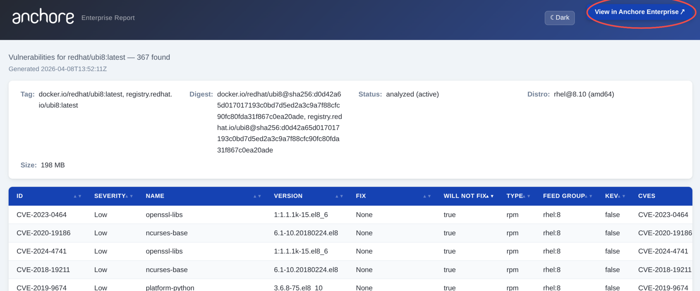
Link to the findings in the Anchore Enterprise GUI.