The EU Cyber Resilience Act (Regulation (EU) 2024/2847) places continuous obligations on any manufacturer of a “product with digital elements” sold on the EU market: document what is inside every release, place no release on the market with known exploitable vulnerabilities, and, from 11 September 2026, report actively exploited vulnerabilities to your CSIRT and ENISA within 24 hours.
This quickstart walks one product release through that lifecycle using Anchore Enterprise: model the product, bring its SBOMs into the system, continuously monitor the release against policy, and respond with evidence when an exploited vulnerability appears.
Before You Begin
You will need:
- Anchore Enterprise v6.2.0 or later and a matching AnchoreCTL, configured against your deployment. The policy status change notifications in Configure Notifications require v6.2.0.
- Fresh vulnerability data. In environments with connectivity to the Anchore Data Service, feeds stay up to date automatically; an administrator can force a sync with
anchorectl feed sync. For air-gapped environments, see Air-Gapped Operation.
Every workflow in this guide can be driven from the Anchore Enterprise GUI. The steps below use AnchoreCTL commands, with the GUI path called out where it is the natural fit.
iot-gateway, released as version 2.4.0, built from a container image and a supplier-delivered SBOM. Substitute your own product name, image references, and SBOM files.Model Your Product
The CRA’s unit of compliance is the product placed on the market. In Anchore Enterprise that is an App; each release you ship is a Version, and everything inside a release (container images, filesystem scans, imported SBOMs) are its Assets.
anchorectl app add iot-gateway \
  --contact-name "Product Security Officer" --contact-email [email protected] \
  --description "Industrial IoT gateway - product with digital elements"

anchorectl app version add 2.4.0 --app iot-gateway --status released --release-date 2026-06-15
The version status field (in_progress, released, eol) mirrors the CRA product lifecycle; you will use it again when the release eventually leaves support.
Generate and Store the Release SBOMs
The CRA (Annex I, Part II (1)) requires a machine-readable SBOM covering at least the product’s top-level dependencies. A real product is rarely a single artifact, so add assets from different sources into the same version:
# A container image that Anchore Enterprise pulls and analyzes (centralized analysis)
anchorectl app version asset add container-image-remote registry.example.com/iot-gateway/web-console:2.4.0 \
  --app iot-gateway --version 2.4.0 --asset web-console --wait

# A third-party supplier component, imported exactly as the supplier delivered it
anchorectl app version asset add sbom telemetry-module-1.8.0.cdx.json \
  --app iot-gateway --version 2.4.0 --asset telemetry-module -t module --wait
You can also scan a local directory tree, such as a build output, an unpacked firmware image, or a mounted VM disk, as a filesystem asset; see also the Create SBOMs from Virtual Machines quickstart.
In the GUI, open Applications > iot-gateway > 2.4.0: the Contents tab shows one deduplicated package view across all assets, including licenses and which asset contains each package.
Make the SBOM Available to Authorities
Two CRA annexes turn the stored SBOM into a document you must be able to produce on demand. Annex II (9) requires the information you give users to state where the SBOM can be accessed, if you choose to make it available to them. Annex VII includes the SBOM in the product’s technical documentation, which market-surveillance authorities can request at any point while the product is on the market.
In the GUI, use the version’s Download menu to export the unified SBOM as CycloneDX 1.6 or SPDX 2.3: a single machine-readable document covering every asset in the release. With AnchoreCTL:
# CycloneDX 1.6
anchorectl app version export sbom-cyclonedx-1 2.4.0 --app iot-gateway -f iot-gateway-2.4.0.cdx.json

# SPDX 2.3
anchorectl app version export sbom-spdx-2 2.4.0 --app iot-gateway -f iot-gateway-2.4.0.spdx.json
The document is produced from the stored SBOMs at the moment you request it, so the same release yields the same component inventory whether the request arrives at launch or years into the support period.
Monitor the Release Against Policy
Annex I Part I (2)(a) requires that products are made available “without known exploitable vulnerabilities”. Policies express that requirement as enforceable rules, and they work in two ways: as a release gate at ship time, and as the ongoing monitoring mechanism once the release is on the market. The bundled default policy already stops on CISA KEV-listed findings and critical severities.
For a dedicated CRA baseline, use the Anchore-provided EU CRA policy. It contains matching rule sets for both artifact types, container images and SBOM assets, each of which returns STOP when a finding is listed on the CISA KEV catalog, directly expressing the “no known exploitable vulnerabilities” requirement. Consider adding a rule that returns STOP when a finding’s EPSS score is at or above a threshold you choose (0.75 is a common starting point); stricter rules can be layered on from there.
Associate the policy with the product (its ID is visible in anchorectl policy list) so every version is evaluated against it:
anchorectl app update iot-gateway --policy-id <eu-cra-policy-id>
Evaluate the release; in CI, the exit code is the gate:
anchorectl app version policy status get 2.4.0 --app iot-gateway --fail-based-on-results
Changing the app’s policy makes any existing evaluation stale, and a fresh evaluation runs as an asynchronous job in the background. Until that job completes, typically within a minute, the status command returns an error stating the policy evaluation is stale or missing; retry once the evaluation has completed.
If the policy evaluation returns a fail result, inspect the findings that drove it:
anchorectl app version policy findings list 2.4.0 --app iot-gateway
or use the version’s Compliance tab in the GUI, where findings can be sorted and filtered by policy rule. For pipeline integration patterns, see the CI quickstart.
A passing evaluation is not the end of the job; this is where policy becomes the monitoring mechanism. Anchore Enterprise re-evaluates stored SBOMs for vulnerabilities and policy compliance on every vulnerability database update, so a shipped release that starts violating the policy surfaces immediately, with no operator or user intervention needed. The next section wires that signal to your team.
Configure Notifications
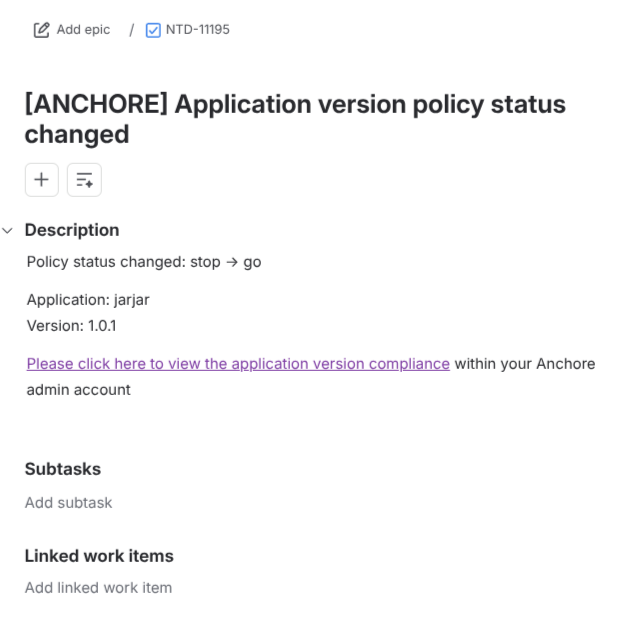
Responding “without delay”, as Annex I Part II requires, starts with the team hearing about a compliance change the moment it happens rather than at the next manual review. After each policy evaluation in which an application version’s overall status changes, Anchore Enterprise emits a policy_status_changed event. The resulting notification reads Policy status changed: <previous> -> <current> with the application and version names, and links straight to that version’s Compliance tab in the GUI.
To route the event to Jira as a new issue per status change (email, Slack, Microsoft Teams, GitHub, and plain webhooks follow the same pattern):
In the Anchore Enterprise GUI, navigate to System > Notifications and choose Jira.
Click Add New Configuration and provide the Jira details: a Description, the Jira URL, the Username of the account creating issues, its Password (an API token for Jira Cloud), the Issue Type to create, such as
Task, and the Project Key. Optional Labels help the issues stand out on the board: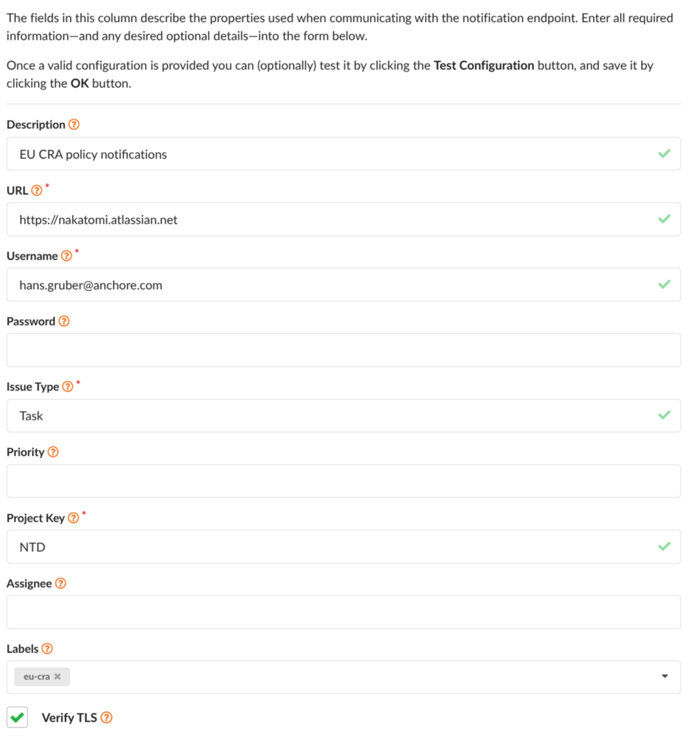
Choose Add Custom Selector and set Event Scope to
account, Event Type touser.application_version.policy_status_changed, Resource to Filter toapplication_version, and Event Level toinfo. The event-type browser beneath the selector lists every available event; expanding User > Application Version > Policy Status Changed fills the type in for you: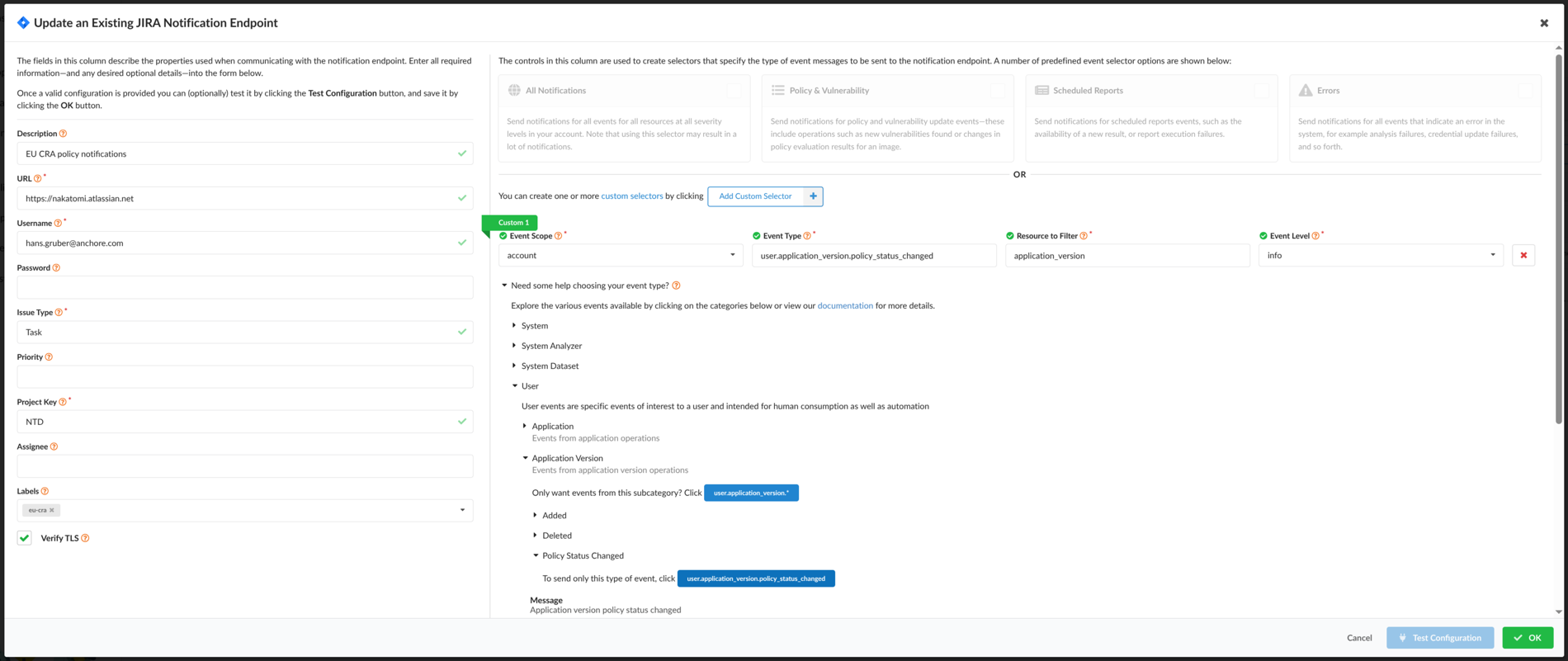
Click Test Configuration to confirm an issue is created in the project, then OK to save.
ui_url configured on the notifications service. See Notifications for details.From here on, a shipped release that stops passing the policy raises a Jira issue that names the application and version, states the previous and new status, and links to the version’s Compliance tab:
Versions marked eol never emit this event; see Ship the Fix and Maintain the Support Period. For endpoint-specific requirements and the full selector reference, see Notifications.
Respond to an Exploited Vulnerability
The detection mechanism is the policy itself: when a vulnerability database update brings a new finding, such as a CVE newly listed on the CISA KEV catalog, a shipped release that was passing starts failing its policy evaluation, and the event notifications configured in the previous section carry that signal to your team.
From 11 September 2026, an actively exploited vulnerability in a product on the EU market starts Article 14’s clock: a 24-hour early warning, a 72-hour notification, and a 14-day final report. The first thing every one of those needs is scope: which products and releases are affected?
Find the blast radius. Start from the failing evaluations: the events and notifications name each App Version that has started failing, the Applications view in the GUI shows compliance status per version, and each version’s Compliance tab identifies the finding responsible.
There is also a search capability. Press Ctrl/Cmd+K anywhere in the GUI and enter a vulnerability ID (for example CVE-2022-22965): the quick vulnerability search returns every App Version containing an affected package, across your whole portfolio, in seconds.
Record the assessment as VEX. Document your engineering analysis as vulnerability annotations using the standard VEX status and justification vocabulary. In the GUI, open the finding in the version’s Vulnerabilities tab and record an annotation: a status of Affected, Not Affected, Fixed, or Under Investigation, a justification where applicable, and your impact or action statement. The same annotation can be recorded with AnchoreCTL; the values below are illustrative:
anchorectl app version vex add 2.4.0 --app iot-gateway \
  --vuln-id CVE-2022-22965 --pkg-name spring-beans --pkg-type java-archive --pkg-version 5.3.17 \
  --status affected \
  --action-statement "Security update 2.4.1 ships the supplier's fixed component; free of charge per Annex I Part II (8)."
Annotations apply to a specific vulnerability-and-package pair and flow through to listings, summaries, and exports.
Export the evidence. Produce a CycloneDX Vulnerability Disclosure Report (VDR) that carries the product identity, components, findings, and your VEX analysis in one document. In the GUI, use the version’s Download menu and choose the VDR export; or with AnchoreCTL:
anchorectl app version export vdr 2.4.0 --app iot-gateway -f iot-gateway-2.4.0-vdr.cdx.json
Submit the report. Article 14 notifications are made through the ENISA Single Reporting Platform (SRP), the single entry point that opens on 11 September 2026. Manufacturers register with an EU Login account, the designated national CSIRT validates your representatives on first access, and one electronic submission reaches your coordinator CSIRT and ENISA simultaneously. Submit the early warning within 24 hours of awareness and the notification within 72 hours; the VDR you exported above provides the supporting technical detail at each stage.
Ship the Fix and Maintain the Support Period
Annex I Part II requires security updates to be distributed without delay, and Article 13 (8) obliges you to keep handling vulnerabilities for the product’s support period (at least five years). Model the security update as a new linked version containing the fixed components:
anchorectl app version add 2.4.1 --app iot-gateway --previous-version 2.4.0 --status in_progress

anchorectl app version asset add container-image-remote registry.example.com/iot-gateway/web-console:2.4.1 \
  --app iot-gateway --version 2.4.1 --asset web-console --wait

anchorectl app version asset add sbom telemetry-module-1.9.0.cdx.json \
  --app iot-gateway --version 2.4.1 --asset telemetry-module -t module --wait

anchorectl app version policy status get 2.4.1 --app iot-gateway
With the affected components updated, the finding clears and the gate passes. For the public advisory obligation (Annex I Part II (4)), export the VEX document for the affected release:
anchorectl app version export vex 2.4.0 --app iot-gateway -f iot-gateway-2.4.0-vex.cdx.json
Both versions now stay registered for as long as they exist: every vulnerability database update triggers a fresh policy evaluation of each one, and if that evaluation changes a version’s policy status, the notification configured earlier fires again; a shipped release that starts failing months from now raises a Jira issue exactly as it did today. This is the support-period obligation running at zero marginal effort, and the continuous policy evaluation constitutes the regular testing and review Annex I Part II (3) expects. When point-in-time evidence of a review is needed, export the version’s compliance findings as a CSV report (see Evaluate Policy Against an App Version). When a release finally leaves support:
anchorectl app version update 2.4.0 --app iot-gateway --status eol
eol do not trigger notifications. Set the status only once the release has left its support period and you no longer need its vulnerability signals.Summary
For one product release you now have a machine-readable SBOM, an exploitability-based release gate, a documented VEX assessment, a regulator-ready VDR, and ongoing security updates driven by continuous monitoring. That is the working skeleton of a CRA vulnerability-handling process.
The reference map below shows how each CRA obligation maps to the Anchore Enterprise capability used in this guide.
| CRA reference | Obligation | Anchore Enterprise capability |
|---|---|---|
| Annex I Part II (1) | Machine-readable SBOM per release, top-level dependencies minimum | Aggregated App Version SBOM; generation and supplier-SBOM import; CycloneDX 1.6 export |
| Annex II (9), Annex VII | SBOM available to authorities; technical documentation | On-demand SBOM/VDR/VEX and CSV exports per release |
| Annex I Part I (2)(a) | No known exploitable vulnerabilities at release | KEV and EPSS policy gates enforced in CI |
| Annex I Part I (2)(b) | Secure by default configuration | Advanced policy gating capabilities |
| Art. 13 (5) | Due diligence on third-party components | Supplier SBOM import with quality insights; license gates |
| Art. 14 | 24 h / 72 h / 14 d reporting of exploited vulnerabilities | Continuous re-evaluation, policy status change notifications, quick vulnerability search, VDR export supporting SRP submission |
| Annex I Part II (2), (8) | Remediate and ship security updates without delay | Fix availability and risk-blended prioritization information |
| Annex I Part II (4)–(6) | Disclose fixed vulnerabilities; coordinated disclosure | VEX annotations with standard justifications; VEX export |
| Annex I Part II (3) | Regular tests and reviews | Automatic re-evaluation on every DB update |
| Art. 13 (8) | Support period of at least five years | Released versions monitored continuously; eol status closes the window |