Download a Single Asset SBOM in the Anchore Enterprise GUI
Anchore Enterprise allows users to generate a single Asset SBOM representing a generated SBOM for a container image or a filesystem analysis, or an imported external SBOM. Navigate to the App Version Summary tab, and click on the action menu for the desired asset. Then select the Download SBOM option.
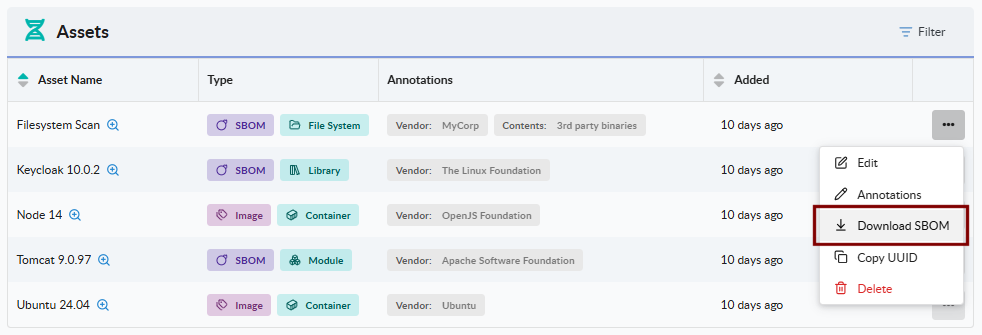
This operation is synchronous and does not use jobs. The downloaded SBOM document will show up in your downloads folder per your browser configuration.
Export a Single Asset SBOM with AnchoreCTL
Retrieve the stored SBOM for a single asset. The asset argument accepts either its name or UUID. Use --file to write the SBOM to disk, or omit it to write to stdout:
anchorectl app version asset sbom get api-image \
  --app my-service \
  --version 1.4.0 \
  --file api-image.sbom.json
Generate a Unified App Version SBOM in the Anchore Enterprise GUI
Anchore Enterprise supports the generation of a single unified SBOM document in an industry standard format for the entire app version. The system aggregates and deduplicates all of the packages across every asset attached to the version and saves the result in an SBOM document in the user-selected format (SPDX v2.3 or CycloneDX v1.6).
The app version’s detail page has a Download button in the top-right of the screen which allows the user to select the desired document and format.

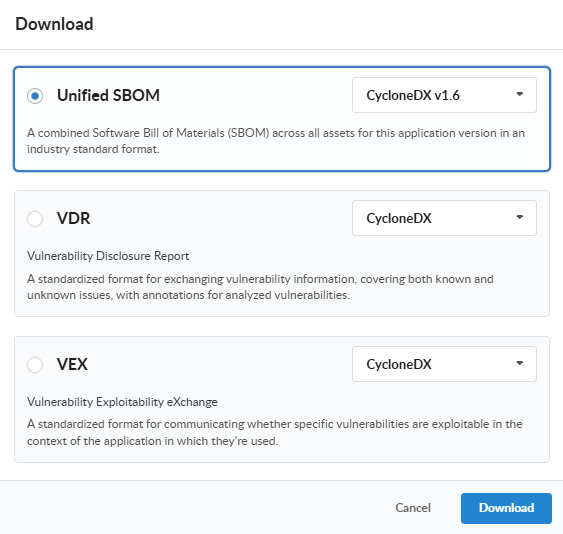
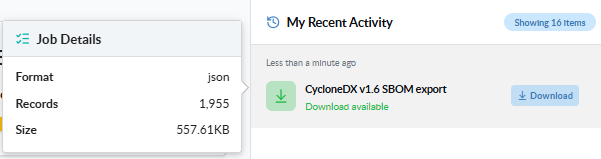
Once the desired options are selected, the GUI submits the download job and shows its progress on the version’s recent activity panel. Once the job completes, click the row in the recent activity panel to download the generated document.
Generate a Unified App Version SBOM with AnchoreCTL
AnchoreCTL hides the job lifecycle behind a single command: it submits the export, waits for the job to reach a terminal state, and streams the exported SBOM to stdout or a file.
Export the combined CycloneDX 1.x SBOM for an app version. The version name or UUID is the positional argument, and the parent app is identified with --app:
anchorectl app version export sbom-cyclonedx-1 1.4.0 --app my-service
By default the exported SBOM is written to stdout. To capture it to a file, pass --file:
anchorectl app version export sbom-cyclonedx-1 1.4.0 \
  --app my-service \
  --file my-service-1.4.0.cdx.json
SPDX 2.x exports use the same flags with the verb swapped:
anchorectl app version export sbom-spdx-2 1.4.0 \
  --app my-service \
  --file my-service-1.4.0.spdx.json
Generate a Unified App Version SBOM with the API
Unified App Version SBOM exports run as asynchronous jobs. AnchoreCTL hides this behind a single command, but the API exposes each step so you can integrate exports into a pipeline that needs finer control.
Submit the Export Job
Submit an export by POSTing to the format-specific job endpoint with the app version ID in the request body. The accepted endpoints are:
| Format | Endpoint |
|---|---|
| CycloneDX 1.x | POST /apps/{app_id}/jobs/export-sbom-cyclonedx-1 |
| SPDX 2.x | POST /apps/{app_id}/jobs/export-sbom-spdx-2 |
The request body accepts optional format and spec_version fields:
| Endpoint | format (default) | spec_version (default) |
|---|---|---|
export-sbom-cyclonedx-1 | json | 1.6 |
export-sbom-spdx-2 | json | 2.3 |
For v6.0 each parameter accepts only the listed value; unsupported pairings are rejected with HTTP 422. The endpoint names leave room for additional CycloneDX 1.x or SPDX 2.x point versions in later releases.
The response carries a job_id.
Poll the Job
GET /apps/{app_id}/jobs/export-sbom-cyclonedx-1/{job_id} (or the SPDX equivalent) returns the current job record. Wait for status to reach a terminal state (complete, failed, or cancelled). When the job is complete, the response carries a completion_detail block whose download_id is the handle for the next step. The job lifecycle is documented in How It Works.
Download the Exported SBOM
Once the job is complete, retrieve the exported SBOM by GETing the download endpoint:
GET /apps/{app_id}/downloads/{download_id}
The endpoint returns:
200withapplication/octet-stream— the file is ready and is streamed in the response body202while the export job is still processing — useful if you choose to poll the download endpoint directly instead of polling the job404if thedownload_iddoes not exist or is no longer available
The full endpoint inventory, request and response schemas, and error codes are in the API browser; search for the App Jobs and App Downloads tags.
A few conventions worth knowing as you call these endpoints:
- Cross-account requests are scoped via the
x-anchore-accountheader or, from AnchoreCTL, theANCHORECTL_ACCOUNTenvironment variable. See Account Scoping for the full mechanism. - The download endpoint is reusable for any export job type, not just SBOM exports — the same handle pattern serves vulnerability, VEX, VDR, package, and policy-compliance exports.