A vulnerability annotation records how a specific (vulnerability, package version) pair affects an app version or an individual container image. Each annotation captures a VEX (Vulnerability Exploitability eXchange) status — whether the package is affected, not affected, fixed, or under investigation — along with the justification, supporting notes, and the actions you intend to take.
Annotations serve three purposes:
- Internal triage. A
not_affectedorfixedannotation removes the finding from the Vulnerabilities view so triage attention stays on the unresolved work. Findings without annotations remain visible; filters can always be adjusted to bring annotated findings back into view. - Policy enforcement. Policy rules can act on annotation state directly: the
vulnerabilitiesgate can fail a version for findings still assessed asaffected, or for findings nobody has assessed yet. See Policy Gating by Annotation Status. - Downstream evidence. Every annotation becomes part of the unified VEX document generated for an app version. Downstream consumers — customers, certifying bodies, deployment gates — see your analysis state directly rather than having to ask.
Annotations in Anchore Enterprise v6 are anchored at the app version and govern findings across every asset attached to that version. A single annotation against (vulnerability, package version) therefore applies whether the affected package was discovered in a container image asset, a filesystem asset, or an externally supplied SBOM asset — you annotate once at the release level rather than once per asset.
The app-version anchor reflects how VEX works in practice: a VEX statement is a release-level claim about how a product is built and used, not a claim about one specific container image. Anchoring the annotation at the version surfaces it consistently across every asset that makes up the release. For the underlying scan surfaces this annotation governs, see Two Evaluation Scopes.
VEX Status
Every annotation carries one of four statuses:
| Status | Meaning |
|---|---|
not_affected | The product contains the vulnerable code, but the vulnerability cannot be exploited for various reasons. Additional information should be provided for a detailed explanation. |
affected | The vulnerable package is included in the product and the vulnerability can be exploited. Remediation is typically required. |
fixed | The product previously contained the vulnerability, but a patch or remediation has been applied to fix it. |
under_investigation | The software supplier is still reviewing their product to determine if it is vulnerable. |
Annotations with status not_affected and fixed are hidden from the default Vulnerabilities view at the app-version level as well as the individual image vulnerability view so that triage attention stays on the unresolved findings. Use the VEX Status filter on the Vulnerabilities tab to bring them back into view.
Justification
When status is not_affected, supply a justification that names the reason the vulnerability does not impact the product:
| Justification | Meaning |
|---|---|
component_not_present | The vulnerable component is not included in the product. |
vulnerable_code_not_present | The vulnerable component is included, but the vulnerable code is not — usually because of how the component was built or configured. |
vulnerable_code_not_in_execute_path | The vulnerable code is present but is never executed by the product. |
vulnerable_code_cannot_be_controlled_by_adversary | The vulnerable code runs but cannot be reached or influenced by an attacker. |
inline_mitigations_already_exist | The product includes built-in protections that prevent exploitation and cannot be disabled by the attacker. |
fix_not_planned | The vulnerability impacts the product but no fix is planned. Anchore-specific extension to the CISA VEX values; available via the API. |
The first five justifications are CISA’s minimum requirements for a VEX statement and have direct equivalents in OpenVEX and CycloneDX. fix_not_planned is an Anchore extension and is omitted from CycloneDX exports because it has no CycloneDX justification equivalent.
Supporting Fields
Beyond status and justification, every annotation can carry the following free-text fields. Each is optional except where the VEX format requires it:
- Status notes — additional context about why this status was chosen.
- Impact statement — required for
affectedwhen no justification is supplied; describes how the vulnerability impacts the product. - Action statement — for
affectedannotations: what steps will be taken to remediate the finding. - Additional details — any other context that should travel with the annotation.
Anchore Enterprise stamps created_at and updated_at timestamps automatically; the two timestamps correspond to “Analysis First Issued” and “Analysis Last Updated” in the exported VEX document.
Roles and Permissions
Creating, editing, and deleting annotations is restricted by RBAC. The built-in role vuln-annotator-editor carries the relevant permissions:
createVulnAnnotationgetVulnAnnotationlistVulnAnnotationsupdateVulnAnnotationdeleteVulnAnnotation
Any role that grants listImages (such as read-only) can view annotation data and generate VEX exports — see Evidence for the export surfaces.
For details on assigning roles, see Authentication and User Management.
Manage Annotations in the Anchore Enterprise GUI
The Vulnerabilities tab on an app version detail page is the primary interface for annotation work. Each row is one (vulnerability, package) finding, and the Annotated column shows the current VEX status.
Record an Annotation
Open the app version’s Vulnerabilities tab and click the finding you want to annotate to open its detail panel. To set the status alone, use the inline VEX Status dropdown in the panel (None, Not Affected, Affected, Fixed, or Under Investigation). For a full annotation, click Add VEX Annotation (it reads Edit VEX Annotation once an annotation exists) to open the Vulnerability Exploit Statement editor, where you set the Status, a Justification when the status is Not Affected, and any of the optional supporting fields: Status Notes, Impact Statement, Action Statement, and Additional Details. Save stays disabled until a status other than None is selected; click Save to record the annotation.
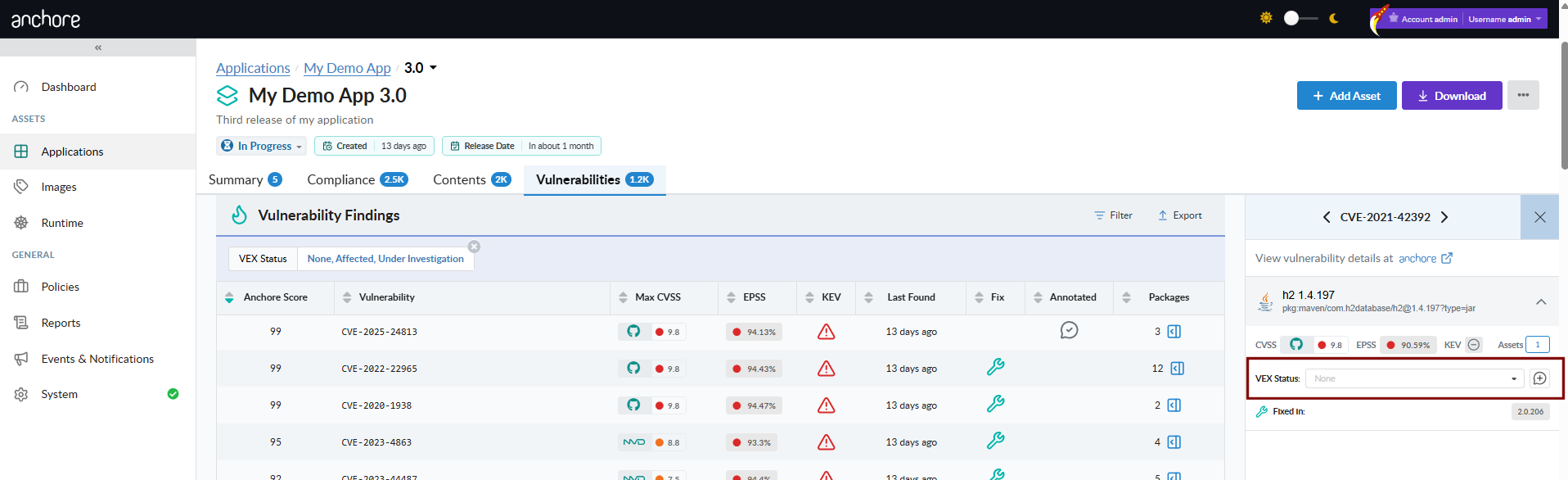
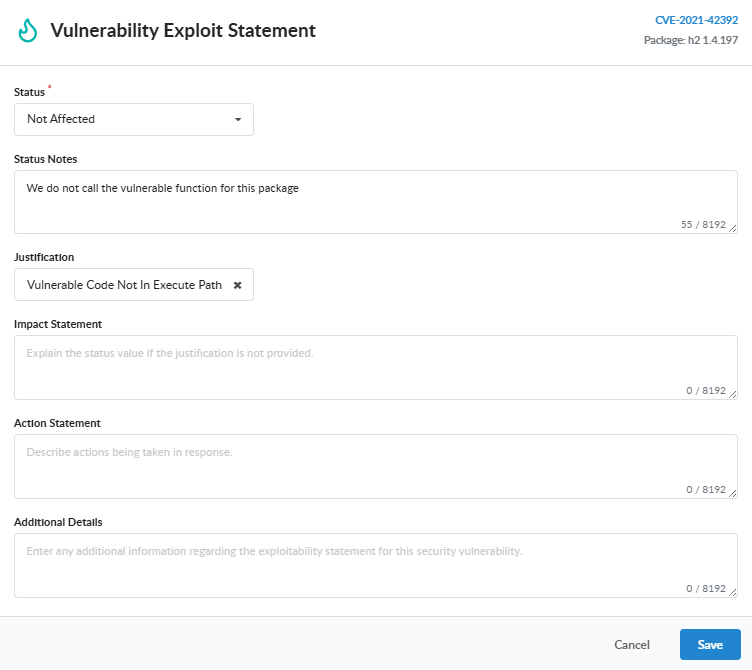
Once saved, the Annotated column reflects the status across every related finding.
Delete an Annotation
To remove an annotation, open the Edit VEX Annotation editor for an annotated finding and set Status back to None.
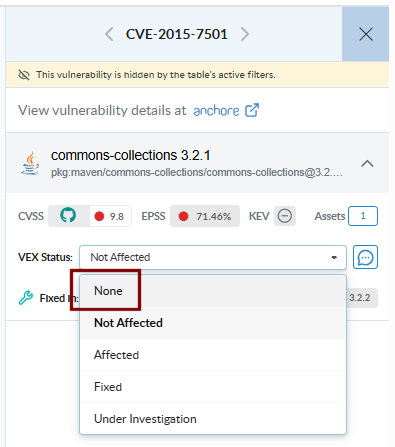
A warning confirms that the annotation will be removed and the Save button changes to Delete. Click Delete to clear the annotation.
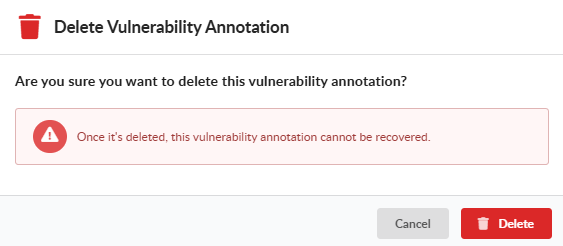
Filter Annotated Findings
By default the Vulnerabilities tab shows unannotated findings plus those marked Affected or Under Investigation, so unresolved work stays at the top; findings marked Not Affected or Fixed are hidden. Use the VEX Status filter to add Not Affected or Fixed back into view, which is useful when reviewing the triage backlog or preparing a VEX document for export.

Manage Annotations with AnchoreCTL
Annotation management is exposed under anchorectl app version vex. Every command requires the parent app via --app.
Add an Annotation
The package identity (--pkg-name, --pkg-type, --pkg-version) plus --vuln-id together uniquely identify the (vulnerability, package) pair the annotation applies to:
anchorectl app version vex add 1.4.0 \
  --app my-service \
  --vuln-id CVE-2024-3094 \
  --pkg-name xz-utils \
  --pkg-type deb \
  --pkg-version 5.6.0-0.2 \
  --status not_affected \
  --justification vulnerable_code_not_in_execute_path \
  --status-notes "xz-utils is bundled but the affected SSH path is not used by this service."
A second annotation for the same (vuln_id, package_name, package_version, package_type) tuple is rejected with a 409 conflict — update the existing annotation instead.
List Annotations for an App Version
anchorectl app version vex list 1.4.0 --app my-service
The default table output covers status, justification, package identity, and the annotation UUID. Use -o json for the full per-annotation record including all supporting fields.
Update an Annotation
Annotations are updated by UUID (the id returned at creation, or the id field from list):
anchorectl app version vex update 943629bb-83ab-0f2c-3326-f0c011ab16cf \
  --app my-service \
  --version 1.4.0 \
  --status fixed \
  --status-notes "Upgraded to xz-utils 5.6.2-1 in the 1.4.0 release."
Only the fields supplied on the command line are changed; omitted fields keep their existing values.
Delete an Annotation
anchorectl app version vex delete 943629bb-83ab-0f2c-3326-f0c011ab16cf \
  --app my-service \
  --version 1.4.0
Deleting an annotation does not affect the underlying vulnerability finding — the finding reappears in the default Vulnerabilities view because nothing is filtering it out anymore.
Export VEX for an App Version
anchorectl app version export vex produces a CycloneDX VEX document for the app version. The export runs as a server-side job; AnchoreCTL waits for completion and writes the result to a file or stdout:
anchorectl app version export vex 1.4.0 \
  --app my-service \
  --format cyclonedx-json \
  --file my-service-1.4.0-vex.json
Manage Annotations with the API
Annotation endpoints live under /apps/{app_id}/versions/{version_id}/vulnerability-annotations. The full request and response schemas are in the API browser; search for the App Version Vulnerability Annotations tag.
Key endpoints:
| Method | Path | Purpose |
|---|---|---|
POST | /apps/{app_id}/versions/{version_id}/vulnerability-annotations | Create an annotation for a (vulnerability, package) pair |
GET | /apps/{app_id}/versions/{version_id}/vulnerability-annotations | List annotations for the version |
GET | /apps/{app_id}/versions/{version_id}/vulnerability-annotations/{vulnerability_annotation_id} | Retrieve a single annotation by UUID |
PATCH | /apps/{app_id}/versions/{version_id}/vulnerability-annotations/{vulnerability_annotation_id} | Update fields on an existing annotation |
DELETE | /apps/{app_id}/versions/{version_id}/vulnerability-annotations/{vulnerability_annotation_id} | Remove an annotation |
A few conventions worth knowing as you call these endpoints:
- The uniqueness constraint is
(account, app, version, vulnerability_id, package_name, package_version, package_type). Creating a second annotation for the same tuple returns 409. PATCHaccepts a partial body; omitted fields are left untouched. Explicitnullis rejected for thestatusfield — drop the key to leave the status unchanged.- VEX exports are produced by the App Jobs export endpoints rather than the annotation endpoints directly — see Evidence.
- Cross-version annotation searches — finding every vulnerability annotated as
not_affectedacross an account, for example — are not yet exposed through a programmatic surface. App-version search and reporting is on the roadmap; see Search for the current state and the per-version data sources available in the meantime.
Policy Gating by Annotation Status
The package trigger on the vulnerabilities compliance gate exposes two parameters that act on annotation state, on both image and SBOM (app-version) rule sets:
missing_annotation— whentrue, the rule matches only vulnerabilities that have no annotation yet, surfacing findings that still need review.annotation_status— a comma-separated list of VEX statuses; the rule matches only vulnerabilities whose status is in the list.
At the app-version scope, the status consulted is the version’s annotation for the finding’s (vulnerability, package version) pair, so an annotation recorded once covers the finding wherever it appears across the version’s assets. Saving or updating an annotation triggers a fresh policy evaluation immediately; the compliance result reflects the new assessment without waiting for the next scheduled evaluation.
Two common patterns, expressed as rules in a rule set:
Warn while critical vulnerabilities remain un-triaged, so annotation discipline is visible in the verdict:
{
  "action": "WARN",
  "gate": "vulnerabilities",
  "trigger": "package",
  "params": [
    { "name": "package_type", "value": "all" },
    { "name": "severity_comparison", "value": ">=" },
    { "name": "severity", "value": "critical" },
    { "name": "missing_annotation", "value": "true" }
  ]
}
Fail while any finding is assessed as exploitable. Findings annotated not_affected or fixed simply do not match, so an accurate VEX assessment directly changes the verdict:
{
  "action": "STOP",
  "gate": "vulnerabilities",
  "trigger": "package",
  "params": [
    { "name": "package_type", "value": "all" },
    { "name": "annotation_status", "value": "affected" }
  ]
}
For full parameter definitions, see Vulnerabilities Gate. Every vulnerability policy finding shows its VEX status, and the app version’s Compliance tab can filter findings by annotation state; see Evaluate Policy Against an App Version.