Vulnerability management is the practice of identifying, categorizing, and remediating security vulnerabilities in software. Anchore Enterprise automates this by matching the contents of an SBOM against curated, Anchore-enriched vulnerability intelligence.
Internally, vulnerability data moves through a pipeline before it ever reaches your results:
- Collect data from dozens of upstream sources — see Vulnerability Data Sources
- Import and normalize it into one consistent format — see Import and Normalize Data
- Enrich it with human review to correct known NVD gaps — see Enrich Vulnerability Data
- Match SBOM packages against the database, tuned per ecosystem to cut false positives — see Vulnerability Matching Process
Windows container images are supported too, matched against MSRC data — see Scan Windows Images.
Specific topics related to the vulnerability management framework can be referenced per the links below:
Two Evaluation Scopes
Anchore Enterprise evaluates vulnerabilities in two distinct scopes — pick the one that matches how your team organizes software. Both scopes draw from the same vulnerability data, but they differ in what the matching runs against, how some matching behaviors are tuned, and how findings are aggregated. See What’s Shared and What Differs Between Scopes for the scope-specific matching behaviors.
| Scope | What is evaluated | Where you read results |
|---|---|---|
| App-version-scoped | Every asset attached to an app version, aggregated and deduplicated | The version’s detail page in the GUI; AnchoreCTL: anchorectl app version vuln list; or API GET /apps/{id}/versions/{vid}/vulnerabilities |
| Image-scoped | A single analyzed container image, identified by digest | The image’s detail page in the GUI; AnchoreCTL: anchorectl image vulnerabilities; or API: GET /images/{digest}/vuln/{type} |
The image-scoped surface is the long-standing path and remains fully supported. The app-version-scoped surface is the v6-native path for teams that have adopted the apps, versions, and assets model; it adds deduplicated aggregation across multiple assets in a release and surfaces the Anchore Score as a vulnerability prioritization index.
See Scans for the walkthroughs of each scope.
Vulnerability Data Sources
Vulnerability matching in Anchore Enterprise begins with collecting vulnerability data from multiple sources to identify vulnerabilities in the packages cataloged within an SBOM.
Anchore Enterprise consolidates data from these sources into a format suitable for vulnerability identification in SBOMs. One key source of data is the National Vulnerability Database (NVD). The NVD serves as a widely recognized, vendor-independent resource for vulnerability identification. Additionally, it provides a framework for measuring the severity of vulnerabilities. For instance, the NVD uses the Common Vulnerability Scoring System (CVSS), which assigns numerical scores ranging from 0 to 10 to indicate the severity of vulnerabilities. These scores help organizations prioritize vulnerabilities based on their potential impact.
For more information on CVSS scoring, see the NVD CVSS documentation.
However, due to known limitations with NVD data, relying on additional vulnerability data sources becomes essential. Anchore Enterprise also presents vulnerability data from vendor-specific databases, which play a crucial role in accurate and efficient detection. These sources enable vulnerability matching from the vendor’s perspective. Examples of such vendor-specific databases include GitHub, the Microsoft Security Response Center (MSRC), and the Red Hat Security Response Database, among many others.
Import and Normalize Data
Anchore’s collection framework reaches out to various data sources, parsing and normalizing that data, then storing it for future use.
There is not one standard format for publishing vulnerability data, and even when there is a standardized data format, such as OVAL or OSV, those formats often have minor incompatible differences in their implementation. The collection framework interprets each data source and outputs a single consistent format that can be used to construct a vulnerability database.
Providers
The process begins with Anchore’s collection framework reaching out to vulnerability data sources. These sources are known as “providers”. The following is a list of providers:
- AlmaLinux: Provides vulnerability data for AlmaLinux, including AlmaLinux-specific remediations that can differ from Red Hat Enterprise Linux.
- Alpine: Focuses on lightweight Linux distributions and provides vulnerability data tailored specifically to Alpine packages.
- Amazon: Offers vulnerability data for its cloud services and Linux distributions, such as Amazon Linux.
- Arch Linux / SecureOS: Provides vulnerability data for both Arch Linux and SecureOS.
- Bitnami: Provides vulnerability data for applications packaged in the Bitnami catalog, sourced from the Bitnami vulnerability database.
- Chainguard: Specializes in securing software supply chains and delivers vulnerability insights for containerized environments, including Chainguard libraries.
- Debian: Maintains a robust security tracker for vulnerabilities in its packages, concentrating on open-source software used in Debian-based systems.
- Echo: Provides vulnerability data for Echo container images from the Echo advisory database.
- Fedora: Provides vulnerability data including EPEL packages sourced from the Bodhi update system.
- GitHub: Provides vulnerability data supported by an extensive advisory database for developers covering numerous language ecosystems.
- Mariner (CBL-Mariner): Provides vulnerability data for Microsoft’s CBL-Mariner Linux distribution.
- MinimOS: Provides vulnerability data for MinimOS minimal container base images.
- NVD (National Vulnerability Database): Serves as the official U.S. government repository of vulnerability information.
- Oracle: Tracks vulnerabilities in Oracle Linux and other Oracle products, focusing on enterprise environments.
- Red Hat Hummingbird: Provides vulnerability data for Red Hat’s Hummingbird lightweight container images, sourced from Red Hat CSAF VEX documents.
- RHEL (Red Hat Enterprise Linux): Delivers detailed and timely vulnerability data for Red Hat products, including EUS (Extended Update Support) data.
- SLES (SUSE Linux Enterprise Server): Offers vulnerability data for SUSE Linux products, with a strong focus on enterprise solutions, particularly in cloud and container environments.
- Ubuntu: Maintains a well-documented vulnerability tracker and provides regular security updates for its popular Linux distribution.
- VMware PhotonOS: Provides vulnerability data for PhotonOS.
- Wolfi: Provides vulnerability data for a community-driven, secure-by-default Linux distribution that emphasizes supply chain security.
Anchore’s collection framework reaches out to all of these providers, collects and consolidates vulnerability data for use. The result of these operations is the Grype database (GrypeDB).
Build GrypeDB
The data collected from Anchore’s collection framework is consolidated into GrypeDB, a vulnerability database used by Anchore Enterprise for matching vulnerabilities. The Anchore Enterprise database and the Grype database are not the same data. The hosted Anchore Enterprise database contains the consolidated GrypeDB as well as the Exclusion database and Microsoft MSRC vulnerability data. This additional information reserved for Anchore Enterprise both expands the set of known vulnerabilities as well as increases the accuracy of the vulnerability reporting.
Non-Anchore (upstream) Data Updates
When problems are identified in other data sources, Anchore contacts those upstream sources and works with them to correct issues. Anchore has an “upstream first” policy for data corrections — whenever possible, corrections are submitted to upstream data sources rather than applied only to Anchore’s data. This approach creates a better overall vulnerability data ecosystem and fosters beneficial collaboration with upstream projects.
Examples of upstream data contributions can be seen in the GitHub Advisory Database pull requests.
Enrich Vulnerability Data
Due to the known issues with the NVD, Anchore Enterprise enhances the quality of its data for analysis by enriching the information obtained from the NVD. This process involves human intervention to review and correct the data. Once this manual process is completed, the cleaned and refined data is stored in the Anchore Enrichment Database.
Before this process was implemented, correcting NVD data was a challenge. The enrichment process provides the flexibility to make changes to affected products and versions, and ensures that the data used by Anchore Enterprise is highly reliable — accurate and free from the common issues associated with NVD data.
Vulnerability Matching Process
Matching is the process of comparing SBOM data against the vulnerability data in Anchore Enterprise. Any vulnerability data surfaced in Anchore Enterprise is the result of a vulnerability match.
CPE Matching
CPE, which stands for Common Platform Enumeration, is a structured naming scheme standardized by the National Institute of Standards and Technology (NIST) to describe software, hardware, and firmware. It uses a standardized format that helps tools and systems compare and identify products efficiently.
CPE matching involves comparing the CPEs found in the SBOM of a software product against a list of known CPE entries to find a match. The diagram below illustrates the steps involved in CPE matching.
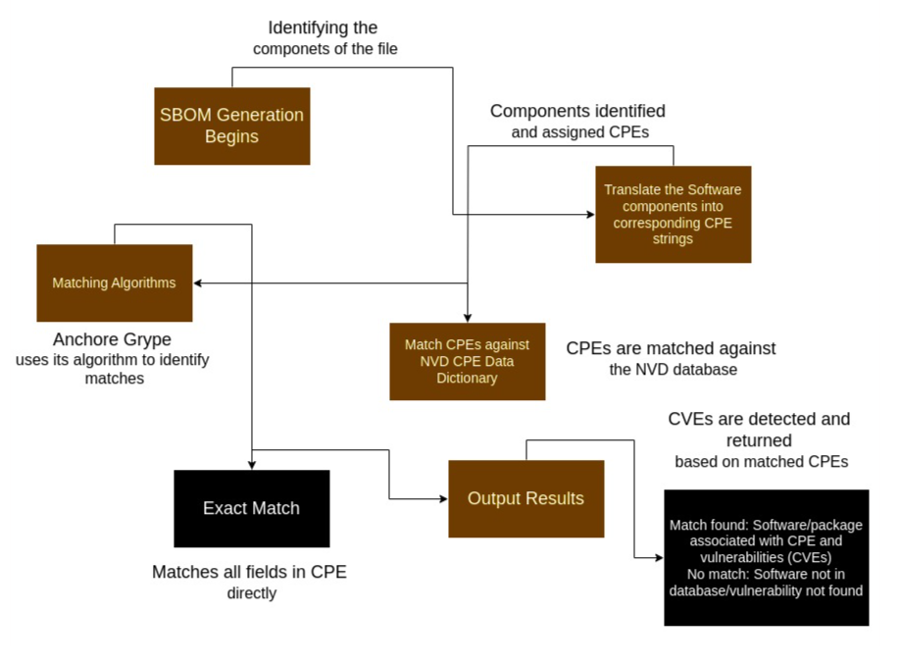
Due to the current state of the NVD data as mentioned above, CPE matching can sometimes lead to false positives. This led to the creation of the exclusions dataset managed within Anchore Enterprise. CPE matching is disabled by default for all GitHub-covered ecosystems to reduce false positives. Vulnerability matching can be further tuned by enabling or disabling CPE matching per ecosystem via the API, Anchore Enterprise GUI, or configuration file. See Vulnerability Matching Configuration for details.
The per-ecosystem CPE matching configuration applies to both image-scoped and app-version-scoped (asset) scans, since both run through the same matching engine.
Synthetic CPE Fallback for Packages Without an Ecosystem PURL
When a package is detected without a Package URL (PURL) that carries ecosystem information — for example, a binary surfaced by Syft that does not map to a known package manager — Anchore Enterprise generates a synthetic pkg:generic/{name}@{version} PURL and runs the matcher with --add-cpes-if-none. The matcher then synthesizes CPEs from the package’s name and version, and those CPEs participate in CPE-based matching against NVD.
This fallback ensures that packages without an ecosystem-specific PURL still receive vulnerability coverage, even when CPE matching is disabled by default for the ecosystems already covered through GHSA. The fallback applies regardless of the per-ecosystem by_cpe configuration — it operates one level below it, against packages that have no ecosystem to configure.
The synthetic-CPE fallback applies only to app-version-scoped (asset) scans; it has no effect on image-scoped scans.
Symbol-Aware Go Matching
A Go binary embeds both its module list and, in its symbol table, the function symbols actually compiled into the executable. During analysis, the embedded Syft records those symbols for the Go standard library and, by default, every module under golang.org/x/. Matching then uses them: advisories from the Go vulnerability database (GoVulnDB) record which functions are affected, so a standard-library advisory whose affected functions are absent from the binary is not reported. This removes a large class of false positives where a binary was flagged for a vulnerability in standard-library code it never linked. A package with no symbol evidence still matches at module level, so coverage is not reduced.
The capture scope is configurable, accepting none, stdlib, extended-stdlib (the default), and all; see Go Symbol Capture for how to set it for centralized and distributed analysis.
For a binary that imports a standard-library package (net/http), an extended-stdlib package (golang.org/x/crypto/bcrypt), and a third-party module (github.com/gin-gonic/gin), each setting captures:
| Setting | net/http symbols | golang.org/x/crypto/bcrypt symbols | github.com/gin-gonic/gin symbols |
|---|---|---|---|
none | Not captured | Not captured | Not captured |
stdlib | Captured | Not captured | Not captured |
extended-stdlib (default) | Captured | Captured | Not captured |
all | Captured | Captured | Captured |
Whatever the setting, gin is still matched for vulnerabilities at module level. Packages outside the capture scope lose only the symbol-level refinement and its false-positive reduction, never vulnerability coverage.
When choosing a scope, start from the default: extended-stdlib covers everything symbol-aware matching uses today, which is the standard library and golang.org/x/ modules. Drop to stdlib to keep the refinement for standard-library advisories only, or to none to disable symbol capture entirely. Captured symbols are stored in the SBOM per package, so wider scopes grow it: all records every function symbol of every module in the binary, which can increase SBOM size dramatically.
Vulnerability Match Exclusions
When a false positive match cannot be resolved using data alone — generally due to limitations of CPE matching — Anchore Enterprise applies Vulnerability Match Exclusions. These exclusions remove a vulnerability from findings for a specific set of match criteria.
The vulnerability match exclusion data is held in a private repository and is not included in the open source Grype vulnerability data.
For example, CVE-2012-2055 is a vulnerability reported against the GitHub product. When matching a CPE against this CVE, CPE is unable to capture this level of detail, causing GitHub libraries for different ecosystems to appear as affected — the Python GitHub library is one such example. To resolve this, the language ecosystems are excluded using a match exclusion.
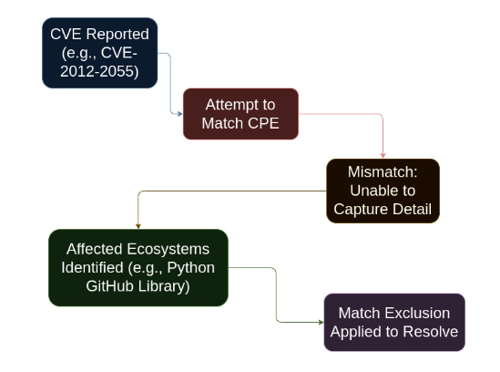
The exclusion data is shown below:
exclusions:
- constraints:
  - namespaces:
    - nvd:cpe
    packages:
    - language: java
    - language: python
    - language: javascript
    - language: ruby
    - language: rust
    - language: go
    - language: php
  justification: This vulnerability affects the GitHub product suite, not language-specific clients
id: CVE-2012-2055
Matching
The matching process is the same in both Grype and Anchore Enterprise. The vulnerability data is stored in GrypeDB; details such as vulnerability ID, affected packages and versions, and fix information are part of these records.
For example, for vulnerability CVE-2024-9823, the package name (Jetty), fixed version (9.4.54), and affected ecosystems — such as Debian, NVD, and Java — are stored. These ecosystems are referred to as a namespace in the context of a match.
The namespace used for the match is determined by the package stored in the SBOM. For a Debian package, the Debian namespace is used; for Java, the GitHub namespace is used. CPE matching is disabled by default for all GitHub-covered ecosystems (including Java, Python, Ruby, Go, JavaScript, .NET, and Rust), resulting in higher quality matches with fewer false positives. CPE matching can be re-enabled per ecosystem if needed. See Vulnerability Matching Configuration for more details.
The details about the versions affected are used to determine if the version reported by the SBOM falls within the affected range. If it does, the vulnerability matches.
For a successful match, the fixed details field is used to display which version fixes a particular vulnerability. The fix details are specific to each namespace. The version in Debian that fixes this vulnerability, 9.4.54-1, is not the same as the version that fixes the Java package, 9.4.54.
Vulnerabilities on the match exclusion list are removed from results.
Once a match exists, additional metadata can be surfaced. Details such as severity and CVSS are stored with each match record. If a field is missing — such as severity or CVSS — it is filled in from NVD data when available.
The Anchore Score
The Anchore Score is a composite risk index score, ranging from 0.0 to 100.0. It is used to prioritize vulnerabilities, and is composed of the CVSS severity and score, the EPSS score, and the CISA KEV data:
- CVSS Severity — the qualitative rating (Critical, High, Medium, Low, Negligible)
- CVSS Score — the quantitative score, ranging from 0.0 to 10.0 of a security vulnerability
- EPSS — the Exploit Prediction Scoring System probability that the vulnerability will be exploited in the next 30 days
- CISA KEV — whether the vulnerability is listed in the CISA Known Exploited Vulnerabilities catalog
The score is intended as a single value you can sort by, filter on, or set thresholds against to surface the vulnerabilities within an app version requiring the most urgent attention.
anchorectl app version vuln list, and API: GET /apps/{id}/versions/{vid}/vulnerabilities. The image-scoped surface continues to use individual vulnerability metrics without the composite Anchore Score.Configure Vulnerability Matching
Search by CPE can be globally configured per supported ecosystem. CPE matching is disabled by default for all GitHub-covered ecosystems, since vulnerability reports from the GitHub Security Advisory Database provide comprehensive coverage for these ecosystems. This reduces false positives caused by CPE matching against NVD data.
These settings can be managed in the following ways:
- API: Use the
GET /v2/system/configurationsandPUT /v2/system/configurations/{uuid}endpoints to view and update individual CPE matching settings. Changes take effect dynamically without requiring a service restart. - Anchore Enterprise GUI: Navigate to System > Configuration to view and toggle CPE matching settings per ecosystem.
- Configuration File: Settings can also be defined in the Anchore Enterprise configuration file under the
policy_enginesection.
The fully-specified default configuration is as follows:
policy_engine:
    vulnerabilities:
      matching:
        default:
          search:
            by_cpe:
              enabled: true
        ecosystem_specific:
          dotnet:
            search:
              by_cpe:
                enabled: false
          golang:
            search:
              by_cpe:
                enabled: false
          java:
            search:
              by_cpe:
                enabled: false
          javascript:
            search:
              by_cpe:
                enabled: false
          python:
            search:
              by_cpe:
                enabled: false
          ruby:
            search:
              by_cpe:
                enabled: false
          rust:
            search:
              by_cpe:
                enabled: false
          stock:
            search:
              by_cpe:
                # Disabling search by CPE for the stock matcher will entirely disable binary-only matches
                # and is *NOT ADVISED*
                enabled: true
A shorter form of the default configuration, since the default by_cpe is true and all GitHub-covered ecosystems are disabled:
policy_engine:
    vulnerabilities:
      matching:
        ecosystem_specific:
          dotnet:
            search:
              by_cpe:
                enabled: false
          golang:
            search:
              by_cpe:
                enabled: false
          java:
            search:
              by_cpe:
                enabled: false
          javascript:
            search:
              by_cpe:
                enabled: false
          python:
            search:
              by_cpe:
                enabled: false
          ruby:
            search:
              by_cpe:
                enabled: false
          rust:
            search:
              by_cpe:
                enabled: false
If enabling search by CPE for a specific ecosystem is desired (for example, Java), the configuration looks like:
policy_engine:
    vulnerabilities:
      matching:
        ecosystem_specific:
          java:
            search:
              by_cpe:
                enabled: true
Vulnerability Data Sources for Severity and CVSS
Anchore Enterprise aggregates vulnerability information from several upstream sources.
Common sources include:
- National Vulnerability Database (NVD)
- Linux distribution security advisories
- GitHub Security Advisories (GHSA)
- Vendor-specific advisory feeds
Each source may provide:
- CVSS scores
- Severity ratings
- Vendor-specific metadata
Grype collects this information and normalizes it before returning results to Anchore Enterprise.
Vulnerability Severity and CVSS Scoring
Anchore Enterprise determines vulnerability severity using data from multiple upstream vulnerability providers. The following sections explain how severity ratings and CVSS scores are sourced, normalized, and displayed in vulnerability scan results.
Each vulnerability finding in Anchore Enterprise may contain two related values:
| Attribute | Description |
|---|---|
| Severity | A categorical rating indicating the relative impact of the vulnerability |
| CVSS Score | A numeric score, ranging from 0.0 to 10.0, representing the quantitative risk value from the Common Vulnerability Scoring System (CVSS) |
Severity and CVSS scores are derived from vulnerability data processed by Grype and the Grype vulnerability database (GrypeDB).
Different upstream vulnerability sources may report different severity levels or CVSS scores for the same vulnerability. Anchore Enterprise applies normalization and source-specific rules to determine which values are used.
Severity Levels
Anchore Enterprise uses the severity levels defined by Grype.
Supported severity levels are:
| Severity | Description |
|---|---|
| Unknown | Severity cannot be determined |
| Negligible | Extremely low impact |
| Low | Low severity vulnerability |
| Medium | Moderate severity vulnerability |
| High | Significant severity vulnerability |
| Critical | Highest severity vulnerability |
These values are normalized across all vulnerability sources to ensure consistent reporting.
Severity Schemes
Upstream vulnerability providers use different classification systems for severity. Grype normalizes these schemes into a common representation.
Supported severity schemes include:
| Scheme | Severity Levels |
|---|---|
| CVSS | Severity derived from a CVSS base score |
| HML | High / Medium / Low |
| CHML | Critical / High / Medium / Low |
| CHMLN | Critical / High / Medium / Low / Negligible |
Grype maps source-specific severity data into one of these normalized schemes before returning results to Anchore Enterprise.
When a vulnerability source only provides a numeric CVSS score, severity is derived from the score using the standard CVSS severity ranges.
CVSS Score to Severity Mapping
If a vulnerability record includes only a CVSS score, the severity is derived from the base score using the following mapping for CVSS v3 and v4 scoring:
| CVSS Base Score | Severity |
|---|---|
| 9.0 – 10.0 | Critical |
| 7.0 – 8.9 | High |
| 4.0 – 6.9 | Medium |
| 0.1 – 3.9 | Low |
| >0 but <0.1 | Negligible |
| Not available | Unknown |
Notes
- CVSSv3 scores are preferred over CVSSv2 and CVSSv4 scores when multiples are present. However, all 3 scores are provided when data is available for a given vulnerability.
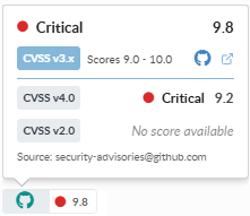
For reference:
Anchore Enterprise primarily displays CVSS scores from the National Vulnerability Database (NVD).
Default Behavior
| Scenario | Displayed CVSS Score |
|---|---|
| NVD CVSS score exists | NVD CVSS score is displayed |
| NVD CVSS score does not exist | No CVSS score is displayed |
Vendor-provided CVSS scores are not shown by default, even if they exist in upstream advisory data.
Optional Fallback Behavior
Anchore Enterprise includes an optional configuration setting:
nvd_fallback_to_secondary_cvss
When this setting is enabled and the NVD record does not contain a CVSS score, Anchore Enterprise falls back to an alternative available CVSS score.
When multiple CVSS scores exist, the highest available score is selected.
Severity Determination for Container Image Scans
During container image scanning, severity determination depends on the vulnerability source.
Linux Distribution Vulnerabilities
For vulnerabilities originating from Linux distribution advisories:
- Severity is taken directly from the distribution’s advisory metadata
- Distribution-provided CVSS scores are not used
Each distribution defines severity using its own classification system, which is normalized by Grype.
Debian vulnerabilities:
Debian severity levels are defined in the Debian Security Tracker.
- Severity is derived from the advisory’s
urgencyfield - If the urgency field is not defined, severity falls back to NVD severity
Ubuntu vulnerabilities:
Ubuntu advisories may mark vulnerabilities as won’t fix when the affected package belongs to an end-of-life (EOL) release. Ubuntu CVE status definitions (including “won’t fix”) are available at ubuntu.com/security/cves.
SUSE (SLES) vulnerabilities:
SUSE severity definitions are available in the SUSE security severity ratings.
GitHub Security Advisories (GHSA) Vulnerabilities
For vulnerabilities identified through GitHub Security Advisories:
- Severity is taken directly from GHSA data
- GHSA severity is based on CVSS scoring; CVSS scores from GHSA may also be used when applicable — see GitHub Security Advisories documentation.
CPE-Based Vulnerabilities
When vulnerabilities are matched using CPE identifiers:
- Severity is derived from NVD data
- CVSS scores are also sourced from NVD
If multiple CVSS scores are present in the vulnerability record, Grype typically selects the highest available score, favoring CVSSv3 scores over CVSSv2.
“Won’t Fix” Vulnerabilities
Some vulnerabilities may be marked as won’t fix when vendors indicate that a patch will not be provided.
Debian:
Debian advisories may set the fixed version to 0, indicating that the vulnerability is not expected to be fixed.
Ubuntu:
Ubuntu marks vulnerabilities as won’t fix when the affected package belongs to an end-of-life release.
Red Hat:
Red Hat may mark vulnerabilities as Will not fix or Deferred depending on product lifecycle and support status.
Grype Database Processing:
During GrypeDB processing, vulnerabilities may be marked as won’t fix when:
- The fixed version is set to
0, and - The advisory indicates that no fix is available.
Conflicting Severity Between Sources
Different vulnerability sources may report different severity ratings for the same vulnerability.
For example, GitHub Security Advisories and the National Vulnerability Database may assign different severity values.
In these cases:
- Grype collects severity data from all available sources.
- Anchore Enterprise uses the normalized severity returned by Grype.
Additional Notes
- CVSS scores are included in Grype JSON output but are not displayed by default in CLI output.
- Scan result exports (such as CSV reports) include all available CVSS scores along with their sources.
Comprehensive Distributions
When matching vulnerabilities against a Linux distribution, such as Alpine, Red Hat, or Ubuntu, there is a concept called “comprehensive distribution”. A comprehensive distribution reports both fixed and unfixed vulnerabilities in its data feed.
For example, Red Hat reports on all vulnerabilities, including unfixed vulnerabilities. Some distros, like Alpine, do not report unfixed vulnerabilities. When a distribution does not contain comprehensive vulnerability information, Anchore Enterprise falls back to other data sources on a best-effort basis to determine vulnerabilities affecting Alpine that have not yet been fixed.
Red Hat Enterprise Linux (RHEL) Extended Update Support (EUS)
Anchore Enterprise supports the use of RHEL EUS data when scanning relevant container images for vulnerabilities.
By default, Anchore Enterprise uses RHEL EUS data for any RHEL-based image that is automatically identified as having EUS support during the image analysis process.
The default behavior can be overridden at the system level by altering your vulnerability scanning configuration, or at the image level by applying the anchore.user/extended_support annotation to individual images.
To specify that a RHEL-based image should use EUS data for vulnerability scanning regardless of EUS support detection, set the anchore.user/extended_support annotation to true.
anchorectl image add myrepo.example.com:5000/my_app/:latest --annotation "anchore.user/extended_support=true"
To specify that a RHEL-based image should not use EUS data for vulnerability scanning regardless of EUS support detection, set the anchore.user/extended_support annotation to false.
anchorectl image add myrepo.example.com:5000/my_app/:latest --annotation "anchore.user/extended_support=false"
Annotations can also be added via the Anchore Enterprise GUI.
For more information on the presentation of Extended Update Support detection and its use in image vulnerability scans, see the API documentation for the /images/{image_digest} and /images/{image_digest}/vuln/{vuln_type} APIs.
For Red Hat severity definitions, see the Red Hat security severity ratings.
Fix Details
There are some additional details for the fixed data from NVD that should be explained. NVD does not contain explicit fix information for a given vulnerability. Other namespaces do, such as GitHub and Debian. There is a concept of “Less Than” and “Less Than or Equal” in the NVD data. When a vulnerability is tagged with “Less Than or Equal”, it could mean there is no fix available, or the fix version could not be determined, or a fix was unavailable at the time NVD looked at it. In those cases, fix details cannot be shown for a vulnerability match.
If NVD uses “Less Than”, it is assumed that the version noted is the fixed version, unless that version is part of the affected range of a subsequent CPE configuration for the same CVE. That version is presented as containing the fix.
For example, given data that looks like this:
some_package LessThan 1.2.3
Version 1.2.3 is assumed to contain the fix, and any version less than that, such as 1.2.2, is vulnerable. Alternatively, given data like:
some_package LessThanOrEqual 1.2.2
Version 1.2.2 and below are known to be vulnerable, but the version containing the fix is not known. It could be in version 1.3.0, or 1.2.3, or even 2.0.0. In these cases, fix details are not surfaced. If such details become available in the future, the CVE data will be updated.
Scan Windows Images
Anchore Enterprise can analyze and provide vulnerability matches for Microsoft Windows images. Anchore Enterprise downloads, unpacks, and analyzes the Microsoft Windows image contents similar to Linux-based images, providing OS information as well as discovered application packages like npms, gems, Python, NuGet, and Java archives.
Vulnerabilities for Microsoft Windows images are matched against the detected operating system version and KBs installed in the image. These are matched using data from the Microsoft Security Response Center (MSRC) data API.
Supported Windows Base Image Versions
The following are the MSRC Product IDs that Anchore Enterprise can detect and provide vulnerability information for. These provide the basis for the main variants of the base Windows containers: Windows, ServerCore, NanoServer, and IoTCore.
| Product ID | Name |
|---|---|
| 10481 | Windows 8.1 for 32-bit systems |
| 10482 | Windows 8.1 for x64-based systems |
| 10484 | Windows RT 8.1 |
| 10729 | Windows 10 for 32-bit Systems |
| 10735 | Windows 10 for x64-based Systems |
| 10788 | Windows 10 Version 1511 for x64-based Systems |
| 10789 | Windows 10 Version 1511 for 32-bit Systems |
| 10852 | Windows 10 Version 1607 for 32-bit Systems |
| 10853 | Windows 10 Version 1607 for x64-based Systems |
| 10951 | Windows 10 Version 1703 for 32-bit Systems |
| 10952 | Windows 10 Version 1703 for x64-based Systems |
| 11453 | Windows 10 Version 1709 for 32-bit Systems |
| 11454 | Windows 10 Version 1709 for x64-based Systems |
| 11583 | Windows 10 Version 1709 for ARM64-based Systems |
| 11497 | Windows 10 Version 1803 for 32-bit Systems |
| 11498 | Windows 10 Version 1803 for x64-based Systems |
| 11563 | Windows 10 Version 1803 for ARM64-based Systems |
| 11568 | Windows 10 Version 1809 for 32-bit Systems |
| 11569 | Windows 10 Version 1809 for x64-based Systems |
| 11570 | Windows 10 Version 1809 for ARM64-based Systems |
| 11644 | Windows 10 Version 1903 for 32-bit Systems |
| 11645 | Windows 10 Version 1903 for x64-based Systems |
| 11646 | Windows 10 Version 1903 for ARM64-based Systems |
| 11712 | Windows 10 Version 1909 for 32-bit Systems |
| 11713 | Windows 10 Version 1909 for x64-based Systems |
| 11714 | Windows 10 Version 1909 for ARM64-based Systems |
| 11766 | Windows 10 Version 2004 for 32-bit Systems |
| 11767 | Windows 10 Version 2004 for ARM64-based Systems |
| 11768 | Windows 10 Version 2004 for x64-based Systems |
| 11800 | Windows 10 Version 20H2 for x64-based Systems |
| 11801 | Windows 10 Version 20H2 for 32-bit Systems |
| 11802 | Windows 10 Version 20H2 for ARM64-based Systems |
| 11896 | Windows 10 Version 21H1 for x64-based Systems |
| 11897 | Windows 10 Version 21H1 for ARM64-based Systems |
| 11898 | Windows 10 Version 21H1 for 32-bit Systems |
| 11929 | Windows 10 Version 21H2 for 32-bit Systems |
| 11930 | Windows 10 Version 21H2 for ARM64-based Systems |
| 11931 | Windows 10 Version 21H2 for x64-based Systems |
| 12097 | Windows 10 Version 22H2 for x64-based Systems |
| 12098 | Windows 10 Version 22H2 for ARM64-based Systems |
| 12099 | Windows 10 Version 22H2 for 32-bit Systems |
| 11926 | Windows 11 Version 21H2 for x64-based Systems |
| 11927 | Windows 11 Version 21H2 for ARM64-based Systems |
| 12085 | Windows 11 Version 22H2 for ARM64-based Systems |
| 12086 | Windows 11 Version 22H2 for x64-based Systems |
| 12242 | Windows 11 Version 23H2 for ARM64-based Systems |
| 12243 | Windows 11 Version 23H2 for x64-based Systems |
| 12389 | Windows 11 Version 24H2 for ARM64-based Systems |
| 12390 | Windows 11 Version 24H2 for x64-based Systems |
| 20437 | Windows 11 Version 25H2 for ARM64-based Systems |
| 20438 | Windows 11 Version 25H2 for x64-based Systems |
| 20853 | Windows 11 Version 26H1 for x64-based Systems |
| 20854 | Windows 11 Version 26H1 for ARM64-based Systems |
| 10378 | Windows Server 2012 |
| 10379 | Windows Server 2012 (Server Core installation) |
| 10483 | Windows Server 2012 R2 |
| 10543 | Windows Server 2012 R2 (Server Core installation) |
| 10816 | Windows Server 2016 |
| 10855 | Windows Server 2016 (Server Core installation) |
| 11571 | Windows Server 2019 |
| 11572 | Windows Server 2019 (Server Core installation) |
| 11923 | Windows Server 2022 |
| 11924 | Windows Server 2022 (Server Core installation) |
| 12244 | Windows Server 2022, 23H2 Edition (Server Core installation) |
| 12436 | Windows Server 2025 |
| 12437 | Windows Server 2025 (Server Core installation) |
| 11466 | Windows Server, version 1709 (Server Core installation) |
| 11499 | Windows Server, version 1803 (Server Core installation) |
| 11647 | Windows Server, version 1903 (Server Core installation) |
| 11715 | Windows Server, version 1909 (Server Core installation) |
| 11769 | Windows Server, version 2004 (Server Core installation) |
| 11803 | Windows Server, version 20H2 (Server Core installation) |
Windows Operating System Packages
Just as Linux images are scanned for packages such as RPMs, DPKG, and APK, Windows images are scanned for the installed components and Knowledge Base patches (KBs). When listing operating system content on a Microsoft Windows image, the results returned are KB identifiers that are numeric. Both the name and version will be identical and are the KB IDs.