Anchore Enterprise supports two distinct reporting jobs that operate on the vulnerability and package data already produced by scans: looking for vulnerabilities across the image catalog, and producing formal documents for downstream consumers.
Two Reporting Jobs
The two jobs use different surfaces and produce different outputs. Pick the one that matches the question you are answering.
Formal documents in standard formats — VEX, VDR, vulnerability data exports
Sharing with customers, auditors, regulators, downstream consumers
Search is the analytical surface and currently covers the image catalog only. The Reports view in the Anchore Enterprise GUI lets you build custom report templates, save them, and run them on demand. The same data is reachable from the Query API for tooling integrations. App-version-scoped search is on the roadmap — see Search for the full current state.
Evidence is the document-producing surface and covers both image-scoped and app-version-scoped exports today. AnchoreCTL and the API submit jobs that produce a fully-formed document — a VDR (Vulnerability Disclosure Report), a VEX (Vulnerability Exploitability eXchange), or a vulnerability data export — that you can hand to a downstream consumer or attach to a release.
Where to Go Next
Search — find vulnerabilities across assets using the GUI Reports view, saved reports, custom templates, and the query API
Evidence — produce VEX, VDR, and vulnerability data exports from images and app versions
For routing vulnerability findings into external systems like Slack or Jira, the Anchore Enterprise GUI also includes an Action Workbench for building action plans on top of the integrations configured in your account. The Workbench is an additional surface for teams that need to push findings into existing ticketing or notification workflows — the primary day-to-day reporting mechanisms remain the Reports view, the export jobs, and the API.
1 - Search
Search answers questions that span more than one asset in your catalog: “Which application versions are affected by a specific CVE?”, “Which images have a Critical finding with a known KEV?”, “Which images contain a vulnerable version of a specific package?”
Anchore Enterprise runs search at two scopes: applications and container images. Pick the one that matches how your team organizes software. Image search is available in the GUI and the API; application search runs in the GUI today, matched by CVE or GHSA identifier.
Scope
What you search
Where to start
Applications
Vulnerabilities across your app versions, matched by CVE or GHSA identifier
For producing formal documents such as VEX, VDR, SBOMs, and vulnerability data exports, see Evidence. Evidence exports are available at both image and app-version scopes today.
Search Applications
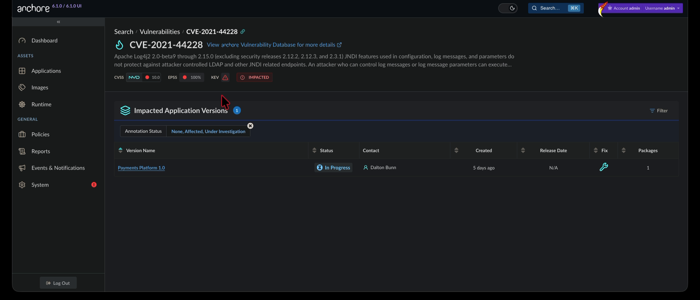
The application scope answers “is this vulnerability affecting any of my applications, and which versions?” Today this search runs in the GUI, matched by CVE or GHSA identifier. It draws on the same aggregated, deduplicated vulnerability data described in Scan an App Version, so a match points you straight at the affected app version.
Coming soon: application search in AnchoreCTL and a stable Query API. Today, application vulnerability search runs in the GUI, matched by CVE or GHSA identifier; the API that backs it is experimental and lives under /exp.
Search Applications in the Anchore Enterprise GUI
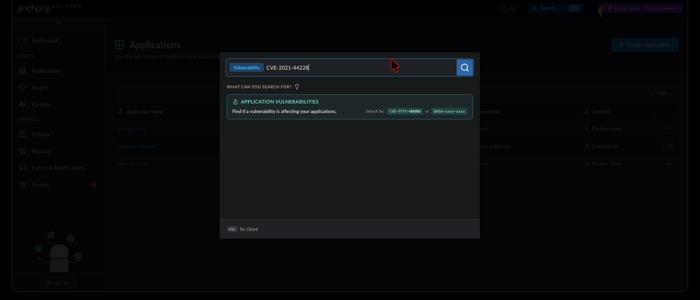
Open the search box in the top navigation bar and choose the Vulnerability filter, then enter a CVE or GHSA identifier. A vulnerability identifier is the only supported query for application search today.
Anchore Enterprise returns the application versions in your account whose aggregated findings include that vulnerability. Open a result to jump to the affected version’s Vulnerabilities tab, triage by Anchore Score, and pivot to the impacted assets.
Check a Known App Version with AnchoreCTL
AnchoreCTL does not search across applications. To check whether a CVE affects a version you already know, list its vulnerabilities and filter for the identifier:
anchorectl app version vuln list 1.4.0 --app my-service
Add -o json for the full per-finding record, including CVSS, EPSS, and CISA KEV flags; findings are aggregated and deduplicated across the version’s assets rather than attributed to individual ones. See Scan an App Version for the complete command reference.
Check a Known App Version with the API
The stable API returns the vulnerabilities for a version you already know, under /apps/{app_id}/versions/{version_id}/vulnerabilities, with a packages-by-vulnerability pivot for a specific finding:
curl -X GET \
'https://my-anchore.example.com/apps/{app_id}/versions/{version_id}/vulnerabilities'\
-H 'accept: application/json'
The image scope searches across the analyzed image catalog. Both surfaces below draw from the same underlying vulnerability and package data, so the choice is about who is running the query and what they want back.
Search Container Images in the Anchore Enterprise GUI
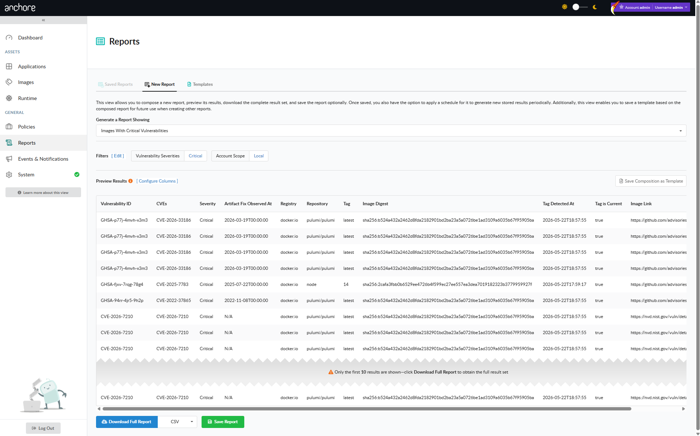
The Reports tab in the Anchore Enterprise GUI is the interactive search surface for images. Reports are built from templates that define which filters appear on the report form and which columns appear in the result, and from executions that capture the result of running a configured report at a point in time.
New Report
The New Report tab is where reports are composed and executed. Pick a template, set the filter values, and run the report once for an immediate result, or save it for re-use.
Saved Reports
Saved reports retain their template, filter selections, and execution history. From the Saved Reports tab you can:
Generate Now — run a saved report on demand.
Schedule — run the report on a recurring cadence and notify subscribers when results are ready.
Execution history — browse past runs, download their CSVs, or drill into the on-screen results.
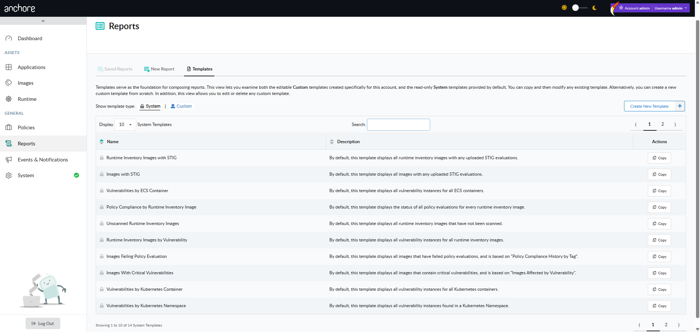
Templates
Templates define the shape of a report: which filters are presented to the user, with what defaults, and which columns appear in the result.
Anchore Enterprise ships a set of system templates as starting points, for example “Images Affected by Vulnerability”, “Images Failing Policy Evaluation”, and “Tags by Vulnerability”. System templates cannot be modified, but you can copy any of them into a user template and tailor the filter and column set to your team’s needs.
Templates and reports are both account-scoped. Templates created by other users in the same account are visible and can be used as a starting point for further customization.
The reporting data cycle is configurable on the deployment, and results in the Reports view may lag analysis output. See Reporting Service configuration for the cycle frequency and tuning options.
Search Container Images with AnchoreCTL
AnchoreCTL returns the findings for a single analyzed image rather than searching across the catalog. To pull an image’s vulnerabilities and filter for a CVE:
See Scan a Container Image for the output formats and filter flags. For questions that span the whole image catalog, use the Reports view above or the Query API below.
Search Container Images with the API
The Query API is the programmatic surface for zero-day investigation and tooling integrations. Two endpoints cover the common patterns: look up a vulnerability by ID, or find images containing a specific package version.
Find Images by Package
When the vulnerability record is incomplete, common in the first hours after disclosure, search by the affected package version directly. The classic example: locate every image with a vulnerable version of k8s.io/ingress-nginx.
curl -X GET \
'https://my-anchore.example.com/v2/query/images/by-package?name=k8s.io%2Fingress-nginx&package_type=go&version=v1.11.0'\
-H 'accept: application/json'
The response is a paginated PaginatedImageList, where each entry names the image digest, the tag history that points at it, and the package records that match the filter:
For the full zero-day investigation pattern, including how to escalate from a package match to remediation, see the Find Zero-day Vulnerabilities quickstart.
Look Up a Vulnerability by ID
When the vulnerability ID is known, GET /v2/query/vulnerabilities returns the underlying record and the packages it affects:
curl -X GET \
'https://my-anchore.example.com/v2/query/vulnerabilities?id=CVE-2024-3094'\
-H 'accept: application/json'
Useful as a quick “does Anchore Enterprise know about this yet?” check before kicking off a broader hunt.
The full request and response schemas for both endpoints are in the API browser under the Query tag.
The Query API operates on container images only. For app-version vulnerability data, use anchorectl app version vuln or the app-version API endpoints under Search Applications above.
Where to Go Next
Evidence — produce formal documents from search results: VEX, VDR, vulnerability data exports.
Annotations — record VEX dispositions on findings; annotations feed the VEX evidence exports and will be filterable through the future app-version search surface.
Evidence is what you hand to a customer, an auditor, a regulator, or a downstream consumer. Anchore Enterprise turns the vulnerability and annotation data it already holds into three kinds of formal, standards-aligned documents:
Document
Format
What’s in it
VEX (Vulnerability Exploitability eXchange)
CycloneDX JSON (app-version)
CycloneDX JSON, CycloneDX XML, OpenVEX (image)
The vulnerabilities found and the VEX annotations recorded against them: your published statement on what affects the product.
VDR (Vulnerability Disclosure Report)
CycloneDX JSON
A combined SBOM-plus-vulnerabilities document: the components, their known vulnerabilities, and the VEX annotations alongside. The single artifact to attach to a release for downstream consumers.
The raw finding rows: vulnerability ID, severity, CVSS, EPSS, KEV, fix availability, affected package with its purl, and source. For ingestion into tickets, spreadsheets, and downstream tooling.
Evidence is available at both app-version and image scope.
For SBOM evidence (CycloneDX and SPDX SBOM exports of an app version’s contents), see Export an SBOM.
Evidence from an App Version
App-version evidence runs as an asynchronous job: submit the job, wait for completion, and the result is written to a file or stdout.
Via the Anchore Enterprise GUI
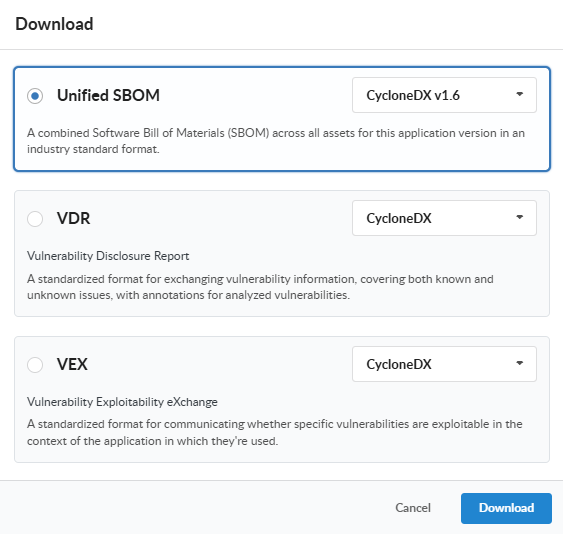
Open the app version detail page, click on the Download button, and choose the document type from the menu along with the desired format (where supported), and click Download. The My Recent Activity panel on the App Version Summary tab shows the job’s progress and, once complete, the link to download the generated document.
Via AnchoreCTL
Each evidence type has a dedicated subcommand under anchorectl app version export:
Each command submits a job, waits for completion, and writes the resulting document to the path supplied with --file (or to stdout if --file is omitted).
Today the app-version VEX and VDR exports both produce CycloneDX JSON. The vulnerability data export, the raw finding rows surfaced by anchorectl app version export vulnerabilities, is CSV-only at app-version scope; VEX and VDR carry the same findings wrapped in their respective document forms.
App-version CSV exports (vulnerabilities, policy compliance, and packages alike) emit one row per result per asset, and every row identifies where it was found through Asset ID, Asset Name, Asset Class (SBOM or Image), and Asset Type columns. A finding that touches three assets therefore appears as three rows.
Via the API
App-version exports live under the App Jobs tag of the API:
Download the completed document referenced by a finished job
The job lifecycle is: POST to submit, poll GET .../{job_id} until status is completed, then fetch download_id from the job’s response and GET /apps/{app_id}/downloads/{download_id}. The full request and response schemas are in the API browser; search for the App Jobs tag.
Evidence from an Image
Image-scoped evidence is synchronous: the document is generated on the fly when you request it. No job to track, no separate download step.
Via the Anchore Enterprise GUI
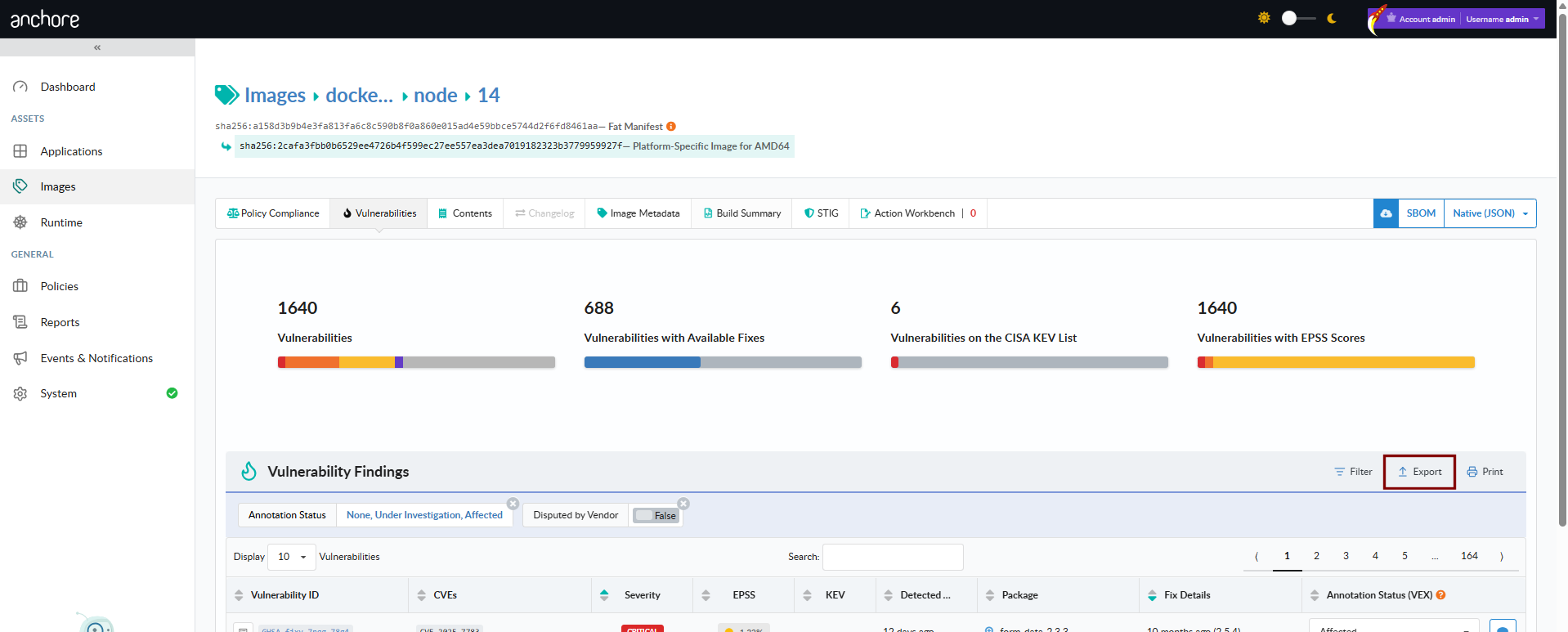
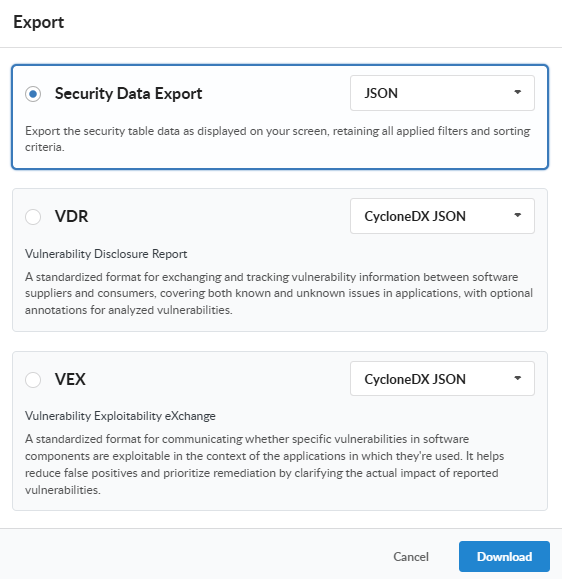
Open the image detail page, switch to the Vulnerabilities tab, and use the Download menu to pick a format. The document streams back to your browser when the request completes.
Via AnchoreCTL
anchorectl image vulnerabilities doubles as the image evidence command; the -o flag selects the output format:
anchorectl image vulnerabilities sha256:<digest> -o csv             > image-vulns.csv
anchorectl image vulnerabilities sha256:<digest> -o cyclonedx-json  > image-vulns.cdx.json
anchorectl image vulnerabilities sha256:<digest> -o html -d ~/reports/  # -d takes a directory; the HTML file is written into ~/reports/
Supported formats are text, json, json-raw, csv, cyclonedx-json, cyclonedx-xml, and html. The JSON and CSV outputs include each vulnerable package’s purl, matching the GUI’s Security Data Export from the image and source analysis vulnerabilities views. The CycloneDX outputs embed VEX annotations recorded on the image’s findings; HTML produces a human-readable summary document suitable as a build artifact.
Via the API
Method
Path
Produces
GET
/images/{image_digest}/vex/openvex
OpenVEX document for the image
GET
/images/{image_digest}/vex/cyclonedx-json
VEX in CycloneDX JSON
GET
/images/{image_digest}/vex/cyclonedx-xml
VEX in CycloneDX XML
GET
/images/{image_digest}/vuln/{vuln_type}
Vulnerability data for the image as paginated JSON. vuln_type is one of os, non-os, or all