App-version-scoped vulnerability scanning produces a single, deduplicated list of vulnerabilities for an entire app version — across every asset attached to that version, whether the asset is a container image, an analyzed filesystem, or an externally supplied SBOM. This is the v6-native evaluation surface; for per-image scanning, see Scan a Container Image.
The app-version scope adds two capabilities that the image scope does not surface directly:
- Deduplication across assets. A package of a given version contained in two assets produces one record at the version level, not two. The same logic applies across vulnerabilities and compliance issues. All instance data is collapsed into a single record with click-throughs for impacted assets.
- Anchore Score prioritization. Every vulnerability includes a composite score combining CVSS severity and score, EPSS, and CISA KEV data. This score reflects a particular vulnerability’s relative ranking across all vulnerabilities for an app version. The Anchore Score can be used to sort or filter vulnerabilities.
Scan an App Version in the Anchore Enterprise GUI
The app version detail page in the GUI aggregates findings across the version’s assets into a single, deduplicated view. The Vulnerabilities tab is the primary surface for triaging findings; the per-asset drill-down and pivot queries answer the follow-on question of where a vulnerability lives.
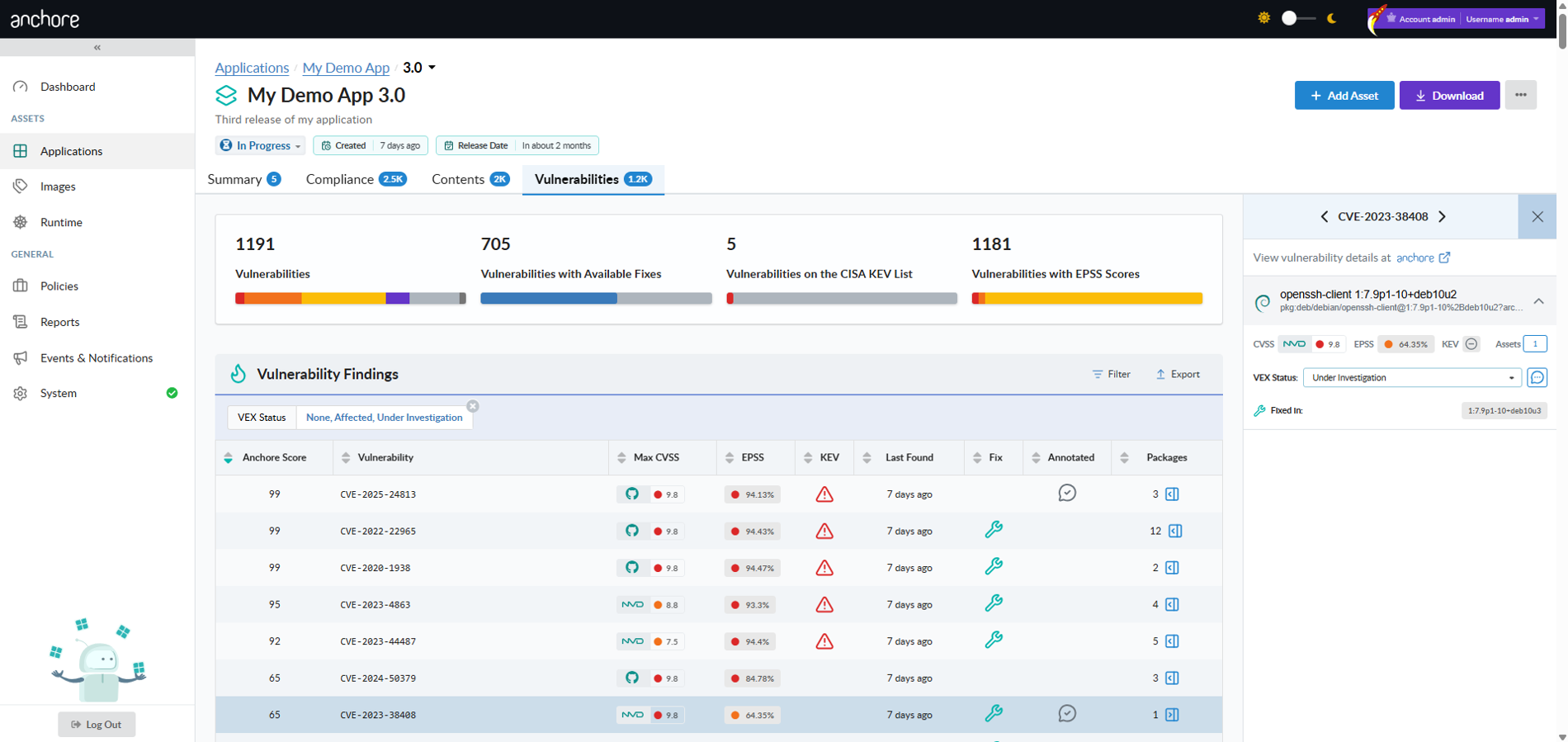
Triage Findings by Anchore Score
Sort the Vulnerabilities tab by Anchore Score to put the highest-prioritized findings at the top. The score combines CVSS severity and score, EPSS, and CISA KEV data, so a single sort ordering surfaces the work most worth attention against all vulnerabilities in an app version.
Pivot to Affected Assets
From a single vulnerability record, open the affected-assets popup to see every asset in the version that contains the vulnerable package and where the package lives inside each asset. This is the GUI equivalent of the API’s pivot endpoints — packages-by-vulnerability below, and assets-by-package in Viewing an App Version’s SBOM.
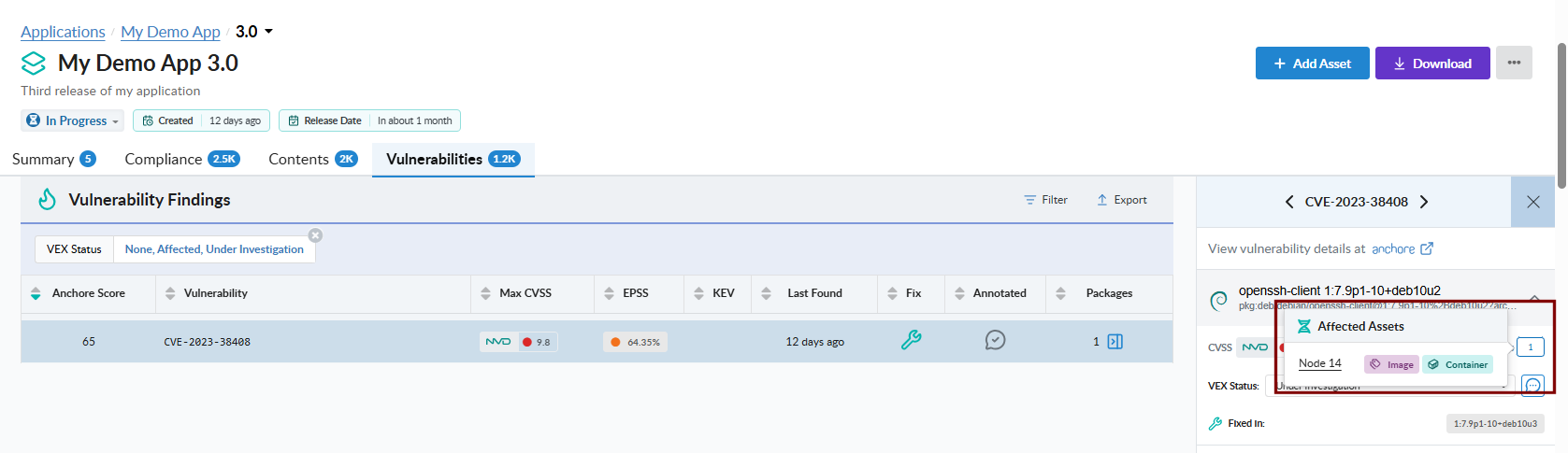
Scan an App Version with AnchoreCTL
The vulnerability list for an app version is exposed under anchorectl app version vuln. The command requires the parent app via --app and accepts either the version name or its UUID.
List Vulnerabilities for an App Version
The default output is a terminal-friendly table aggregated across every asset in the version:
anchorectl app version vuln list 1.4.0 --app my-service
 ✔ Fetched vulnerabilities
┌────────────────┬──────────┬───────────────┬──────────────┬────────────┬──────────────┐
│ VULN ID        │ SEVERITY │ ANCHORE SCORE │ PACKAGE      │ FIX        │ AFFECTED     │
├────────────────┼──────────┼───────────────┼──────────────┼────────────┼──────────────┤
│ CVE-2024-3094  │ Critical │ 98.4          │ xz-utils     │ 5.6.2-1    │ 2 assets     │
│ CVE-2024-1234  │ High     │ 71.2          │ openssl      │ won't fix  │ 1 asset      │
│ CVE-2023-5678  │ Medium   │ 42.7          │ libcurl      │ 7.85.0     │ 3 assets     │
└────────────────┴──────────┴───────────────┴──────────────┴────────────┴──────────────┘
For programmatic consumption, use -o json to retrieve the full per-finding record, including per-source CVSS assessments, EPSS, CISA KEV flags, Anchore Score, fix versions, and VEX status. Findings are aggregated and deduplicated across the version’s assets:
anchorectl app version vuln list 1.4.0 --app my-service -o json
The app version vuln list command supports the formats text, json, json-raw, and id. For HTML or CSV outputs intended as downstream deliverables, use the export command described below.
Export Vulnerabilities as a Formal Report
To turn an app version’s findings into a formal, shareable document — a CSV vulnerability export, or a VEX or VDR document — use the anchorectl app version export commands. These run as server-side jobs and are documented, alongside the GUI and API equivalents, under Evidence.
Scan an App Version with the API
App-version vulnerability data lives under /apps/{app_id}/versions/{version_id}/vulnerabilities. Results are aggregated and deduplicated across the version’s assets; pass asset_id to scope the listing to a single asset instead. The full request and response schemas, including the per-finding data shape with CVSS, EPSS, KEV flags, and Anchore Score, are in the API browser; search for the App Version Vulnerabilities tag.
Key endpoints:
| Method | Path | Purpose |
|---|---|---|
GET | /apps/{app_id}/versions/{version_id}/vulnerabilities | Aggregated, deduplicated vulnerability list for the version |
GET | /apps/{app_id}/versions/{version_id}/packages-by-vulnerability | Pivot: packages affected by a specific vulnerability |
For the export-job endpoints (CSV, VEX, VDR) under the App Jobs tag, see Evidence.
A few conventions worth knowing as you call these endpoints:
- Vulnerability deduplication respects each asset’s distro context for filtering, then merges related CVEs across sources. The deduplication logic matches what is applied elsewhere in Anchore Enterprise.
- The vulnerabilities endpoint accepts an optional
asset_idquery parameter to narrow the result to a single asset rather than the aggregated view. - For the package-side query surface across an app version — package listings and the assets-by-package pivot — see Viewing an App Version’s SBOM.
- Cross-account requests follow the standard pattern — see Account Scoping.