Repositories give Anchore Enterprise a way to monitor a registry repository for new tags and automatically analyze them as they appear. This is a common setup for production registries where every new release tag should be picked up without a manual image add.
Repositories are an extension of the image scanning workflow — once a repository is added and watched, every tag picked up from it follows the same analysis pipeline as a manually added image, and its findings appear in the same image-scoped views.
Watch a Repository in the Anchore Enterprise GUI
Open the Images view, click Analyze Repository, and choose Automatically Check for Updates to Tags in the resulting dialog. Anchore Enterprise enumerates the repository’s current tags, queues them for analysis, and continues to monitor the repository for new ones.
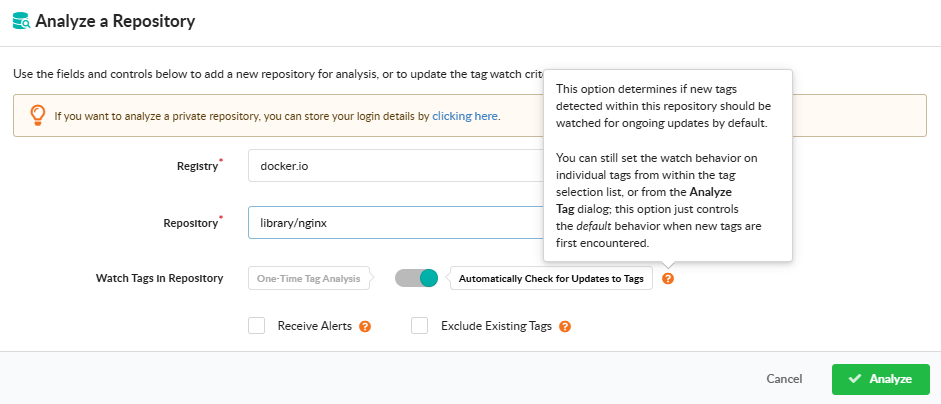
For the full Analyze Repository dialog walkthrough — including the one-time-analysis alternative and the tag-count preview — see Scan a Container Image — Analyze a Repository.
Watch a Repository with AnchoreCTL
Repository watching is managed through anchorectl repo. Each command operates on a registry/repository identifier such as docker.io/my-org/api.
Add a Repository to the Watch List
anchorectl repo add registers a repository and immediately starts watching it. Anchore Enterprise enumerates the current tags and queues them for analysis:
anchorectl repo add docker.io/my-org/api
To watch the repository for new tags without analyzing the existing ones, pass --exclude-existing-tags. To skip the default behavior of auto-subscribing discovered tags to the tag_update subscription, pass --auto-subscribe=false.
List Watched Repositories
anchorectl repo list shows every repository under watch:
anchorectl repo list
Pause and Resume Watching
unwatch pauses monitoring without removing the repository record. The repository stays in the list but no longer picks up new tags:
anchorectl repo unwatch docker.io/my-org/api
Re-enable monitoring with watch:
anchorectl repo watch docker.io/my-org/api
Stop Watching a Repository
anchorectl repo delete removes the repository from the watch list entirely. Existing image records analyzed from the repository are not affected by this command:
anchorectl repo delete docker.io/my-org/api
Remove a Repository and All Its Images
To remove the repository and every image record produced from it — for example, after accidentally watching a repository with a very large tag count — combine the unwatch, repository-delete, and image-delete steps. Unwatch first to prevent new tags from being added during the cleanup:
anchorectl repo unwatch docker.io/my-org/api
anchorectl repo delete docker.io/my-org/api
for digest in $(anchorectl -q image list | grep docker.io/my-org/api | awk '{print $2}'); do
  anchorectl image delete "$digest" --force
done
Watch a Repository with the API
Adding a repository to the watch list is exposed under /repositories; listing and removing watches are managed through /subscriptions, since a repository watch is a repo_update subscription. The full endpoint inventory, request and response schemas, and error codes are in the API browser; search for the Repository and Subscriptions tags.
Key endpoints:
| Method | Path | Purpose |
|---|---|---|
POST | /repositories?repository=<repo>&auto_subscribe=<bool>&exclude_existing_tags=<bool> | Add and start watching a repository |
GET | /subscriptions | List subscriptions; filter to repo_update for watched repositories |
DELETE | /subscriptions/{subscription_id} | Stop watching a repository (delete its repo_update subscription) |
For the per-tag subscription model that drives the auto-analysis behavior — what tag_update subscriptions are, how repo_update differs, and how to manage them in bulk — see Subscriptions.