Subscriptions tell Anchore Enterprise to pay attention to specific things — a tag, an image, a registry repository, a Kubernetes namespace — and either keep them up to date or notify you when their state changes. Every long-running automated behavior in Anchore Enterprise that runs in the background on your behalf is driven by one of these subscription types.
For the configuration-side write-up of each subscription type (granularity, background-process behavior, default state), see Subscriptions.
Subscription Types
Anchore Enterprise supports seven subscription types:
| Type | Key | Managed via |
|---|---|---|
| Tag Update | tag_update | anchorectl subscription |
| Policy Evaluation | policy_eval | anchorectl subscription |
| Vulnerability Update | vuln_update | anchorectl subscription |
| Analysis Update | analysis_update | anchorectl subscription |
| Alerts | alerts | anchorectl subscription |
| Repository Update | repo_update | anchorectl repo — see Repositories |
| Runtime Inventory | runtime_inventory | anchorectl inventory watch — see Kubernetes Inventory |
Subscription keys identify what is being watched and depend on the type. For tag_update, policy_eval, vuln_update, and analysis_update, the key is a fully qualified registry/repo:tag. For repo_update, it is a registry/repo. alerts accepts either form — a registry/repo:tag for tag-scoped alerting, or a registry/repo to alert on every image in the repository. For runtime_inventory, it is a cluster/namespace identifier.
Manage Subscriptions in the Anchore Enterprise GUI
A subset of subscription types can be created and toggled directly in the GUI, from the feature area that owns the watched resource. The remaining types — policy_eval, vuln_update, and analysis_update — are managed through AnchoreCTL or the API, covered below.
Watch a Tag in the GUI
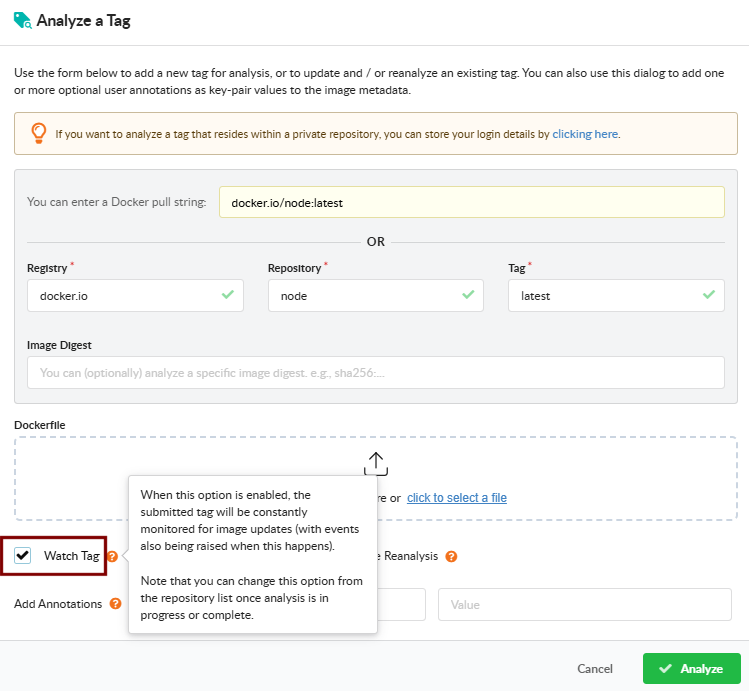
On the Analyze Tag dialog in the Images view, enable Watch Tag to create a tag_update subscription for the tag. See Analyze a Tag for the full dialog.
Watch a Repository in the GUI
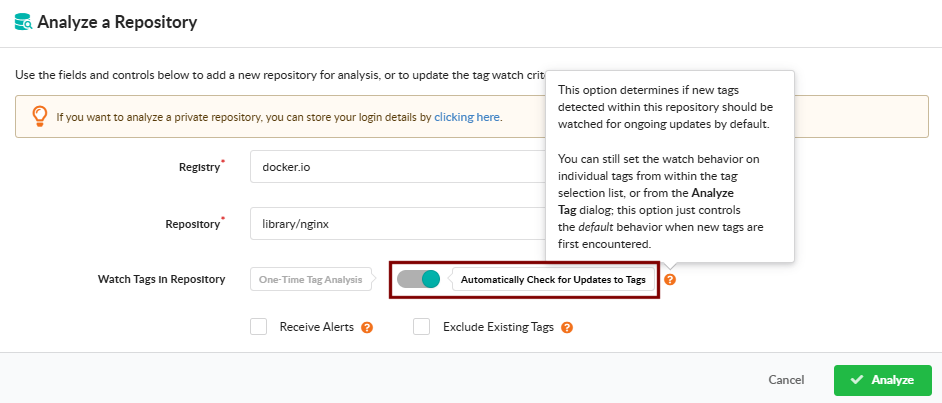
On the Analyze Repository dialog in the Images view, choose Automatically Check for Updates to Tags to create a repo_update subscription that picks up new tags as they appear. See Watch a Repository for New Images.
Receive Alerts in the GUI
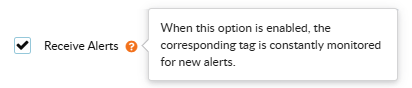
Both the Analyze Tag and Analyze Repository dialogs include a Receive Alerts checkbox that creates an alerts subscription — tag-scoped from the tag dialog, repository-scoped from the repository dialog.
Watch a Cluster or Namespace in the GUI
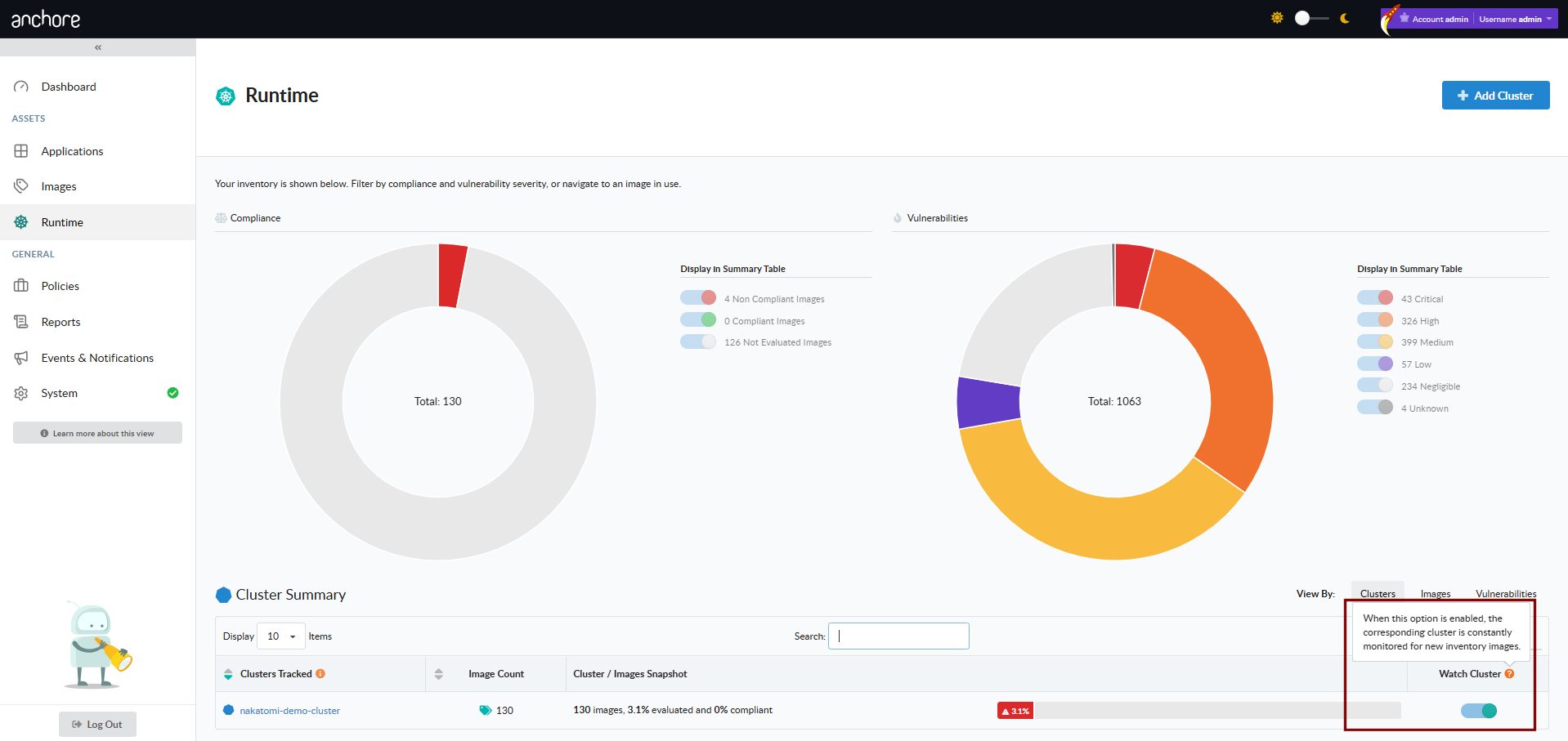
From the Kubernetes runtime inventory views, toggle a cluster or namespace watch to create a runtime_inventory subscription. See Kubernetes Inventory.
Manage Subscriptions with AnchoreCTL
Subscriptions are managed with the anchorectl subscription command tree; runtime-inventory watches use anchorectl inventory watch.
List Subscriptions
anchorectl subscription list returns every subscription on the deployment and its current state:
anchorectl subscription list
 ✔ Fetched subscriptions
┌─────────────────────────────────────┬───────────────────┬────────┐
│ KEY                                 │ TYPE              │ ACTIVE │
├─────────────────────────────────────┼───────────────────┼────────┤
│ docker.io/library/nginx:1.27        │ tag_update        │ true   │
│ docker.io/library/nginx:1.27        │ vuln_update       │ true   │
│ docker.io/library/nginx:1.27        │ policy_eval       │ false  │
│ docker.io/library/nginx             │ alerts            │ false  │
│ docker.io/library/nginx             │ repo_update       │ true   │
│ cluster-one/platform-services       │ runtime_inventory │ true   │
└─────────────────────────────────────┴───────────────────┴────────┘
tag_update, policy_eval, vuln_update, and analysis_update subscriptions are tied to a fully qualified registry/repo:tag, not to image digests — a subscription survives the tag pointing at a new digest.
Activate and Deactivate Subscriptions
anchorectl subscription activate enables a subscription for a given key and type:
anchorectl subscription activate docker.io/library/nginx:1.27 tag_update
 ✔ Activate subscription
Key: docker.io/library/nginx:1.27
Type: tag_update
Id: 04f0e6d230d3e297acdc91ed9944278d
Active: true
The matching deactivate command pauses a subscription without removing the record:
anchorectl subscription deactivate docker.io/library/nginx:1.27 tag_update
To remove a subscription entirely, use anchorectl subscription delete with the same key and type:
anchorectl subscription delete docker.io/library/nginx:1.27 tag_update
Auto-Subscribe on Image Add
When AnchoreCTL adds a new image with anchorectl image add, it creates and activates a tag_update subscription for that tag by default. To suppress the auto-subscribe:
anchorectl image add docker.io/library/nginx:1.27 --no-auto-subscribe
The same suppression is available via the environment variable ANCHORECTL_IMAGE_NO_AUTO_SUBSCRIBE=true.
Runtime Inventory Subscriptions
Runtime-inventory subscriptions are managed under a dedicated command tree because they take a cluster/namespace key rather than a tag. anchorectl inventory watch enumerates the watched namespaces and toggles activation:
anchorectl inventory watch list
 ✔ Fetched watches
┌─────────────────────────────────────┬───────────────────┬────────┐
│ KEY                                 │ TYPE              │ ACTIVE │
├─────────────────────────────────────┼───────────────────┼────────┤
│ cluster-one/platform-services       │ runtime_inventory │ true   │
└─────────────────────────────────────┴───────────────────┴────────┘
anchorectl inventory watch activate creates the subscription if one does not already exist.anchorectl inventory watch activate cluster-one/platform-services
anchorectl inventory watch deactivate cluster-one/platform-services
For the broader Kubernetes integration — the agent, what it reports, and the namespace-scoped views in the Anchore Enterprise GUI — see Kubernetes Inventory.
Manage Subscriptions with the API
Subscriptions are exposed under the /subscriptions collection — create, list, get, update (activate/deactivate), and delete are all available. The full request and response schemas, and error codes, are in the API browser; search for the Subscriptions tag.
Key endpoints:
| Method | Path | Purpose |
|---|---|---|
POST | /subscriptions | Create a new subscription of a given type for a key |
GET | /subscriptions | List subscriptions; filter with the subscription_key and subscription_type query parameters |
GET | /subscriptions/{subscription_id} | Get a single subscription |
PUT | /subscriptions/{subscription_id} | Update an existing subscription, including its active state |
DELETE | /subscriptions/{subscription_id} | Delete a subscription |
A few conventions worth knowing as you call these endpoints:
- Create a subscription with
POST; change an existing one — including activating or deactivating it — withPUT. The AnchoreCTLactivateanddeactivatecommands change the active state through these endpoints. GET,PUT, andDELETEaddress a subscription by itssubscription_id. AnchoreCTL accepts the friendlier key-and-type form and resolves the ID for you.- Cross-account requests are scoped via the
x-anchore-accountheader or, from AnchoreCTL, theANCHORECTL_ACCOUNTenvironment variable. See Account Scoping for the full mechanism.