Evaluate Policy Against an App Version
App-version-scoped policy evaluation runs a policy against every asset attached to an app version and aggregates the results into a single per-version verdict. Use this surface for release-stage CI/CD gates, version-acceptance checks once an app version has all its assets attached, and portfolio-level compliance reporting.
The policy applied is the per-app policy_id when one is set on the parent app, otherwise the account’s active policy. Every asset in the version — container images and SBOMs alike — is evaluated against all SBOM-type rule sets in the policy bundle; the bundle’s container-image mappings are not used in app-version evaluation, and rule sets are not selected by mapping. SBOM mappings are consulted only for their allowlists: every allowlist referenced by any SBOM mapping is applied to the findings, and the sbom_name and sbom_version selectors are completely ignored in v6.0. The per-asset findings are rolled up into the version-level status.
To apply different rule sets to different applications, set a specific policy on the app (its policy_id). SBOM mapping selectors are not used to differentiate assets during app-version evaluation. See Policy Mappings.
When an evaluation changes the version’s overall policy status, Anchore Enterprise emits a policy_status_changed event that the Notifications service can route to Slack, email, Jira, and other endpoints. The notification carries the previous and new status alongside the application and version names, and links to the version’s Compliance tab. Versions marked eol are never notified, and emission is best-effort; a failed notification never fails the evaluation job.
App-version evaluation is VEX-aware: each vulnerability finding carries the version’s VEX annotation status for its (vulnerability, package version) pair, and the vulnerabilities gate’s missing_annotation and annotation_status parameters let rules act on that state, for example failing the version while findings remain assessed as affected or un-triaged. Saving or updating an annotation triggers a fresh evaluation immediately, so the compliance verdict reflects the new assessment without waiting for the next scheduled evaluation. See Policy Gating by Annotation Status for worked examples.
Evaluate an App Version in the Anchore Enterprise GUI
The Compliance tab on a version’s detail page is the home for app-version compliance results. The tab shows the aggregated Pass / Fail verdict at the top, with findings grouped by gate, trigger, and asset below. Each finding carries the action badge (STOP, WARN, GO), the rule that produced it, the asset on which it fired, and any allowlist item that matched.
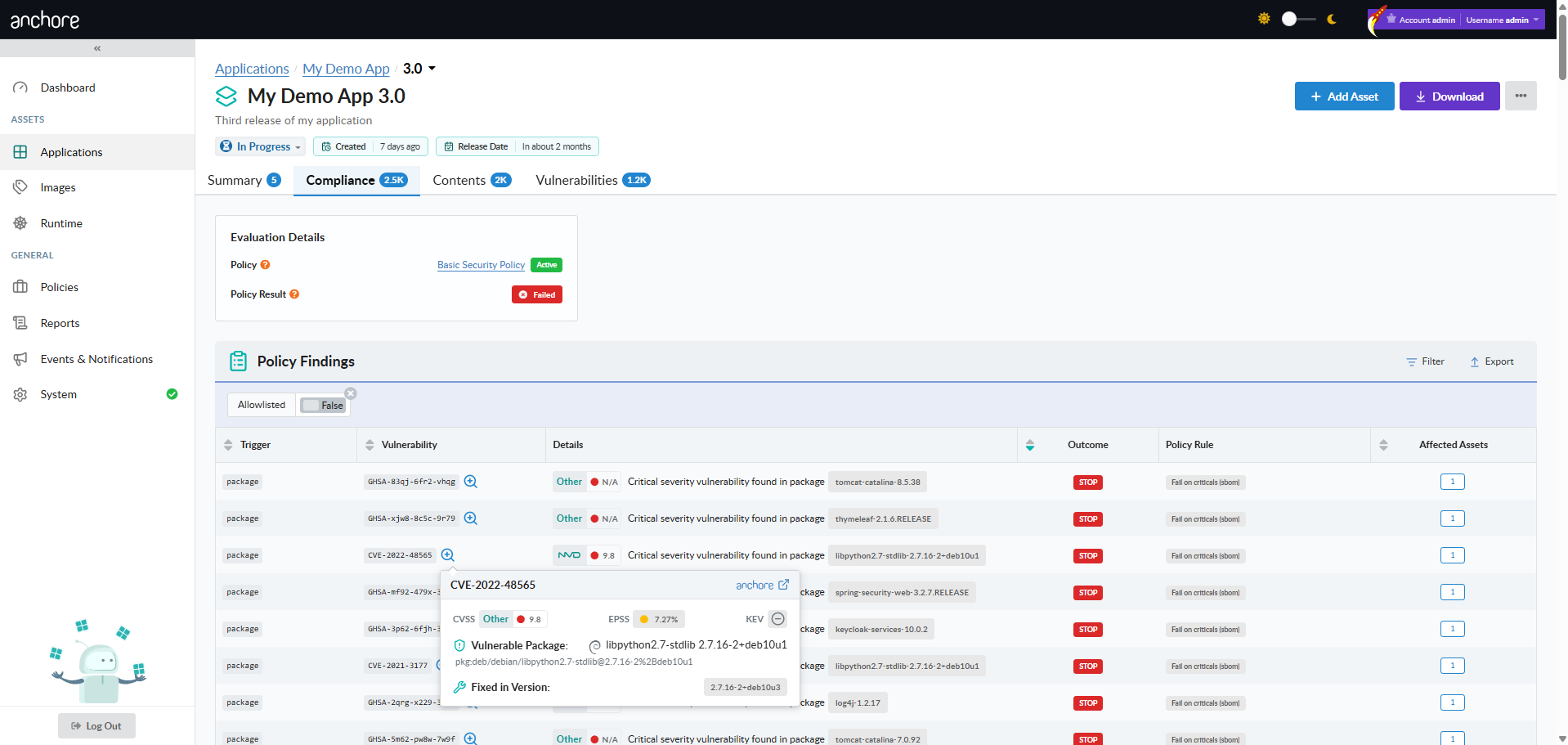
Filter Findings by VEX Status
Each vulnerability finding on the Compliance tab shows the VEX status of its (vulnerability, package version) pair, and the tab can be filtered by Has VEX Annotation and VEX Status, matching the filters on the version’s Vulnerabilities tab. Findings can also be filtered by rule set name, and the Policy Rule column is sortable. Filter and sort selections are reflected in the URL, so a filtered view can be bookmarked or shared, and updating a VEX annotation refreshes the compliance findings automatically.

Evaluate an App Version with AnchoreCTL
AnchoreCTL exposes two read commands plus an export. The pair of read commands covers the typical CI/CD pattern of “check the verdict, then drill into findings if it failed.”
Get the Version’s Pass / Fail Status
The status command returns the headline verdict for a version against the account’s active policy (or the app’s policy_id if one is set). It’s the right surface for CI/CD pipelines that need a quick pass/fail signal:
anchorectl app version policy status get 1.4.0 --app my-service
Use -o json for the structured response, which includes the verdict, the policy ID that was evaluated against, and the timestamp of the underlying evaluation.
List the Findings That Drove the Verdict
When a version fails, the findings list enumerates every rule that fired across every asset in the version, with the gate, trigger, action, count of affected assets, and any allowlist match:
anchorectl app version policy findings list 1.4.0 --app my-service
Use -o json for the structured records that downstream tooling can consume.
Export the Compliance Report
To produce a downloadable CSV report of the version’s compliance findings — for an audit, a customer deliverable, or an offline review — use the export command:
anchorectl app version export policy-compliance 1.4.0 \
  --app my-service \
  --file my-service-1.4.0-compliance.csv
The export runs as an asynchronous job; AnchoreCTL submits it, waits for completion, and writes the result to the file specified by --file (or stdout if omitted). CSV is the only export format supported today. The CSV contains one row per finding per asset, and each row identifies the asset through Asset ID, Asset Name, Asset Class, and Asset Type columns; see Evidence for the shared CSV conventions.
Evaluate an App Version with the API
App-version-scoped evaluation is exposed through several endpoints under /apps/{app_id}/versions/{version_id}/policy/:
GET .../policy/status— the headline Pass / Fail verdict for the version.GET .../policy/findings/all— every finding from the most recent evaluation, with a count of affected assets per finding.GET .../policy/findings/vulnerabilities— vulnerability findings only, isolated from other gate types.
There is no endpoint for requesting an evaluation directly; re-evaluation is automatic. Editing the policy, changing the version’s assets, saving a VEX annotation, and vulnerability data updates all make the stored evaluation stale. While a fresh evaluation runs, the .../policy/ endpoints return 409 (error code PO504); retry after a short delay to receive the new result.
The full response schemas, including the structure of findings, are in the API browser; search for the App Version Policy tag.
A few conventions worth knowing as you call these endpoints:
- Re-evaluations are asynchronous; a
409from the status or findings endpoints means one is in flight, not an error to handle. - Findings are first-class records — see Findings as First-Class Records for the data shape and the relationship to allowlists.
- Cross-account requests follow the standard pattern — see Account Scoping.