Policy Mappings
Policy mappings bind rule sets and allowlists to the artifacts they evaluate. When an artifact is checked against a policy, the mapping section of the bundle is what decides which rule sets to run and which allowlists to apply, based on the artifact’s identity.
Each artifact type — container images and SBOMs — has its own mapping configuration inside the policy bundle. Mappings are evaluated in order; the first match wins; everything else in the list is ignored for that artifact.
A typical bundle ends with a catch-all mapping that uses wildcards in every selection field, so every artifact gets matched against at least one rule set. Without a catch-all, an artifact that matches no specific mapping is treated as unmapped.
Mapping Selection Fields
The two mapping types match on different artifact attributes, but share the same set of action fields — the rule sets and allowlists the mapping applies.
Container Image Mappings
| Field | Purpose |
|---|---|
name | Human-readable label for the mapping |
registry | Registry hostname to match. Wildcards supported; * matches any registry |
repository | Repository name including namespace. Wildcards supported; partial matches like web*/* work |
image | Tag, digest, or image ID. type is one of tag, digest, or id; value is the matching string, wildcards supported |
rule_set_ids | The container-image rule sets that evaluate matching images |
allowlist_ids | The allowlists applied to the evaluation results |
A worked example: an image at registry.example.com/anchore/webapi:latest matches a mapping with registry = registry.example.com, repository = anchore/web*, and image.value = *.
SBOM Mappings
| Field | Purpose |
|---|---|
name | Human-readable label for the mapping |
sbom_name | Name of the SBOM to match. Ignored in v6 — see the note below |
sbom_version | Version string to match. Ignored in v6 — see the note below |
rule_set_ids | The SBOM rule sets that evaluate matching SBOMs |
allowlist_ids | The allowlists applied to the evaluation results |
App Version policy evaluation uses all SBOM rules and ignores SBOM mapping selectors in v6. When a policy is evaluated against an app version, every asset in the version — container images and SBOMs alike — is evaluated against all SBOM-type rule sets in the policy bundle, whether or not a rule set is referenced by an SBOM mapping. The container-image mappings list is not used at all. SBOM mappings are consulted only for their allowlists: every allowlist referenced by any SBOM mapping is applied to the results. The sbom_name and sbom_version selectors are completely ignored.
If you need different rule sets to apply to different applications, set a specific policy on each Application (its policy_id) rather than relying on SBOM mappings to differentiate them.
SBOM rule sets support a limited gate library — see Policy Gates for the per-rule-set-type availability.
Order of Evaluation
Container-image mappings within the mappings list are evaluated top-to-bottom and halt on the first match. This means:
- Order matters. A specific mapping placed below a wildcard mapping will never fire.
- A catch-all should always be last. Putting wildcards (
*) in every selection field at the bottom of the list guarantees nothing slips through. - Image and SBOM mappings are independent. Container images consult the
mappingslist only; SBOMs consult thesbom_mappingslist only. An image’s mapping order has no effect on what an SBOM matches.
sbom_mappings are consulted only for their allowlists, and the sbom_name / sbom_version selectors are ignored. See SBOM Mappings above.Manage Mappings in the Anchore Enterprise GUI
Mappings live on the Mappings tab of the policy editor, with separate panels for container-image and SBOM mappings. Each panel shows the existing mappings in order, with controls to add, edit, reorder, or delete entries.
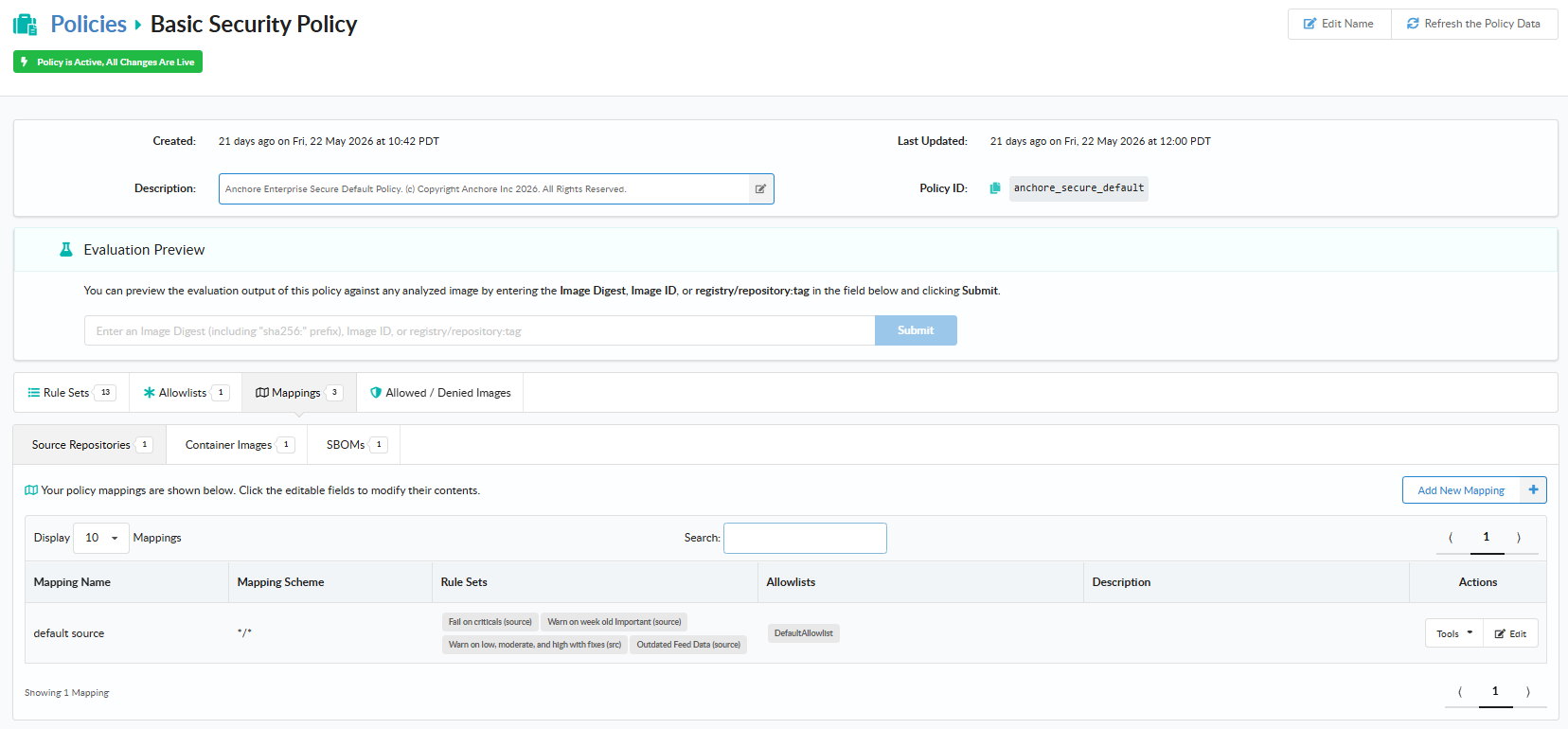
Add a Mapping in the GUI
From the relevant panel, click Add Mapping (or the prompt that appears when the panel is empty). Provide a name, the rule sets the mapping should apply, optional allowlists, and the selection fields for the artifact type (registry / repository / tag for images; name / version for SBOMs). When more than one mapping exists, a Position field also appears so the new mapping can be placed at the right point in the evaluation order.
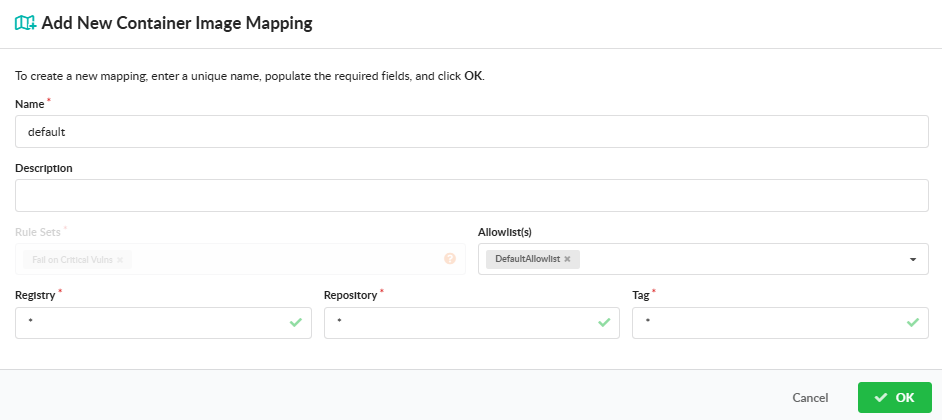
Reorder, Edit, or Delete a Mapping
Use the row actions on each mapping to edit, reorder, or delete it. Because order matters, the reorder action carries the most operational weight — moving a wildcard mapping above a specific one effectively disables the specific one.
Manage Mappings with AnchoreCTL
Mappings live inside the policy bundle JSON. There is no dedicated anchorectl mapping command — to change a policy’s mappings, retrieve the bundle, edit the mappings and sbom_mappings arrays, and submit the updated bundle through anchorectl policy update. The full CRUD workflow is documented under Manage Policies.
A minimal pair of bundle excerpts — one image mapping and one SBOM mapping, each terminated by a catch-all:
{
  "mappings": [
    {
      "name": "internal-registry",
      "registry": "registry.example.com",
      "repository": "anchore/web*",
      "image": { "type": "tag", "value": "*" },
      "rule_set_ids": [ "strict-policy-image-rs" ],
      "allowlist_ids": [ "prod-allowlist" ]
    },
    {
      "name": "default",
      "registry": "*",
      "repository": "*",
      "image": { "type": "tag", "value": "*" },
      "rule_set_ids": [ "default-image-rs" ]
    }
  ],
  "sbom_mappings": [
    {
      "name": "default",
      "sbom_name": "*",
      "sbom_version": "*",
      "rule_set_ids": [ "default-sbom-rs" ]
    }
  ]
}
To apply the edit, submit the updated bundle:
anchorectl policy update --input ./strict-policy.json
Manage Mappings with the API
The mappings and sbom_mappings arrays are part of the Policy schema and are created and updated through the same POST /policies and PUT /policies/{policy_id} endpoints as the rest of the bundle. The full schema for each mapping type, including every selection field and allowed value, is in the API browser; search for the Policies tag.