Data Feeds
Introduction
In this section, you’ll learn how to configure and manage the data that Anchore Enterprise uses for analysis and vulnerability management. For the underlying concepts, see Anchore Data Service.
Your Anchore Enterprise deployment uses four datasets that are managed by the Anchore Data Service and automatically synced to your deployment by the Data Syncer Service:
- Vulnerability Database (vulnerability_db)
- Vulnerability Match Exclusions Database (vulnerability_match_exclusions_db)
- ClamAV Malware Database (clamav_db)
- STIG Profiles (stig_profiles_db)
When Anchore Enterprise runs, the Data Syncer Service begins downloading this data from the Anchore Data Service, including CVE data for Linux distributions such as Alpine, CentOS, Debian, Oracle, Red Hat, and Ubuntu. The initial sync typically takes 1-5 minutes depending on your environment and network speed. After that, the Data Syncer Service checks for new data every hour by default. When a new dataset is found, it is downloaded immediately, and the Policy Engine Service is triggered to reprocess the data so it is available for policy evaluations. The analyzer checks the Data Syncer Service for a new ClamAV malware signature database before every malware scan (if enabled).
For air-gapped environments, see Air-Gapped Operation.
Requirements
Network Ingress
The following FQDN will need to be allowlisted in your network to allow the Data Syncer Service to communicate with the Anchore Data Service:
https://data.anchore-enterprise.com
Ideally the endpoint can be allowlisted via a layer 7/proxy.
If you are filtering based on IP, please raise a support ticket with Anchore Customer Success so that we can provide you with the IP addresses.
Check Feed Status
Feed information can be retrieved through the API and AnchoreCTL. Use anchorectl feed list to report the feeds synchronized by Anchore Enterprise, the last sync time, and the current record count.
anchorectl feed list
 ✔ List feed
┌────────────────────────────────────────────┬────────────────────┬─────────┬──────────────────────┬──────────────┐
│ FEED                                       │ GROUP              │ ENABLED │ LAST UPDATED         │ RECORD COUNT │
├────────────────────────────────────────────┼────────────────────┼─────────┼──────────────────────┼──────────────┤
│ ClamAV Malware Database                    │ clamav_db          │ true    │ 2024-09-26T13:13:50Z │ 1            │
│ Vulnerabilities                            │ github:composer    │ true    │ 2024-09-26T12:14:50Z │ 4036         │
│ Vulnerabilities                            │ github:go          │ true    │ 2024-09-26T12:14:50Z │ 1875         │
│ Vulnerabilities                            │ github:java        │ true    │ 2024-09-26T12:14:50Z │ 5058         │
│ Vulnerabilities                            │ nvd                │ true    │ 2024-09-26T12:14:58Z │ 263831       │
│ Vulnerabilities                            │ alpine:3.20        │ true    │ 2024-09-26T12:13:37Z │ 6428         │
│ Vulnerabilities                            │ debian:12          │ true    │ 2024-09-26T12:14:52Z │ 32452        │
│ Vulnerabilities                            │ rhel:9             │ true    │ 2024-09-26T12:14:59Z │ 4039         │
│ Vulnerabilities                            │ ubuntu:24.04       │ true    │ 2024-09-26T12:15:12Z │ 19537        │
│                       ... (output truncated for brevity) ...                                                     │
│ Vulnerabilities                            │ anchore:exclusions │ true    │ 2024-09-26T12:14:43Z │ 12851        │
│ CISA KEV (Known Exploited Vulnerabilities) │ kev_db             │ true    │ 2024-09-26T13:13:47Z │ 1181         │
│ Exploit Prediction Scoring System Database │ epss_db            │ true    │ 2024-11-18T18:04:12Z │ 266565       │
└────────────────────────────────────────────┴────────────────────┴─────────┴──────────────────────┴──────────────┘
Synchronize Feeds Manually
You can initiate a manual sync of the latest datasets, which tells the Data Syncer Service to download the latest feed data from the Anchore Data Service.
anchorectl feed sync
 ✔ Synced feeds
This also informs the Policy Engine to sync down the new dataset if the Data Syncer Service has successfully downloaded the latest data.
If you want the Data Syncer Service to force a download of the latest datasets and overwrite the existing data, use the --force_sync flag.
anchorectl feed sync --force_sync
 ✔ Synced feeds
Selective Synchronization
You can exclude certain vulnerability providers and package types from vulnerability matching. This is not a generally recommended practice.
Using Helm
In your values.yaml file, set the following:
anchoreConfig:
  policy_engine:
    vulnerabilities:
      matching:
        exclude:
          providers: ["rhel","debian"]
          package_types: ["rpm"]
Using Docker Compose
In your config.yaml file, set the following:
services:
  policy_engine:
    vulnerabilities:
      matching:
        exclude:
          providers: ["rhel","debian"]
          package_types: ["rpm"]
Further information can be found in Vulnerability Management.
Air-Gapped Operation
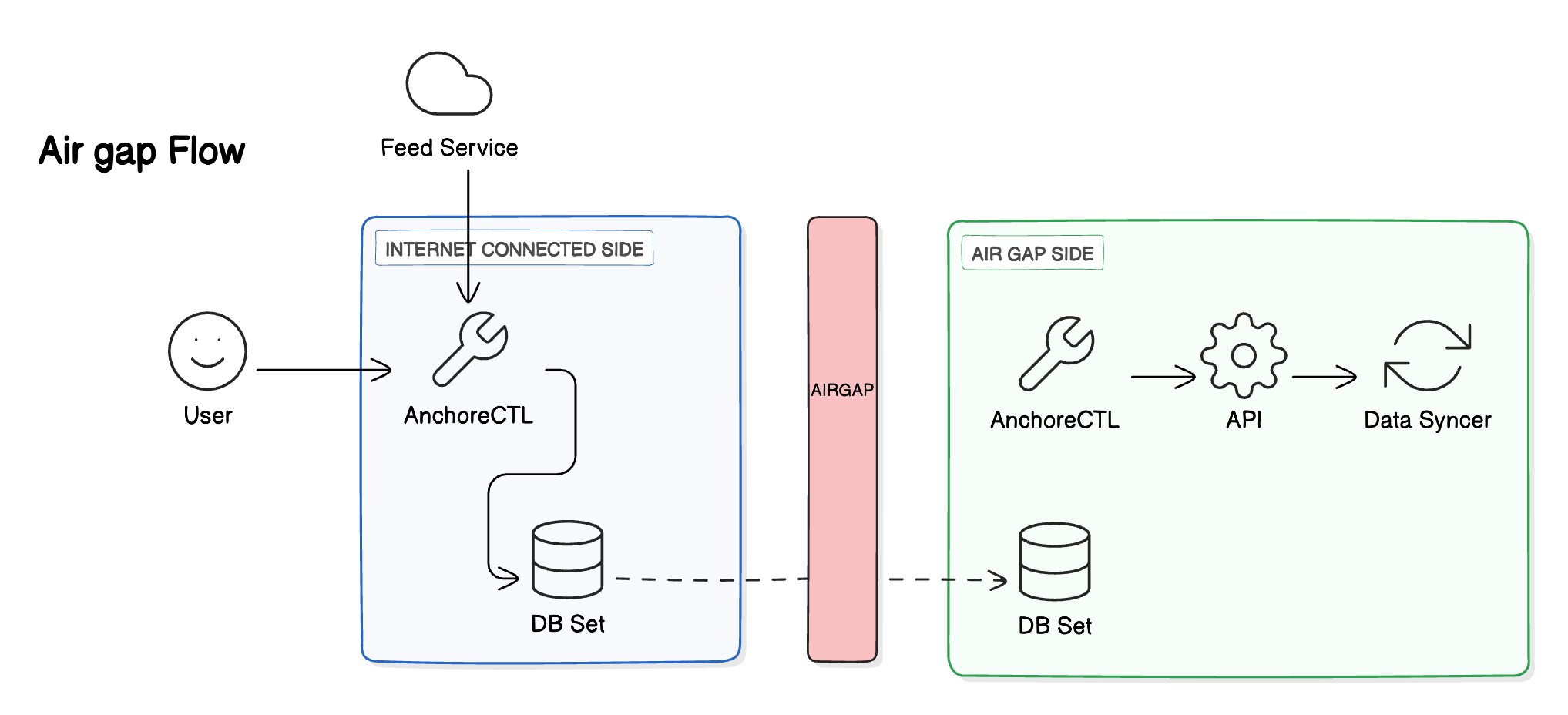
For any deployment which is air-gapped, a release-compatible AnchoreCTL should be used to download the required datasets from the Anchore Data Service and then upload them to your Anchore Enterprise deployment.
Disable Automatic Sync
To configure your Anchore Enterprise deployment to work in an air-gapped environment, you will need to disable the Data Syncer Service’s automatic feed sync.
Using Helm
Set the following in your values.yaml:
anchoreConfig:
  data_syncer:
    auto_sync_enabled: false
ANCHORE_DATA_SYNC_AUTO_SYNC_ENABLED environment variable under dataSyncer.extraEnv. In v6.x the chart no longer accepts that environment variable and will fail the install or upgrade if it is present — use anchoreConfig.data_syncer.auto_sync_enabled instead. See Values File Changes.When using an nginx ingress, you may need the following to allow the large file upload required for air-gap feed upload:
ingress:
  annotations:
    nginx.ingress.kubernetes.io/proxy-body-size: "0"
    nginx.ingress.kubernetes.io/proxy-read-timeout: "3600"
    nginx.ingress.kubernetes.io/proxy-send-timeout: "3600"
Using Docker Compose
Set the following in your Docker Compose YAML file:
services:
  data-syncer:
    environment:
      - ANCHORE_DATA_SYNC_AUTO_SYNC_ENABLED=false
To confirm auto sync is disabled, the following log is emitted by the data-syncer service upon startup:
[INFO] [anchore_enterprise.services.data_syncer.service/handle_data_sync():33] | Auto sync is disabled. Skipping data sync.
Download and Import Datasets
Once installed, AnchoreCTL can be used to download the latest feed data from the Anchore Data Service. This data can then be moved across the air gap and uploaded into your Anchore Enterprise deployment.
Download the Datasets
Run the following command outside your air-gapped environment to download the datasets.
Using your license key:
anchorectl airgap feed download -f <filename> -k <your api key>
Using your license file:
anchorectl airgap feed download -f <filename> -l <path to your license file>
- To get your API key, check your license file for a field called
apiKey. - This command downloads all the feeds from the hosted service to the file specified by
-f. - This command can take some time to return, depending on your connection speed.
- The resulting file is approximately 0.5 GB in size as of this writing, but will continue to grow as more data is added to the feeds.
Import the Datasets
Take a copy of this file and move it into your air-gapped environment. Then run the following command to import the feeds into your Anchore Enterprise deployment:
anchorectl airgap feed upload -f <filename>
grypedb version error, your AnchoreCTL version does not match your Anchore Enterprise deployment. The dataset schema AnchoreCTL produces is tied to its version, so an AnchoreCTL that is newer or older than your deployment can generate data the deployment cannot accept. Use an AnchoreCTL version that matches your Anchore Enterprise version, then download and upload the datasets again.Your Analyzer Service and Policy Engine Service will now be able to fetch the latest data from the Data Syncer Service as normal. This procedure must be repeated each time you want to update the datasets in your air-gapped environment.
Data Feed Availability
A live status page is available for real-time updates on the Anchore Data Service, including information on outages, maintenance, and options for subscribing to notifications. You can access the status page at https://status.anchore-enterprise.com
The status page is updated in real-time and provides information on the following:
- Current Status - The current status of the Anchore Data Service.
- Incidents - A list of any ongoing incidents that may be affecting the Anchore Data Service.
- Scheduled Maintenance - A list of any upcoming maintenance windows that may affect the Anchore Data Service.
- Subscribe to Updates - Options for subscribing to updates via email, SMS, or webhook.
- Past Incidents - A list of past incidents that have affected the Anchore Data Service.
- Historical Uptime - Historical uptime data for the Anchore Data Service.