Scan for Secrets and Keys
Hardcoded secrets, such as AWS credentials, private keys, API tokens, and Docker auth configs, are one of the most common causes of container image security incidents. This quickstart walks you through detecting these patterns with AnchoreCTL and enforcing policy gates that block non-compliant images from progressing through your pipeline.
The quickstart uses distributed analysis: AnchoreCTL analyzes the image on your machine or CI runner and sends the results to Anchore Enterprise. Everything is configured on the AnchoreCTL side, so no changes to the Anchore Enterprise deployment are needed.
By the end of this quickstart you will have:
- Enabled secret search in AnchoreCTL, with the built-in patterns and a custom pattern
- Scanned an image and retrieved secret findings
- Created a policy gate that fails images containing hardcoded secrets
- Run a policy check and interpreted the results
Before You Start
- Access to an Anchore Enterprise deployment, with permission to add images and policies
- AnchoreCTL installed and configured to connect to it
- The image to scan, either in your local Docker daemon or in a registry that AnchoreCTL can pull from
Step 1: Enable Secret Search in AnchoreCTL
Secret search is disabled by default in AnchoreCTL. Enable it for a single command with an environment variable:
export ANCHORECTL_SECRET_SEARCH_CATALOGER_ENABLED=true
To keep it enabled, add the setting to your AnchoreCTL configuration file (~/.anchorectl.yaml):
secret-search:
  cataloger:
    enabled: true
AnchoreCTL ships with built-in patterns, so no further configuration is needed to start detecting common secrets:
| Pattern Name | Matches |
|---|---|
AWS_ACCESS_KEY | AWS access key IDs |
AWS_SECRET_KEY | AWS secret access keys |
PRIV_KEY | PEM-encoded private keys |
DOCKER_AUTH | Docker config.json auth tokens |
API_KEY | Generic API key patterns |
Step 2: Add Custom Patterns
You can extend the built-in set with your own named patterns under secret-search.additional-patterns in ~/.anchorectl.yaml. Each entry maps a pattern name to a regular expression in Go’s RE2 syntax. The name is what you will reference in policy rules.
For example, to detect GitHub personal access tokens:
secret-search:
  cataloger:
    enabled: true
  additional-patterns:
    github_token: '(?i)gh[pousr]_[A-Za-z0-9]{36,255}'
GITHUB_TOKEN is reported as github_token, and a policy rule that references GITHUB_TOKEN never matches.Secret search reads file contents and increases analysis time. AnchoreCTL skips files larger than secret-search.skip-files-above-size (1 MB by default). Lower this value if analysis is slow. See AnchoreCTL Configuration for all secret-search settings.
Step 3: Scan an Image and Retrieve Findings
Analyze the image locally and send the results to Anchore Enterprise:
anchorectl image add <your-registry>/<image>:<tag> --from docker --wait
Use --from docker for an image in your local Docker daemon, or --from registry to have AnchoreCTL pull the image from the registry itself. If Anchore Enterprise has already analyzed the image, add --force so that it is analyzed again with your secret search settings.
Once analysis is complete, retrieve the secret scan results:
anchorectl image content <your-registry>/<image>:<tag> -t secret_search
A finding looks like this:
Secret Search:
┌────────────────┬───────────────────────────┬────────────┐
│ SEARCH NAME    │ PATH                      │ AT LINE(S) │
├────────────────┼───────────────────────────┼────────────┤
│ API_KEY        │ /app.conf                 │ 0          │
│ github_token   │ /app.conf                 │ 1          │
│ PRIV_KEY       │ /etc/ssl/fake_priv.key    │ 0          │
│ AWS_ACCESS_KEY │ /root/.aws/credentials    │ 1          │
│ AWS_SECRET_KEY │ /root/.aws/credentials    │ 2          │
│ DOCKER_AUTH    │ /root/.docker/config.json │ 3          │
└────────────────┴───────────────────────────┴────────────┘
Each row shows the pattern name that matched, the file path where it was found, and the line number within that file.
You can also retrieve findings in the Anchore Enterprise GUI on the image’s Contents tab, under the Secret Search content type.
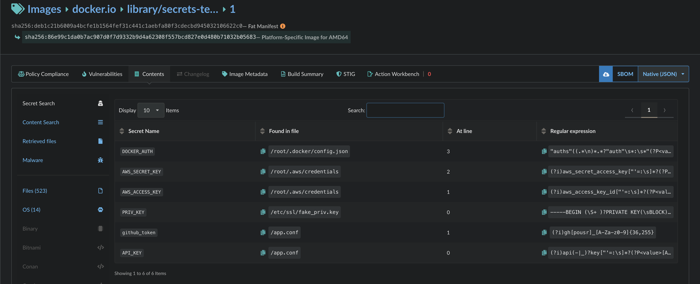
Secret search findings on the image's Contents tab in the Anchore Enterprise GUI, under the Secret Search content type.
Step 4: Create a Policy Gate for Secrets
Detecting secrets is useful, but the real value is using policy gates to automatically block images that contain them. The secret_scans gate with the content_regex_checks trigger lets you do exactly that.
Create a Policy Bundle
Save the following as secrets_policy.json:
{
  "id": "secrets-scanning-quickstart",
  "name": "Secrets Scanning Policy",
  "version": "2",
  "description": "Block images containing hardcoded secrets and credentials.",
  "rule_sets": [
    {
      "id": "secrets-ruleset-01",
      "name": "Block Hardcoded Secrets",
      "version": "2",
      "description": "Fail if any configured secret pattern is found in the image.",
      "artifact_type": "image",
      "rules": [
        {
          "id": "rule-aws-access-key",
          "gate": "secret_scans",
          "action": "STOP",
          "trigger": "content_regex_checks",
          "params": [
            { "name": "match_type", "value": "found" },
            { "name": "content_regex_name", "value": "AWS_ACCESS_KEY" }
          ],
          "recommendation": "",
          "description": "Fail if an AWS access key is found anywhere in the image."
        },
        {
          "id": "rule-aws-secret-key",
          "gate": "secret_scans",
          "action": "STOP",
          "trigger": "content_regex_checks",
          "params": [
            { "name": "match_type", "value": "found" },
            { "name": "content_regex_name", "value": "AWS_SECRET_KEY" }
          ],
          "recommendation": "",
          "description": "Fail if an AWS secret key is found anywhere in the image."
        },
        {
          "id": "rule-priv-key",
          "gate": "secret_scans",
          "action": "STOP",
          "trigger": "content_regex_checks",
          "params": [
            { "name": "match_type", "value": "found" },
            { "name": "content_regex_name", "value": "PRIV_KEY" }
          ],
          "recommendation": "",
          "description": "Fail if a private key is found anywhere in the image."
        },
        {
          "id": "rule-api-key",
          "gate": "secret_scans",
          "action": "STOP",
          "trigger": "content_regex_checks",
          "params": [
            { "name": "match_type", "value": "found" },
            { "name": "content_regex_name", "value": "API_KEY" }
          ],
          "recommendation": "",
          "description": "Fail if an API key is found anywhere in the image."
        },
        {
          "id": "rule-docker-auth",
          "gate": "secret_scans",
          "action": "STOP",
          "trigger": "content_regex_checks",
          "params": [
            { "name": "match_type", "value": "found" },
            { "name": "content_regex_name", "value": "DOCKER_AUTH" }
          ],
          "recommendation": "",
          "description": "Fail if Docker auth credentials are found in the image."
        }
      ]
    }
  ],
  "allowlists": [],
  "mappings": [
    {
      "id": "secrets-mapping-default",
      "name": "default",
      "registry": "*",
      "repository": "*",
      "image": { "type": "tag", "value": "*" },
      "description": "",
      "rule_set_ids": ["secrets-ruleset-01"],
      "allowlist_ids": []
    }
  ],
  "source_mappings": [],
  "allowlisted_images": [],
  "denylisted_images": [],
  "sbom_mappings": []
}
Add the policy to Anchore Enterprise:
anchorectl policy add --input secrets_policy.json
To also block the custom pattern from Step 2, add another rule with content_regex_name set to github_token, the lowercase name that AnchoreCTL reports.
You can also create and manage these rules directly in the Anchore Enterprise GUI under Policies → your policy → Edit.

Configuring a secret_scans gate rule in the Anchore Enterprise policy editor, with gate secret scans, trigger content regex checks, and parameter content_regex_name = AWS_ACCESS_KEY.
Step 5: Run a Policy Check
Evaluate an image against the secrets policy:
anchorectl image check <your-registry>/<image>:<tag> --policy secrets-scanning-quickstart --detail
An image containing hardcoded secrets will produce output like the following:
Tag: docker.io/myrepo/myimage:latest
Digest: sha256:<digest>
Policy ID: secrets-scanning-quickstart
Last Evaluation: 2026-10-05T14:21:37Z
Evaluation: fail
Final Action: stop
Reason: policy_evaluation

Policy Evaluation Details:
┌──────────────┬──────────────────────┬──────────────────────────────────────────────────────────────────────────────────────────────────────────────────────────────────────────────────────────────────────────────────────────────────────────────────────────┬────────┬────────────────┐
│ GATE         │ TRIGGER              │ DESCRIPTION                                                                                                                                                                                                              │ ACTION │ RECOMMENDATION │
├──────────────┼──────────────────────┼──────────────────────────────────────────────────────────────────────────────────────────────────────────────────────────────────────────────────────────────────────────────────────────────────────────────────────────┼────────┼────────────────┤
│ secret_scans │ content_regex_checks │ Secret content search analyzer found regexp match in container: file=/root/.aws/credentials regexp=AWS_ACCESS_KEY=(?i)aws_access_key_id["'=:\s]*?(?P<value>[A-Z0-9]{20})                                                 │ stop   │                │
│ secret_scans │ content_regex_checks │ Secret content search analyzer found regexp match in container: file=/root/.aws/credentials regexp=AWS_SECRET_KEY=(?i)aws_secret_access_key["'=:\s]*?(?P<value>[0-9a-zA-Z/+]{40})                                        │ stop   │                │
│ secret_scans │ content_regex_checks │ Secret content search analyzer found regexp match in container: file=/etc/ssl/fake_priv.key regexp=PRIV_KEY=-----BEGIN (\S+ )?PRIVATE KEY(\sBLOCK)?-----((?P<value>(\n.*?)+)-----END (\S+ )?PRIVATE KEY(\sBLOCK)?-----)? │ stop   │                │
│ secret_scans │ content_regex_checks │ Secret content search analyzer found regexp match in container: file=/app.conf regexp=API_KEY=(?i)api(-|_)?key["'=:\s]*?(?P<value>[A-Z0-9]{20,60})["']?(\s|$)                                                            │ stop   │                │
│ secret_scans │ content_regex_checks │ Secret content search analyzer found regexp match in container: file=/root/.docker/config.json regexp=DOCKER_AUTH="auths"((.*\n)*.*?"auth"\s*:\s*"(?P<value>[^"]+)")?                                                    │ stop   │                │
└──────────────┴──────────────────────┴──────────────────────────────────────────────────────────────────────────────────────────────────────────────────────────────────────────────────────────────────────────────────────────────────────────────────────────┴────────┴────────────────┘
To fail a CI pipeline step automatically when the policy evaluation returns fail, add the -f flag:
anchorectl image check <your-registry>/<image>:<tag> --policy secrets-scanning-quickstart --detail -f
The -f flag (shorthand for --fail-based-on-results) returns exit code 1 on a failing evaluation, which causes the CI step to fail. See Use Anchore Enterprise in CI for guidance on wiring this into a full pipeline.
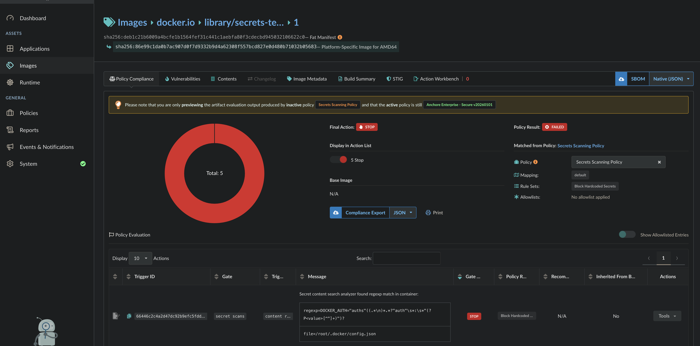
Policy evaluation result for the inactive Secrets Scanning Policy, showing Final Action STOP and Policy Result FAILED, with 5 violations from the secret_scans gate listed under Policy Evaluation.
Conclusion
You have enabled secret search in AnchoreCTL, extended the built-in patterns with a custom regular expression, and created a policy gate that blocks non-compliant images. Because the scan runs through AnchoreCTL, you can add it to any CI pipeline without changing the Anchore Enterprise deployment, providing automated enforcement that prevents secrets from reaching production container images.
Further reading:
Last modified October 9, 2026