Managing SBOM Assets
An SBOM asset is created by uploading an SBOM that was produced outside Anchore Enterprise — by a vendor, a different SCA tool, or a custom build pipeline — and attaching it to an app version. Use this path when you already have an SBOM in hand and want to bring it into Anchore Enterprise’s vulnerability and policy analysis without re-scanning the underlying artifact.
The same upload path also serves as the GUI equivalent for filesystem-derived SBOMs — generate the SBOM with a tool of your choice, then upload it here.
Supported Formats
Anchore Enterprise accepts CycloneDX (JSON or XML), SPDX (JSON or tag-value), and Syft native JSON documents. The supported versions of each format are listed in Supported SBOM Formats.
Content Validation
Anchore Enterprise runs every uploaded SBOM through a multi-stage validation pipeline before extracting its packages into the app version’s catalog. The pipeline runs as the first step of the upload job; if any stage fails, the job moves to failed with the specific error captured on the job record.
The stages are:
- Format detection — the document is classified as CycloneDX, SPDX (2.x or 3.0), or Syft based on identifying markers in the document head. Documents that match none of the supported formats are rejected before any parser runs.
- Structural parsing — the format-specific parser deserialises the document. Anchore Enterprise uses the
cyclonedx-python-liblibrary for CycloneDX,spdx-toolsfor SPDX, and a native parser for Syft. Invalid JSON, malformed XML, missing required fields, or wrong root elements are rejected at this stage. - Version support — for CycloneDX uploads, the declared
specVersionmust fall within the supported range. Documents declaring an unsupported version are rejected even if they otherwise parse cleanly. - Content ingestion — only after the previous stages pass does Anchore Enterprise extract packages and dependencies from the document and insert them into the app version.
When the job fails, the error record carries one of the following codes alongside a human-readable reason:
| Code | Meaning |
|---|---|
AS510 | Generic SBOM parse failure (no format-specific code applies) |
AS511 | SPDX parse failure |
AS512 | CycloneDX JSON parse failure |
AS513 | CycloneDX specVersion outside the supported range |
AS514 | CycloneDX XML is malformed |
AS515 | Document does not match any recognised SBOM format |
AS516 | Syft document failed structural parsing |
You can inspect the failure detail for a job through any of the three surfaces. From the GUI, open the Recent Activity panel on the version detail page and click the failed job to see the error code and reason. From the API, GET /apps/{app_id}/jobs/{job_id} returns the same record. From AnchoreCTL, retrieve the job by its ID:
anchorectl app job get <job-id> --app my-service
Upload an SBOM Asset in the Anchore Enterprise GUI
From an app version’s detail page, open the Add Asset action and choose SBOM. The GUI walks through a short three-step wizard: pick the SBOM file from disk, supply the asset’s name and type, and optionally add annotations. The asset’s type tells Anchore Enterprise what the SBOM describes — a container, a filesystem, a library, an application, and so on — and is selected from the same AssetType enum used everywhere else.
Select the SBOM option: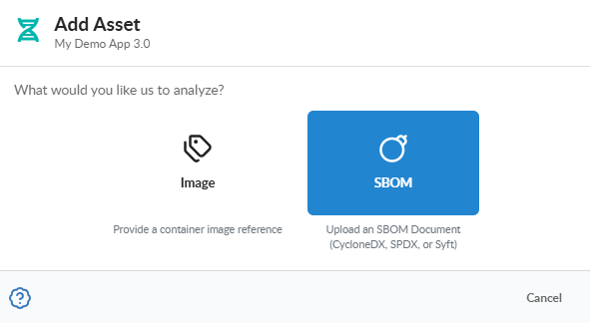
Select the desired SBOM document: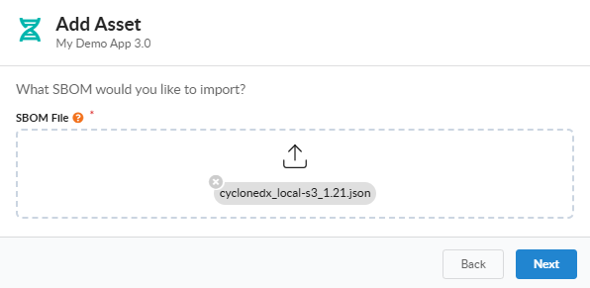
Enter the SBOM Asset Name: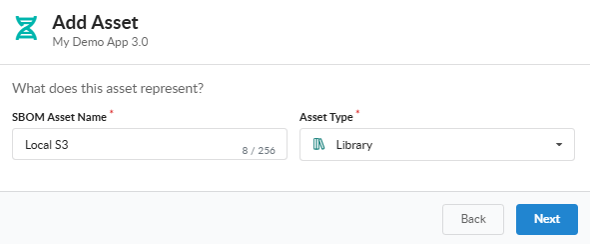
Optionally, enter up to 10 SBOM asset annotations: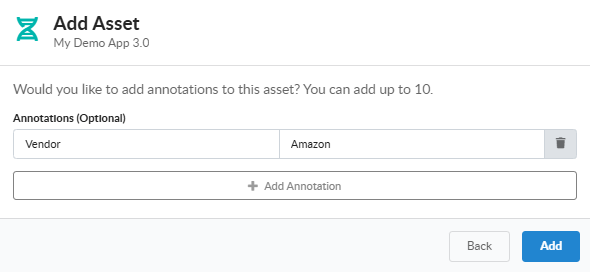
You can view the recently added assets in the My Recent Activity panel on the App Version Summary tab: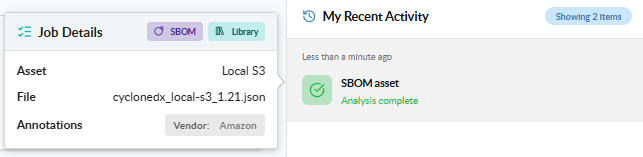
Upload an SBOM Asset with AnchoreCTL
Use app version asset add sbom to upload a CycloneDX, SPDX, or Syft-native document to an app version. The SBOM file path is the positional argument; the parent app, parent version, and asset name are required:
anchorectl app version asset add sbom ./vendor-cyclonedx.json \
  --app my-service \
  --version 1.4.0 \
  --asset vendor-sbom
Set the Asset Type
Unlike the container-image and filesystem add commands, add sbom cannot infer the asset’s type from the input — the SBOM document describes its components, but Anchore Enterprise does not assume what the whole asset represents. The flag defaults to unknown. Set it explicitly to one of the AssetType values so downstream queries and filters work as expected:
anchorectl app version asset add sbom ./vendor-cyclonedx.json \
  --app my-service \
  --version 1.4.0 \
  --asset vendor-sbom \
  --type library
Annotate the Asset
Attach build metadata at create time with --annotations. The full merge and clear semantics are documented under Managing Assets in an App Version:
anchorectl app version asset add sbom ./vendor-cyclonedx.json \
  --app my-service \
  --version 1.4.0 \
  --asset vendor-sbom \
  --type library \
  --annotations "owner=platform-team,vendor=example-corp"
Wait for the Job to Complete
By default the command submits the job and returns immediately. To block until the job reaches a terminal state — useful in CI pipelines where you want validation to gate later steps — add --wait:
anchorectl app version asset add sbom ./vendor-cyclonedx.json \
  --app my-service \
  --version 1.4.0 \
  --asset vendor-sbom \
  --type library \
  --wait
Upload an SBOM Asset with the API
SBOM uploads are exposed as a single job type:
POST /apps/{app_id}/jobs/add-sbom-asset— multipart form-data carrying the asset name, the parent version ID, the SBOM document, anasset_typevalue, and optional annotations.
The full request and response schemas are in the API browser; search for the App Jobs tag. The same endpoint is used by AnchoreCTL’s filesystem and distributed container-image flows after local SBOM generation, so a direct API caller can replicate any of those flows by generating an SBOM client-side and submitting it here with the appropriate asset_type.
A few conventions worth knowing as you call this endpoint:
- Schema validation runs before the job leaves
pending; a malformed document moves the job tofailedwith the validation error in the job record. - Job state transitions and polling are documented in How It Works.
- Cross-account requests are scoped via the
x-anchore-accountheader or, from AnchoreCTL, theANCHORECTL_ACCOUNTenvironment variable. See Account Scoping for the full mechanism.