Verifying Service Health
You can verify which services have registered themselves successfully, along with their status, by running: anchorectl system status
anchorectl system status
 ✔ Status system
┌───────────────────┬────────────────────┬───────────────────────────────┬──────┬────────────────┬────────────┬──────────────┐
│ SERVICE           │ HOST ID            │ URL                           │ UP   │ STATUS MESSAGE │ DB VERSION │ CODE VERSION │
├───────────────────┼────────────────────┼───────────────────────────────┼──────┼────────────────┼────────────┼──────────────┤
│ simplequeue       │ anchore-quickstart │ http://queue:8228             │ true │ available      │ 6020       │ 6.2.2        │
│ component_catalog │ anchore-quickstart │ http://component-catalog:8228 │ true │ available      │ 6020       │ 6.2.2        │
│ notifications     │ anchore-quickstart │ http://notifications:8228     │ true │ available      │ 6020       │ 6.2.2        │
│ reports_worker    │ anchore-quickstart │ http://reports_worker:8228    │ true │ available      │ 6020       │ 6.2.2        │
│ data_syncer       │ anchore-quickstart │ http://data-syncer:8228       │ true │ available      │ 6020       │ 6.2.2        │
│ reports           │ anchore-quickstart │ http://reports:8228           │ true │ available      │ 6020       │ 6.2.2        │
│ analyzer          │ anchore-quickstart │ http://analyzer:8228          │ true │ available      │ 6020       │ 6.2.2        │
│ apiext            │ anchore-quickstart │ http://api:8228               │ true │ available      │ 6020       │ 6.2.2        │
│ catalog           │ anchore-quickstart │ http://catalog:8228           │ true │ available      │ 6020       │ 6.2.2        │
│ policy_engine     │ anchore-quickstart │ http://policy-engine:8228     │ true │ available      │ 6020       │ 6.2.2        │
└───────────────────┴────────────────────┴───────────────────────────────┴──────┴────────────────┴────────────┴──────────────┘
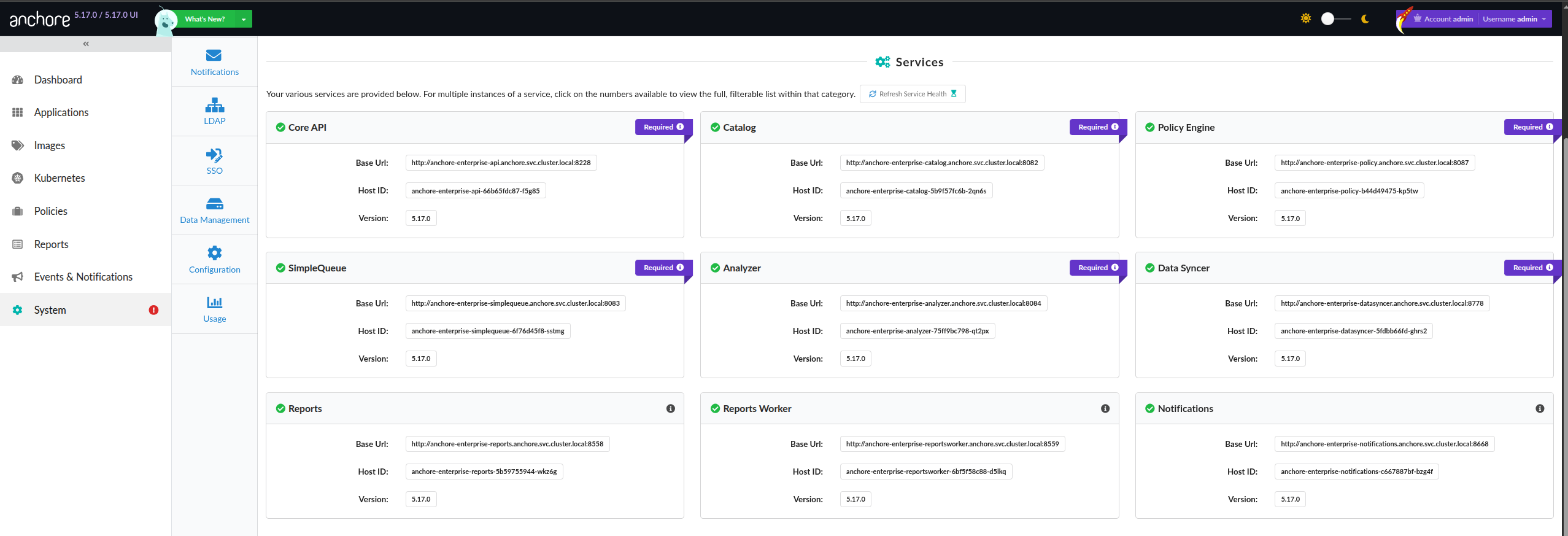
This can also be found in the GUI under the System tab, where each service will be laid out with information on its name, status, and other related information:
Database Availability
All Anchore Enterprise services depend on the shared PostgreSQL database. When the database becomes unavailable, the effect on the services depends on when it happens:
- Database down at startup: Services will not finish starting. They wait on the database and never reach the
availablestate, soanchorectl system statusshows them as down (or they never register at all). - Database stops while services are running: The services keep running and may still appear up, but nearly all operations fail because the database is not reachable. Image analysis, policy evaluation, and API requests return database errors until the database is restored.
- Not enough connections: If the database is running but has exhausted its connection limit, operations fail intermittently with connection errors even though the database process itself is healthy. Anchore Enterprise can require hundreds to thousands of concurrent connections; size the database’s
max_connectionsfor your number of service replicas. See Requirements.
To diagnose, confirm the database process is running and reachable from the deployment, check that it has free connections available, and review the affected service logs (see Viewing Logs) for connection or could not connect errors.
The -vvvv and -o json Options
Passing a high-verbosity flag (-vvvv) to AnchoreCTL can often help narrow down particular issues by displaying the client configuration and client functions as they are running:
Example system status with -vvvv
anchorectl system status -vvvv
[0000]  INFO anchorectl version: v6.2.3
[0000] DEBUG application config:
  url: http://localhost:8228
  username: admin
  password: '******'
  account: ""
  skip-api-version-check: false
  ui-url: ""
  check-for-updates: true
  config: /Users/lzw/.anchorectl.yaml
  quiet: false
  log:
    level: trace
    file: ""
  debug:
    api: false
    events: false
  http:
    tls-insecure: true
    timeout: 180
    headers: {}
  dev:
    profile-cpu: false
    profile-mem: false
  registry:
    insecure-skip-tls-verify: false
    insecure-use-http: false
    auth: []
  secret-search:
    cataloger:
      enabled: false
      scope: all-layers
    additional-patterns: {}
    exclude-pattern-names: []
    reveal-values: false
    skip-files-above-size: 1048576
  content-search:
    cataloger:
      enabled: false
      scope: all-layers
    patterns: {}
    reveal-values: false
    skip-files-above-size: 1048576
  file-contents:
    cataloger:
      enabled: false
      scope: squashed
    skip-files-above-size: 1048576
    globs: []
  syft-parallelism: 0
[0000] DEBUG command config:
  format: text
[0000] DEBUG checking for anchorectl updates from Enterprise
[0000] DEBUG current anchorectl version: v6.2.3
[0000] DEBUG querying Enterprise for available tools (darwin/arm64)
[0000] DEBUG version check result: enterprise=6.2.2, anchorectl=v6.2.3, mismatch=false
[0000] DEBUG anchorectl version matches Enterprise (current: v6.2.3, enterprise: 6.2.2)
[0000] TRACE worker stopped component=eventloop
[0000] TRACE bus stopped component=eventloop
┌───────────────────┬────────────────────┬───────────────────────────────┬──────┬────────────────┬────────────┬──────────────┐
│ SERVICE           │ HOST ID            │ URL                           │ UP   │ STATUS MESSAGE │ DB VERSION │ CODE VERSION │
├───────────────────┼────────────────────┼───────────────────────────────┼──────┼────────────────┼────────────┼──────────────┤
│ simplequeue       │ anchore-quickstart │ http://queue:8228             │ true │ available      │ 6020       │ 6.2.2        │
│ catalog           │ anchore-quickstart │ http://catalog:8228           │ true │ available      │ 6020       │ 6.2.2        │
│ notifications     │ anchore-quickstart │ http://notifications:8228     │ true │ available      │ 6020       │ 6.2.2        │
│ reports_worker    │ anchore-quickstart │ http://reports_worker:8228    │ true │ available      │ 6020       │ 6.2.2        │
│ data_syncer       │ anchore-quickstart │ http://data-syncer:8228       │ true │ available      │ 6020       │ 6.2.2        │
│ reports           │ anchore-quickstart │ http://reports:8228           │ true │ available      │ 6020       │ 6.2.2        │
│ analyzer          │ anchore-quickstart │ http://analyzer:8228          │ true │ available      │ 6020       │ 6.2.2        │
│ apiext            │ anchore-quickstart │ http://api:8228               │ true │ available      │ 6020       │ 6.2.2        │
│ policy_engine     │ anchore-quickstart │ http://policy-engine:8228     │ true │ available      │ 6020       │ 6.2.2        │
│ component_catalog │ anchore-quickstart │ http://component-catalog:8228 │ true │ available      │ 6020       │ 6.2.2        │
└───────────────────┴────────────────────┴───────────────────────────────┴──────┴────────────────┴────────────┴──────────────┘
Passing the -o json option to AnchoreCTL commands will output the API response data in JSON, which often contains much more information than what the CLI outputs by default for both regular successful operations, and for operations that are resulting in an error:
anchorectl -o json system status
 ✔ Status system
{
  "serviceStates": [
    {
      "baseUrl": "http://reports_worker:8228",
      "hostid": "anchore-quickstart",
      "serviceDetail": {
...
...